
If you have bought a WiFi Range Extender for your home or office, but do not know how to set it up, then you have come to the right place. We will show you how to set up a WiFi Range Extender so that you can use your existing WiFi router from a distance too. You can set it up for your home, office, educational institute, or anywhere else.
What is a WiFi Range Extender
A WiFi Range Extender helps you extend the range of your existing WiFi router. Let’s assume you have a router on the ground floor and do not receive a strong WiFi signal on the second floor of the same building. You can use a WiFi range extender to improve the WiFi signal on the second floor.
Before getting started:
- Please note that we have utilized a TP-Link WiFi extender (specifically, the TP-Link RE 200 WiFi N 300Mbps dual-band AC750 range extender). However, this is a general guide that you can use to set up any WiFi range extender as long as you can understand the process.
- You must get a minimum WiFi signal where you want to install the device.
- Your WiFi range extender must have a power supply.
- We have used a computer to capture the screenshots and set it up. However, you can do the same from your mobile as well.
- You need to keep your WiFi router and range extender on to maintain a stable connection.
Read: How to improve Wireless Network Signal on Windows.
How to set up WiFi Range Extender
Follow these steps to set up a WiFi range extender-
- Give the power supply to your WiFi range extender.
- Connect your computer to the new WiFi network
- Open the extender’s website and create a password for login
- Choose the source WiFi network
- Set password for 2.4GHz as well as 5GHz bands
- Set and confirm new SSID
To get started, ensure you have a minimum WiFi signal from your existing WiFi router. Otherwise, your range extender cannot detect the source. After ensuring that the power supply is connected to your WiFi range extender, it will start broadcasting its SSID. You need to connect to that SSID from a computer or mobile device.
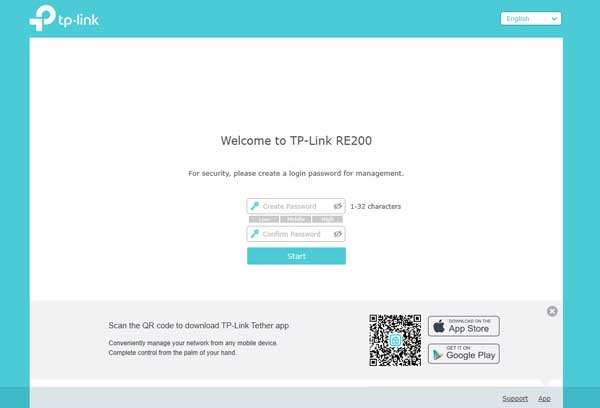
After establishing a successful connection, open the corresponding website of your range extender. It varies by manufacturer, and you can find the website address in the user manual provided with the range extender. After opening the website, you need to create a password. This password is for the admin panel of your range extender.
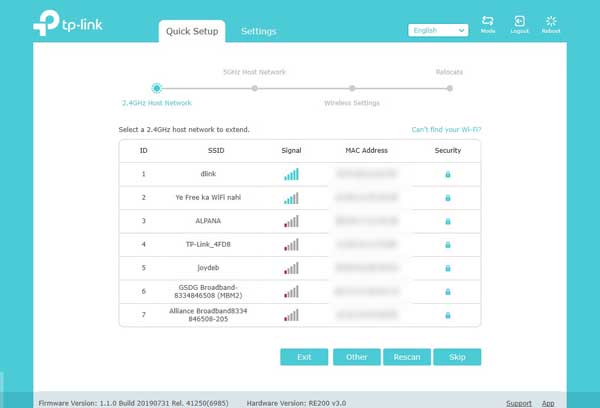
Following that, you can see all the WiFi networks detected by your device. You need to select the existing router’s SSID and go forward.
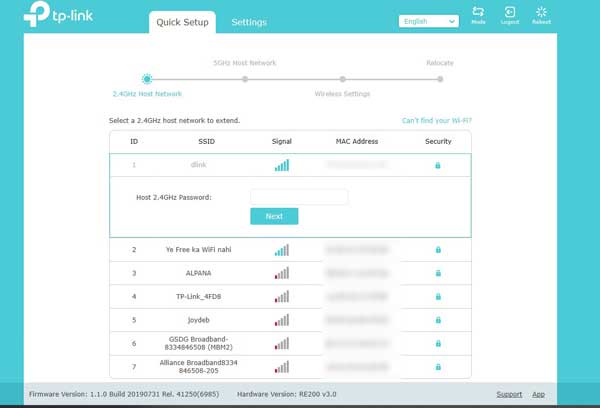
Here you have to enter the password of your existing WiFi network (source network). In other words, this is the password that you use to connect your mobile or computer to your existing WiFi router.
If your WiFi router has different passwords for 2.4GHz and 5GHz band, you need to enter them accordingly.
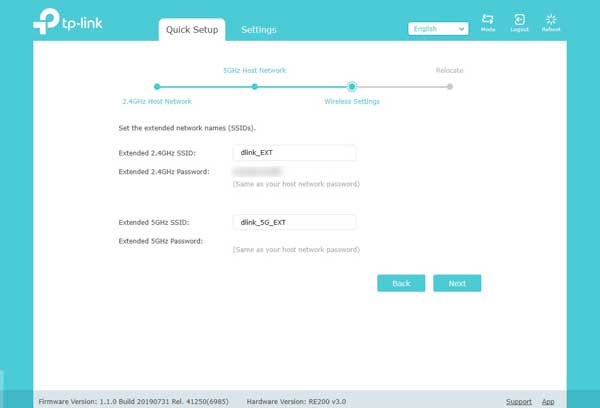
However, if your WiFi router doesn’t have a 5GHz band, you can go with the 2.4GHz only. After confirming the password, you need to set the SSID for your WiFi range extender.
Read: Wi-Fi or Whole-Home Wi-Fi system (Mesh); Which is better?
If your device supports the 5GHz band, you can set different SSID for 2.4GHz and 5GHz.
After setting that up, you can use the WiFi range extender without any problem.
Notes:
- Most of the WiFi range extenders have two primary modes. They are Access Point and Repeater. This aforementioned process has given a brief guide on how to use that device as a repeater. However, if you want to convert your wired internet connection to a wireless connection and use the extender as a router, you can do that too.
- Always use the Maximum Coverage or similar option that is available in your admin panel. Such an option helps you get better signal and network quality.
Hope this guide will help you.
Do I need a WiFi extender or booster or repeater?
If your devices are a few yards away from the WiFi router, it is recommended to use a device to fetch the WiFi signal without any barriers. For example, if your router is located on the ground floor and you stay on the second floor, you can use an extender to receive the WiFi signal without any limitations. However, if your devices are positioned relatively close to the router, there is no need for such devices.
What is the difference between WiFi extender and WiFi booster and repeater?
In simple terms, a WiFi extender extends the network coverage of the existing network. Even if you have a weak signal, you will still get a weak signal even after using an extender. However, the WiFi repeater repeats the signal in weak network areas. That said, you will experience a stronger WiFi signal while using the booster or repeater.
Read next: Tips to increase WiFi Speed and Signal strength and coverage area.
