
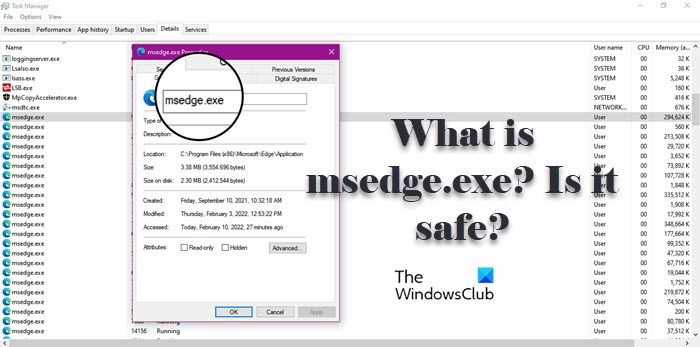
MsEdge.exe is the process related to Microsoft Edge. Microsoft Edge as you may already know is the default browser that comes preinstalled with Windows OS. So, if you are on Windows 11 or Windows 10, you will see the process running on your computer. If it is so common then why are we even discussing it? The issue many users are experiencing is pretty daunting. According to them, msedge.exe is consuming a lot of their CPU and Disk resources. If you are one of the victims, then maybe the process on your system is not genuine, instead, it is a virus. To know what is msedge.exe and if it is safe for your system, you should read the entire article.
What is MsEdge.exe?
MsEdge is an abbreviation of Microsoft Edge and EXE means executable file. All applications on your system have an executable file that is triggered when you open the app. So, you will see the process in question while running Microsoft Edge, sometimes, even after closing it. And if you are opening way too many tabs in your browser, you will see a surge in its consumption.
Is MsEdge.exe legit?
MsEdge.exe is a genuine process, it is safe and there is no need to worry if you see it running. But maybe it’s not. A virus or malware can masquerade as a genuine process. To determine whether the process running on your system is genuine, we need to check its location.
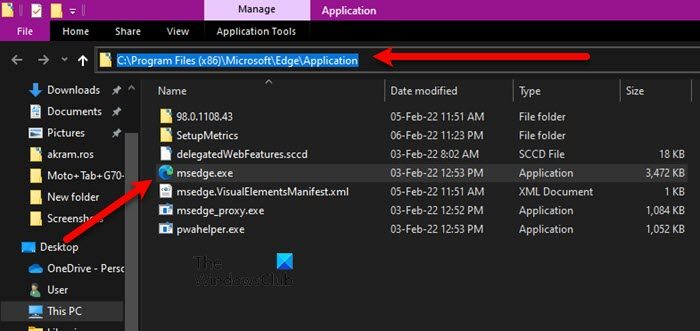
To do that, open Task Manager, go to the Details tab, look for msedge.exe, right-click on it, and select Open File Location. You will be redirected to a location in File Explorer, where you will see the msedge.exe process.
If you are still suspicious, right-click msedge.exe in File Explorer and select Scan with Defender. This will scan the file and give you the result.
If scanning yields no results and you, for some very obvious reason, suspect there are viruses on your system, you can try using your antivirus to scan the system. If you don’t have an antivirus installed, follow the steps below to use Windows Defender to scan your system on Windows 11/10.
- Search out “Windows Security” from the Start Menu.
- Go to Virus & threat protection > Scan options.
- Select Microsoft Defender Offline scan and click Scan now.
Let it run; hopefully, it will resolve the issue for you.
Where is Msedge.exe located?
Msedge.exe is an executable file of Microsoft Edge. And is located at the edge where the edge is installed. The following is the location of the Edge browser, where you will find msedge.exe.
C:\Program Files (x86)\Microsoft\Edge\Application
So in conclusion, the msedge.exe process, if located in the above folder, is the legit Edge process; else it could be malware.
Read: How to enable high-performance GPU for Microsoft Edge browser
Msedge.exe high Disk or CPU usage
If the msedge.exe process is continuously using high CPU or Disk usage, then you may need to check Edge add-ons. If need be, clear Edge browsing cache and see. If nothing helps, resetting Edge is sure to help you.
Read: How to enable Efficiency Mode in Microsoft Edge
What is msedge.exe.exe and how do I remove it?
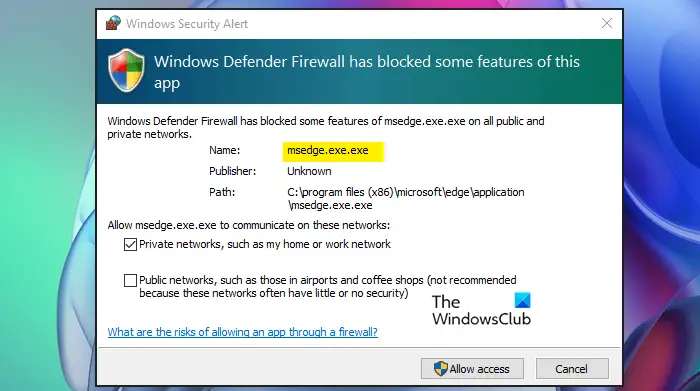
Some users are complaining that Microsoft Defender Firewall is popping and saying that there is a suspicious file called msedge.exe.exe. Now we have to point out that this one is a virus for sure! So, do not click on the Allow access button.
Go to the path mentioned in the pop-up, right-click the .exe file, and select Scan with Defender. It will give you the results.
Having identified that it is malware masquerading as the legitimate Edge file, we recommend scanning your computer with your antivirus software at boot for best results.
Read Next: How to speed up Edge and make it load faster
