
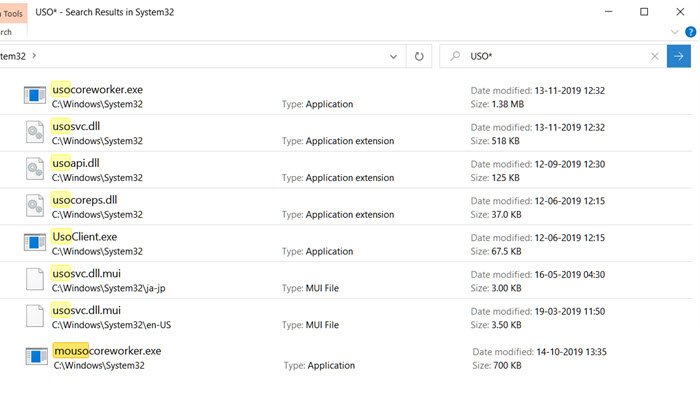
MoUsoCoreWorker.exe, also known as Mo USO Core Worker program, is a file from Microsoft which is related to Windows Update. If your computer continually wakes from sleep, this program may be the cause. Along with this, there are a few more programs, including USOCoreWorker.exe, USOClient.exe, and a few DLLs linked to each other. In this post, we will explore how to resolve the issue.
What is MoUSOCoreWorker.exe?
MoUsoCoreWorker.exe or USOCoreWorker.exe are replacement programs for the wuauclt.exe command in Windows 11/10. The programs are responsible for checking for updates in the background and hence are also called Windows Update AutoUpdate Client. Since there is a new program, it could trigger Windows Security or your antivirus program as they try to connect outside. Make sure to whitelist such programs.
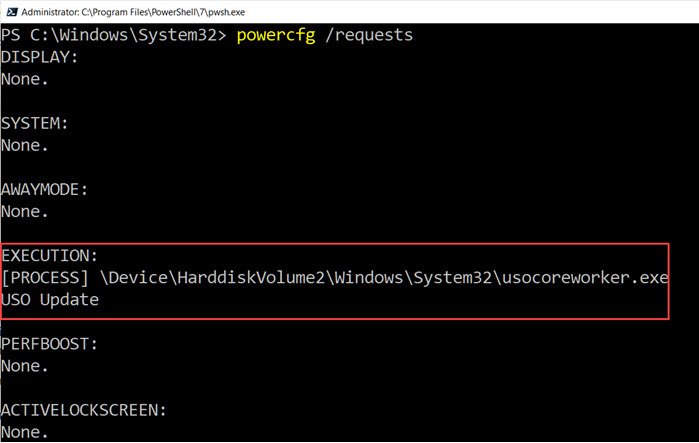
USO stands for Update Session Orchestrator, and it shows up in task manager every time Windows checks for an update. It can be either MoUsoCoreWorker.exe or USOCoreWorker.exe that shows up in the Task Manager or Power Configuration.
Why does MoUsoCoreWorker.exe keep waking PC from Sleep Mode?
The most probable reason why it keeps bringing the PC back from sleep mode is that the process is unable to determine the update status. It keeps trying and is not successful. Important to know that when you click on Check for Update button, it will launch the USOCoreWorker.exe in the background.
Restart Windows Update Service
- Open Command Prompt in Administrator mode and execute this command:
powercfg /requests - If you see MoUsoCoreWorker.exe listed anywhere, then it’s because of the Windows Update
- Open Service Manager, locate Windows Update service, and restart it.
- Rerun the Power Config command, and check if the listing of MoUsoCoreWorker.exe is gone.
Read: What is Update Orchestrator Service (UsoSvc) in Windows?
More on USOClient.exe
It is also a Windows Update client and comes with a set of options that allow you to manually check for updates. Here is the list:
- RefreshSettings
- RestartDevice
- ResumeUpdate
- ScanInstallWait
- StartDownload
- StartInstall
- StartInteractiveScan
- StartScan
To scan for Windows Update, you can use USOClient.exe StartScan to initiate the scan. That said, the program is entirely safe, and only when it is unable to find an update does it continue to check for one.
That said, you can choose to disable it in multiple ways, but we do not recommend disabling anything related to Windows Update unless you never want to receive updates. If it requires a lot of resources, try restarting the computer or the Windows Update Service.
Is Mousocoreworker.exe a virus?
No, Mousocoreworker.exe located in the System32 folder is not a virus. MoUSO Core Worker Process — also known as MoUSOCoreWorker.exe — is a file from Microsoft that is related to Windows Update. It is a Microsoft task that helps coordinate the installation of Windows updates within the operating system.
Now read: What is the IgfxEM.exe process?
