
Device Drivers are the software through which the kernel of a computer communicates with different hardware without having to go into the details of how the hardware works. It is software that controls a hardware component attached to a computer and enables it to use that hardware by providing an appropriate interface. This means the operating system need not go into the details of how the hardware works. It also provides a common interface so that the operating system or the Kernel can communicate with the hardware. Thus, the purpose of device drivers is to enable the smooth operation of the hardware they support and to allow it to be used across different operating systems.
What are Drivers in Windows 11/10?
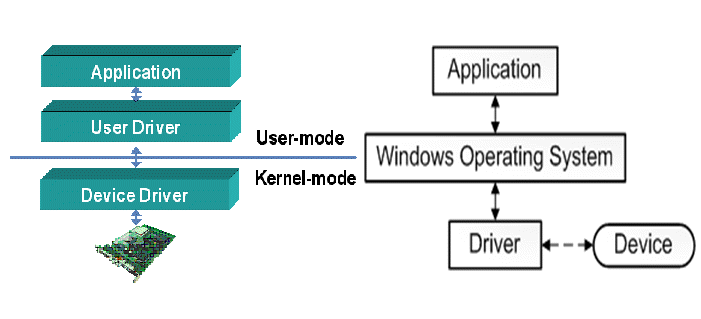
Device Driver Types – Kernel & User Drivers
There are device drivers for almost every device associated with a computer – from BIOS to even virtual machines and more. Device drivers can be broadly be classified into two categories:
- Kernel Device Drivers
- User Device Drivers
Kernel Device Drivers are the generic device drivers that load with the operating system into the memory as part of the operating system; not the entire driver but a pointer to that effect so that the device driver can be invoked as soon as it is required. The drivers are pertaining to BIOS, motherboard, processor, and similar hardware form part of Kernel Software.
A problem with Kernel Device Drivers is that when one is invoked, it is loaded into RAM and cannot be moved to the page file (virtual memory). Thus, multiple device drivers running concurrently can slow down the machine. That is why there are minimum system requirements for each operating system. The different operating systems already allocate the resources required for kernel device drivers, so end users need not worry about additional memory requirements.
User Mode Device Drivers are the ones usually triggered by users during their session on a computer. It might be thought of as devices that the user brought to the computer other than the kernel devices. Drivers for most Plug-and-Play devices fall into this category. User Device Drivers can be written to disk to avoid resource contention. However, for the drivers related to gaming devices, it is recommended to keep them in the main memory (RAM).
Read: How to manually install a Driver using a .INF File.
Block Drivers and Character Drivers
These two – the block and character device drivers – belong to the category of data reading and writing. Hard disks, CD ROMs, USB Drives, etc. – might be either Block Drivers or Character Drivers based on how they are used.
Character Drivers are used in serial buses. They write data one character at a time. One character means a byte in a generic sense. If a device is connected to a serial port, it uses a character driver. A mouse is a serial device and has a character device driver.
Block drivers refer to the simultaneous reading and writing of more than one character at a time. Usually, block device drivers create a block and retrieve as much information as the block can contain. Hard disks, for example, use block device drivers. CD-ROMs, too, are Block device drivers, but the kernel must verify that the device remains connected to the computer whenever any application accesses it.
Read: How to install Drivers in Windows 11
Generic and OEM Drivers
Device drivers can be generic or OEM-related. If the device driver is included with the operating system, it is most likely a generic driver. A generic device driver is one that can be used with different brands of a particular device type. Windows 11, for example, includes several generic drivers that work without requiring manual installation of additional software.
In some cases, the generic drivers don’t help. So, the original equipment manufacturers create their own device drivers. These are OEM device drivers and have to be installed separately after installing the operating system. Computers of the older era were marked, and hence even the motherboard drivers had to be installed externally. But that was the age of Windows XP. Barring a few brands, most built-in driver sets are already included in the operating systems.
Read: What is Firmware?
Virtual Device Drivers
Drivers for virtual devices are called Virtual Device Drivers. Often, we use software to emulate hardware, and the software that runs this virtual hardware is a virtual device driver. For example, if you are using a VPN, it may create a virtual network card to securely connect to the Internet. It is not a physical card but rather a virtual card configured by VPN software. Even that card needs a device driver, and the same VPN software will install the virtual device drivers
Thus, you can see that there are different types of device drivers, and it is difficult to explain them using just one or two categories. In this article, we explained what a device driver is and discussed the following device driver types: kernel and user-mode drivers, generic and OEM device drivers, and virtual device drivers, including the differences among them.
Read next:
