
Of late, there have been some issues reported regarding the use of Office 365 with Windows 11/10. For instance, some users who have Windows 11 or Windows 10 installed on their machine received an error message when they tried opening Office apps like Word, PowerPoint, Excel. It either displayed error messages at times, or sought details like account name and password. The remedy for this issue is that users who purchase a new device that supports Office 365 are required to install Office 365 before upgrading Windows.
How to upgrade new devices with Office 365 to Windows 11
If you just purchased a new device that includes Office 365, Microsoft recommends installing Office before upgrading Windows.
If you are facing issues, the initial troubleshooting steps involve uninstalling the recent version of Office and then downloading and installing Office 365 on a PC.
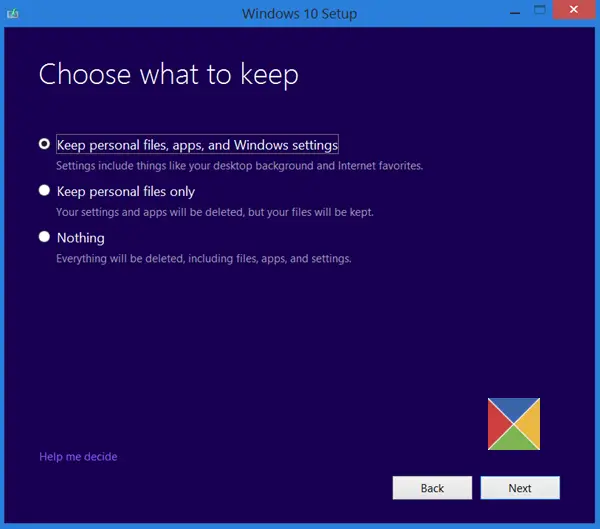
Later, while upgrading to Windows 11/10, choose the option ‘Keep personal files, apps and Windows settings‘ because if you accidentally choose the option ‘Keep personal files only‘, the option to install Office 365 will be removed.
If you choose the option ‘Keep personal files only’ to erase all files except personal files, you must contact Microsoft Support to get all the complete information essential for installing Office.
The problem arises when you have received Office as part of the Home Use Program (HUP); here, you might need to reinstall Office.
You can reinstall Office at any time by going to your Order History.
If you purchased a Backup DVD or Backup USB Flash Drive, you can use these tools to reinstall the software.
You can only re-download or buy additional products if the Software Assurance agreement is still valid, says Microsoft.
Users having the version of Office 365 installed as part of the Volume Licensing Academic Program (VLAP), should sign into the store, look for the place where you ordered your Microsoft Office Professional Plus, go to your Accounts > Orders to find your product key. Use this product key to upgrade to Windows 10 on new devices that include Office 365.
