
We normally use the Microsoft Store application on our Windows 11/10 computers to check for and install Microsoft Store app updates. But there may be times when you may want to update the apps, and your system does not have an Internet connection. It is for scenarios like these that Microsoft has rolled out a collection of downloadable updates for the Microsoft Store Apps, which are now available in the Windows Update Catalog.
The Microsoft Update Catalog is a service from Microsoft that provides a listing of software updates that can be distributed over a corporate network. The Microsoft Update Catalog can be a one-stop location for finding Microsoft software updates, drivers, and hotfixes.
Update Microsoft Store Apps offline without Internet connection
The idea behind making these downloads available is not to bypass the standard route (Microsoft Store) but to offer an alternative for machines that fail to connect to the Windows Store when updating Microsoft Store applications.
This can only help you update apps already installed on the system, not install them anew. These updates can be distributed via System Center, WSUS, and third-party equivalents or slipstreamed into the operating system image used by your organization.
Microsoft Store Apps distributed with Windows 11/10 editions are, by default, available. Third-party Microsoft Store Apps cannot be updated via this process. The developers can, however, make the package available for side-loading, similar to the line of business apps.
Microsoft recommends that users install app updates as part of their post-operating-system deployment updates via WSUS. If users need an automated process, they can extract each .cab file to its corresponding MSI. Then, script the installation or deployment using traditional application deployment technologies.
The packages listed in the chart below will be available to users for installation via WSUS and the Windows Update Catalog, and can be downloaded in languages supported by the Microsoft Store.
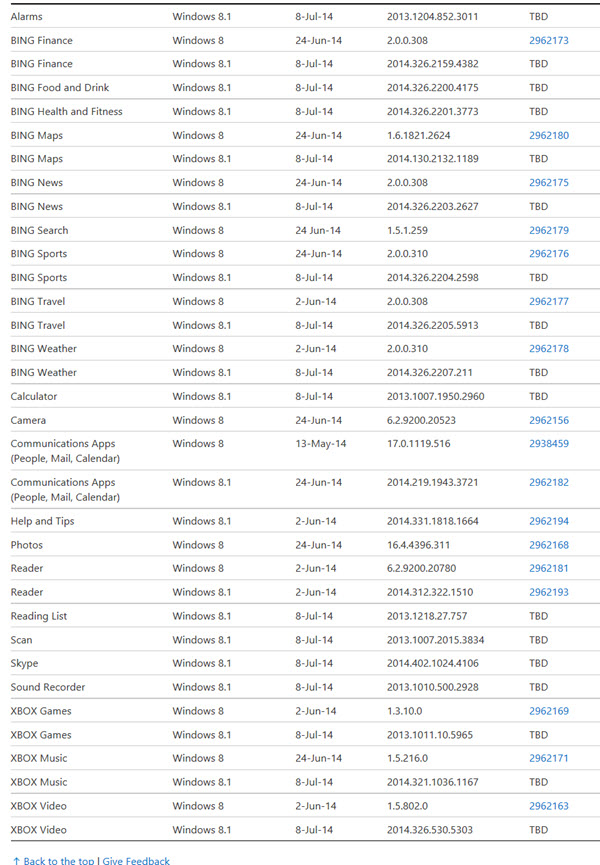
It is important to note that the packages cannot use dism.exe to install the updates offline. They must be installed via the .MSI installer to a running operating system, says KB2971128.
How to download Windows Updates manually may also interest you. Also, see how to update Windows offline.
