
The default File Explorer in Windows does not offer tabs, unlike Internet Explorer. There may be times when we need to have multiple instances of the Explorer window open. For this, we have to right-click any item and choose Open in new window. This opens a separate window, and that now lets us manipulate content between the two windows. Meet Tablacus Explorer, – it will help your open tabs and display them in various layouts. Tablacus Explorer is portable File Manager software that can be used without installing. We tested it on the latest Windows 11, and it worked nicely.
Tablacus Explorer for Windows PC
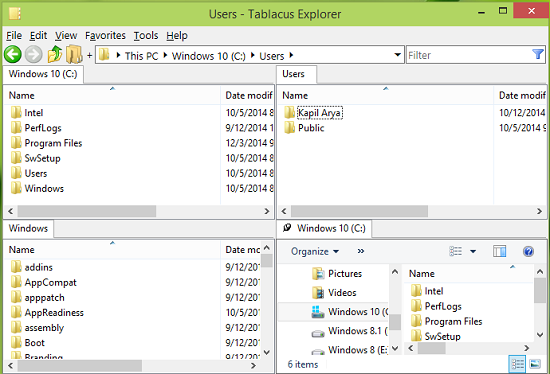
As you can see in the above-shown screenshot, we can have up to four windows running in the same instance. Thus, if you’re concerned about the view of Explorer, this tool is a must-have for you.
Tablacus Explorer Features
Following are the highlights of this tool:
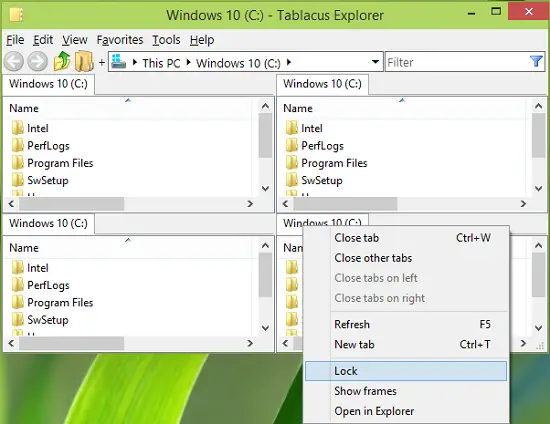
- Tabbed interface for multiple windows
- Add-on support
- Completely portable, can be used from USB too
- Customizable association, menus, keys, mouse gestures, alias
- Open-source version
- Free and available for both 32-bit and 64-bit architectures of Windows OS.
Tablacus Explorer Loading Layouts
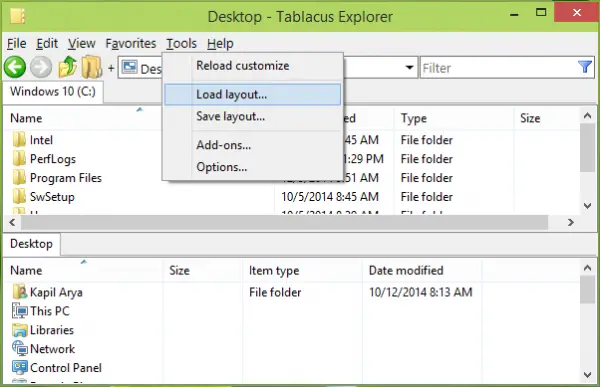
1. In order to load various layouts of Explorer under this Tablacus Explorer, click Tools -> Load layout.
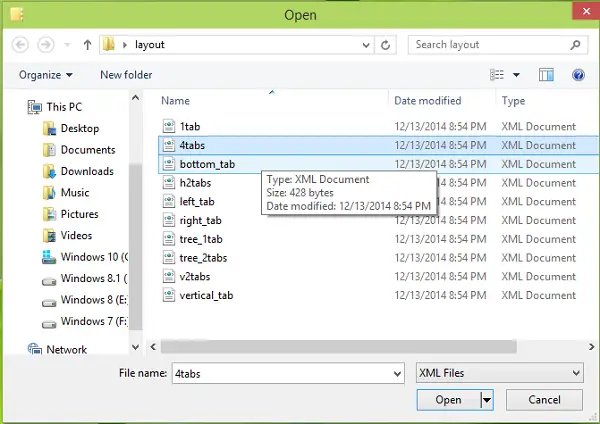
2. Then, in the following window, pick the layout you wish to see. For the first time, you need to load each layout individually. From second usage, you’ll already have the idea, which layout you must select.
Apart from offering tabbed windows, the most important feature of this Windows Explorer replacement is that it offers support for add-ons. These add-ons can add many more features to it.
To install add-ons, you will have to first download them from the official website, extract the ZIP file to your Addons folder, and then from the UI, select the Get Add-ons button in the options.
You can download it from here. It can be used on almost all Windows iterations.
