
As Microsoft Scout takes on more autonomous tasks, securing these operations is crucial. Unlike traditional AI assistants, Scout works independently by accessing approved resources and completing workflows. Microsoft has introduced Entra Agent IDs, a dedicated identity for autonomous agents, to enhance security. This, alongside Microsoft Purview sensitivity labels and role-based permissions, allows organizations to control Scout’s access, monitor its actions, and ensure compliance. Understanding these security features is essential for organizations planning to deploy Microsoft Scout. In this post, we will talk about securing Autopilot Agents and discuss how Microsoft uses Entra Agent IDs.
How to Secure Microsoft Scout with Entra Agent IDs
One major challenge with autonomous AI is figuring out who did what. For example, if an AI agent edits a document, downloads a report, or updates project files after hours, those actions shouldn’t look like they were done by a human employee. Microsoft solves this by giving Scout its own identity through an Entra Agent ID. Instead of using a user’s credentials for all tasks, the agent completes approved actions with its own dedicated enterprise identity. This keeps human actions separate from AI actions and makes security checks and compliance audits easier.
To secure Microsoft Scout with Entra Agent IDs, we need to keep the following things in mind.
- Assign Only the Permissions the Agent Needs
- Use Microsoft Purview to Protect Sensitive Content
- Monitor Every Background Task
- Separate Human Activity from Autonomous Operations
- Start Small before Expanding Deployment
- Review Security Settings Regularly
Let us talk about them in detail.
1] Assign Only the Permissions the Agent Needs
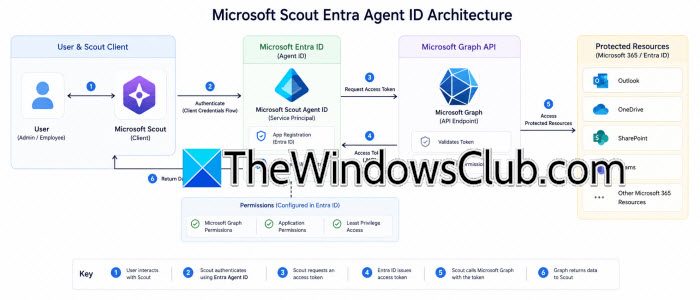
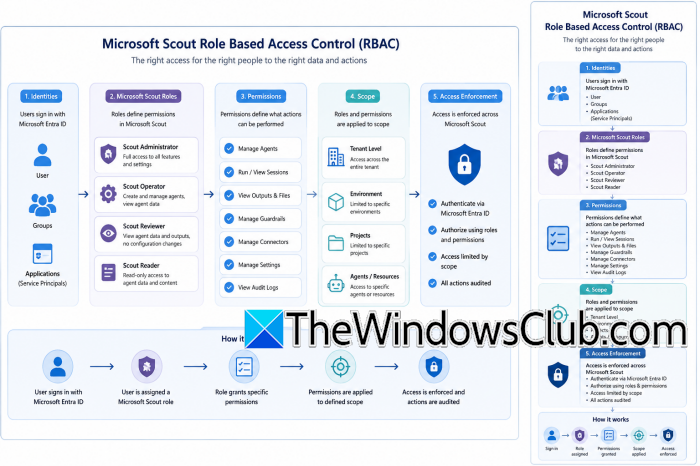
To create an Agent ID, start by choosing what that agent can access. Instead of giving Scout wide permissions across Microsoft 365, assign access based on its tasks. For example, a documentation agent might only need read and write access to one SharePoint library, while a reporting agent may only need permission to collect data from specific locations. Keeping permissions limited reduces the risk of mistakes and aligns with Microsoft’s least-privilege approach. If an agent doesn’t need access to finance documents or HR records, don’t grant those permissions. A smaller permission scope also makes management easier.
2] Use Microsoft Purview to Protect Sensitive Content
Managing identity is just one part of security. Organizations must also control how sensitive information is handled once someone has access. This is where Microsoft Purview sensitivity labels become useful. You can classify files as Public, Internal, Confidential, or Highly Confidential based on your organization’s rules. Scout works within these classifications instead of ignoring them. For instance, a confidential document can stay encrypted even when accessed by an authorized Scout agent. Additionally, sharing restrictions, download controls, and compliance policies still apply automatically during background processes. This ensures that AI automation follows the same rules that are already set for employees.
3] Monitor Every Background Task
After Scout is deployed, administrators should regularly check its activity instead of assuming everything is working well. Audit logs show what each Agent ID does, including which resources it accesses, which files it changes, and which workflows it runs, along with timestamps for each action. Keeping an eye on these logs can help spot unusual behavior before it becomes a bigger security issue. Regular monitoring is also helpful for fixing failed automations or ensuring an agent interacts only with approved resources. Many organizations set up regular reviews as part of their usual security and compliance processes.
4] Separate Human Activity from Autonomous Operations
Entra Agent IDs help tell the difference between actions done by employees and those done by automated systems. This makes it easy for administrators to see who completed a task and who started it. It’s important for companies that need to follow strict rules, as they must keep clear records of changes. This system also helps with troubleshooting because automated actions are easy to spot.
5] Start Small before Expanding Deployment
Microsoft Scout can handle complex tasks, but it’s best to start using it slowly. Begin with simple tasks like organizing project folders, summarizing documents, or creating internal reports. Set up dedicated Agent IDs and give them only the permissions they need. Make sure to check that Purview policies are applied correctly before using Scout for critical business tasks. This step-by-step approach helps administrators ensure security policies work, review audit logs, and adjust access permissions without risking sensitive systems. Once the initial setup is confirmed to be safe, you can introduce more automations with confidence.
6] Review Security Settings Regularly
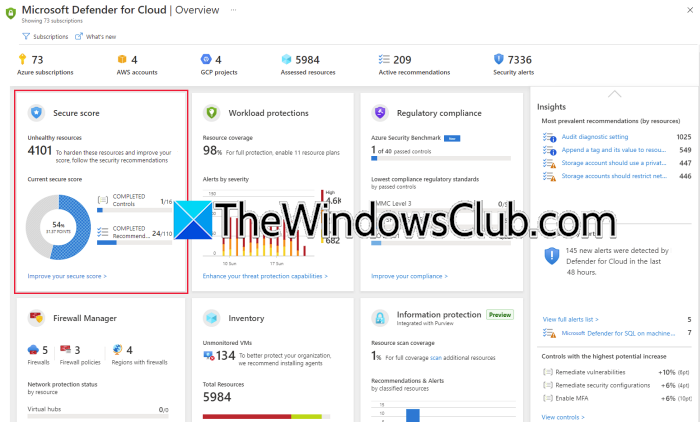
Using Scout isn’t a one-time setup. As projects and business needs change, it’s important to regularly check permissions to ensure they fit the agent’s roles. Remove any unused Agent IDs, take away unnecessary access, and keep an eye on audit logs. It’s also vital to confirm that sensitivity labels are protecting confidential information properly. Regular reviews help keep everything secure while allowing agents to work effectively.
Having a steady governance process ensures that Scout works well without causing security issues. By using Entra Agent IDs, limiting permissions, applying Microsoft Purview sensitivity labels, and continuously monitoring, organizations can confidently use Microsoft Scout for independent tasks. This way, businesses can maintain the visibility and security they need in today’s environment.
Read: What is Microsoft Entra Agent ID?
Why does Microsoft Scout use Purview sensitivity labels?
Microsoft Scout works with Microsoft Purview sensitivity labels to ensure autonomous agents follow an organization’s existing data protection policies. Labels classify documents based on their sensitivity and enforce rules such as encryption, restricted sharing, and controlled access. Even when Scout processes files automatically, these protections remain in place, helping organizations safeguard confidential information while maintaining compliance with internal and regulatory security requirements.
Read: Microsoft Scout: An always-on Personal AI Agent for Microsoft 365
How do Entra Agent IDs improve Microsoft Scout security?
Entra Agent IDs improve Microsoft Scout security by giving each autonomous agent its own enterprise identity with carefully controlled permissions. Instead of inheriting broad user access, agents receive only the privileges needed for their assigned tasks. This follows the principle of least privilege, reduces potential security risks, creates clearer audit trails, and allows administrators to monitor, review, and manage AI-driven activities more effectively across the organization.
Also Read: Install and Configure Microsoft Security Agents in Windows 11.
