
There’s a battle for the future of the Internet in the web browser space, and Microsoft Edge and OpenAI’s Atlas are two strong contenders. Microsoft Edge has been integrating powerful AI tools into its interface, whereas OpenAI has newly launched the Atlas browser with its AI core as a tough competitor. However, one question lingers in users’ minds: which is better? In this article, we will explore what they offer to determine which one delivers the smarter web experience.
Microsoft Edge’s AI vs OpenAI’s Atlas Browser: Which one is better?
Microsoft Edge’s AI and OpenAI’s Atlas Browser share similar goals, and you can’t go wrong with either of them to do tasks like summarising an article, writing emails, and so on. However, they vary in their philosophies. While Edge integrates AI into the browser, Atlas is the browser built entirely around AI.
We are going to compare them on the following grounds.
- Interface and User Experience
- AI integration and capabilities
- Productivity and Ecosystem
- Privacy and Data Handling
- Performance and accessibility
Let’s get started with the guide.
1] Interface and User experience
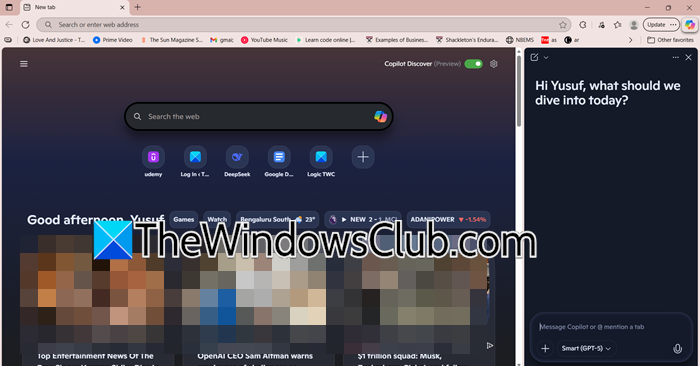
Microsoft Edge is one of the classic browsers that most people are used to, with everything exactly where users expect it. They have just added a smart AI sidebar (Copilot) to the traditional layout, so that users don’t have to waste their time learning just to access the AI tool.
Atlas, on the other hand, breaks this traditional browsing effect and is almost identical to the classical ChatGPT interface. It features a central conversational agent, with pages appearing as sources in a single workflow. Here, users tell the browser, instead of typing in the search bar, what they want to do.
That being said, the Edge interface is more familiar and easier to ‘learn’. In contrast, Atlas is more inclined towards people who love experimenting and mastering new technology, especially one built from the ground up around AI.
2] AI integration and capabilities
Edge uses AI as a smart assistant that understands the webpage users are currently working on. It summarises pages, compares open tabs, fills forms, and follows instructions across sites. However, it’s necessary to note that it does not do so on its own accord; it operates within a permissions framework that first asks users for permission before performing sensitive tasks or navigating to new sites.
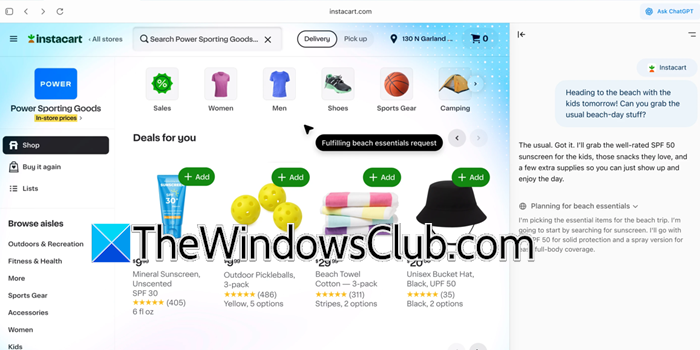
In contrast, Atlas integrates AI directly into the search box, providing both web links and AI-generated summaries. Although included in the subscribed version, Agent mode is one of its standout features that can work independently on behalf of the user. It can click links, fill multi-step workflows, and navigate sites on its own, but still requires user supervision and confirmation for higher-risk tasks. Users can enable ‘memory’ within a session to allow the model to draw on the user’s past browsing to understand their behaviour and learn.
In short, Edge is a good choice for defined-in-the-moment tasks, but Atlas is suitable for multi-step projects where it can act as your personal assistant. However, this liberty comes with its own responsibilities and risks on the user’s side, and is not accessible to all since it’s a paid feature.
3] Productivity and Ecosystem
When it comes to productivity, Edge is infamous for its seamless integration with the Microsoft ecosystem. Copilot connects neatly with Office 365, Teams, OneDrive, and the rest of the system.
Atlas is a standalone app that can import bookmarks from Chrome or Safari and support extensions from the Chrome Web Store. However, it is not tied to any particular productivity suite. Its value lies in its AI, not in its app integration.
The verdict in this case is Edge’s undisputed win for users in the Microsoft ecosystem. On the other hand, Atlas is better suited for users who rely heavily on AI for their research-intensive tasks.
4] Privacy and data handling
Edge operates under the Microsoft data collection policy, which collects diagnostic data to improve its services. Moreover, it provides security features, such as SmartScreen filters, that check visited websites and downloaded files to block phishing scams and prevent malware attacks.
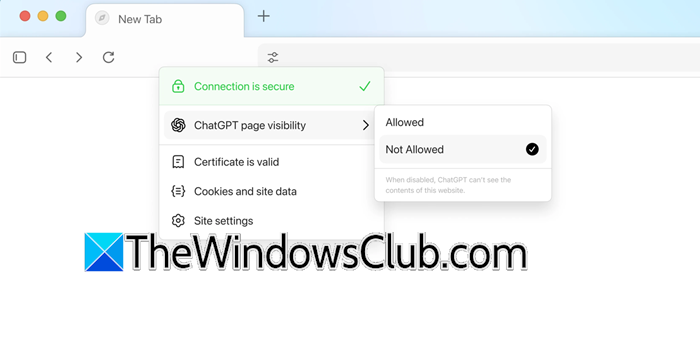
Its alternative, Atlas, uses the ‘memories’ feature to collect data and observe the interaction to provide better responses. It’s worth noting that OpenAI states the collected data remains ‘private’; however, a closer look at the fine print reveals that it uses users’ data to train its model. Users can manually disable “Improve the model for everyone” to prevent their data from being used for training.
The bottom line is that neither browser offers explicit security or privacy features. It’s up to users to weigh their options by comparing policies and settings that best fit their needs.
5] Performance and accessibility
Edge is a stable, generally fast browser thanks to its Chromium foundation. It is completely free, available on all platforms, and comes pre-installed on Windows. It makes browsing accessible for people who prefer speaking over typing, thanks to its voice control and permission-based features.
Currently, Atlas is only available for macOS users, with Windows and Android versions coming soon. It offers both free and paid versions. However, key features like Agent mode and higher usage limits are reserved for the latter versions, such as ChatGPT Plus, Pro, and Go Subscribers.
Ultimately, Edge is lighter, more stable, and ready for everyday use, whereas Atlas is a premium, subscription-driven experience currently limited to the Mac ecosystem.
Conclusion
It’s hard to pick one over the other, as users’ needs and requirements vary accordingly. However, if one is looking for a familiar browsing experience with stable performance and tight integration with Windows, Edge with Copilot is the answer. In contrast, if you are looking for something new and fresh to enhance your palette, and don’t mind a newer product that’s evolving, Copilot Atlas is the way to go with its conversation-driven workflow.
Read: Best AI Search Engine Tools to use
Is Atlas better than ChatGPT?
Atlas isn’t exactly better than ChatGPT, as they serve different purposes. ChatGPT, through its conversational interface, helps users write, brainstorm, and learn. Alternatively, Atlas takes the same intelligence and rebuilds it into an AI browser. It can not only converse with users and help them with all the above tasks, but also take actions on websites if users allow it. In the end, they are rather complementary than competitors.
Read: How to use AI features in Edge browser
Which AI does Microsoft Edge use?
Microsoft Edge uses an AI called Microsoft Copilot, which is powered by a custom Microsoft model built on OpenAI’s technology. It specifically uses Microsoft’s Prometheus model, which is based on GPT-4, and is fine-tuned for web search, task automation, and chat.
Also Read: Best AI Extensions and Tools for Microsoft Edge.
