
Certain websites ask you for your email address for different activities. To enter a comment, for example, you have to provide your email ID. Likewise, when you download some free e-books, they ask for your email ID so they can send you the download link to that address. This way, they can build up a database so that they can contact you even after you get the book. If the site is good and the mail they send is useful, it is fine, but what if they start spamming you? One of the benefits of masking an email address is that you can avoid spam using a third-party browser extension.
How to Avoid Spam
Providing your email ID anywhere on the Internet invites spam. Although companies or websites promise not to sell your email address to anyone, they may still share it with third parties. Some websites sell your email ID, along with other information, to online marketing companies, which can use it to send more spam to your Inbox. For example, you register for a newsletter with a reputed website and start receiving promotional emails from unknown parties; you may wonder how the unknown party got your email ID!
Although there are many spam filters in place, they may not help you. Some of them offer an Unsubscribe option, but again, it may or may not help. A service like Unroll.me can then help.
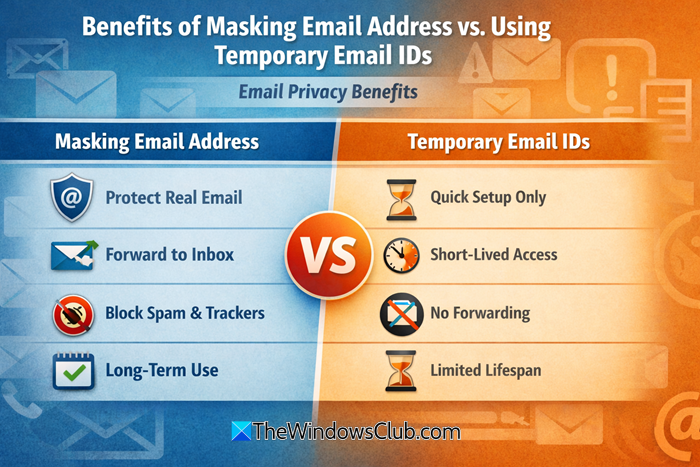
The best way to avoid spam is to mask your email ID while providing it to websites. Even better is to use temporary emails. Temporary emails last for a set period and expire afterward. They are perfect for receiving links to e-books and for avoiding the spam that follows later.
How to Mask email address
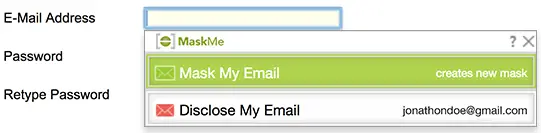
You will need a third-party browser extension for masking your email address. One example of email masking is MaskMe and Blur from Abine. The extension comes both free and paid. In the free version, it masks only the email addresses. The paid version goes a step further by masking phone numbers and credit card numbers.
MaskMe is available for Firefox and Chrome. It is, however, no longer being updated. Its developers have developed a new add-on called Blur, which does this and more. Blur is available for Chrome, Edge as well for Firefox.
Using an extension, when you encounter a field that asks for an email ID, you will have the option to mask the email address. If you choose that, you can enter an email mask (something like a fake ID) instead of a real email address. Mail sent to the masked email ID will be forwarded to your real email ID. You can decide which ones to keep and which ones to delete. That is, if you start receiving a promotional email or something similar from a third party, you can set it to be deleted automatically.
Masking works best only in browsers, as email clients will download or sync all emails. With email clients, you can set up filters and rules to check incoming email and delete it if it is spam. There is a probability of losing important emails if you are not very careful when creating rules in email clients.
A better way to avoid spam email is to use temporary email addresses whenever possible.
How can Temporary email IDs help avoid spam?
As evident from the name, temporary disposable emails are valid only for a certain period of time – like 10 minutes or half an hour. Such email IDs can be used only once for correspondence. For example, if you need to give them an email ID to obtain a download link for something, you can quickly create a temporary email and use it instead of your real email ID. Once you receive the link and the email ID expires, any further emails sent to it will bounce. That way, you will be saved from spam.
This explains the benefits of masking an email address and using temporary email IDs. It depends on the circumstances whether to use temporary emails or to go for masking. You can use temporary email only for limited correspondence. In case of masking, you will keep on receiving mail, but you will have options to delete the emails using third-party browser extensions directly.
If you have other light to shed on this subject, please do share.
