
Microsoft Elevate is a new initiative from Microsoft that aims to bring AI education and skills to people worldwide. Instead of simply creating AI tools and leaving educators to figure them out, Microsoft Elevate provides teachers with training, resources, and practical solutions so they can confidently use AI in their day‑to‑day teaching. In this post, we’ll walk you through how you can use Microsoft Elevate to teach AI in your school.
How to use Microsoft Elevate to teach AI in Schools
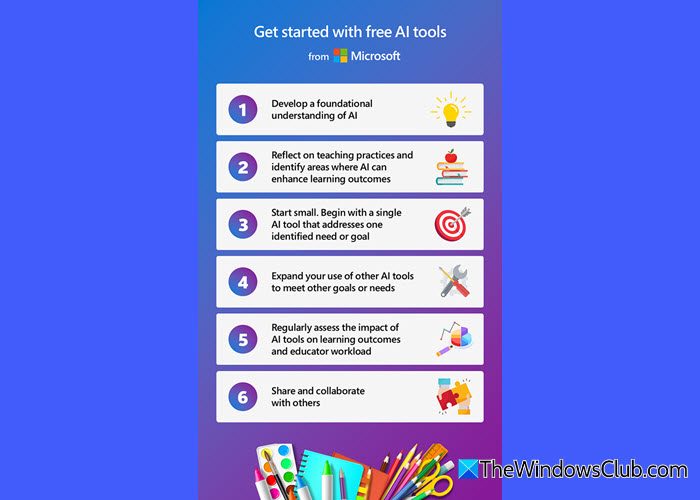
To use Microsoft Elevate to teach AI in schools, follow these steps:
- Sign in with your Microsoft Education account
- Build a strong AI foundation
- Explore Microsoft Elevate resources
- Reflect on your classroom needs and choose your first tool
- Assess impact and refine your approach
- Share and collaborate with others
Let us see this in detail.
1] Sign in with your Microsoft Education account
Most of Elevate’s AI tools, like Microsoft Copilot (in Word and Excel), Teams for Education, Minecraft Education (for AI Foundations), and Learning Accelerators, are already part of Microsoft’s education ecosystem. To access them, you’ll need a Microsoft Education account.
Go to the official Microsoft Learn for Educators portal or your school’s Microsoft 365 Education portal. Sign in using your Microsoft Education credentials.
2] Build a strong AI foundation
Start by strengthening your understanding of AI so you know how best to use these tools in the classroom.
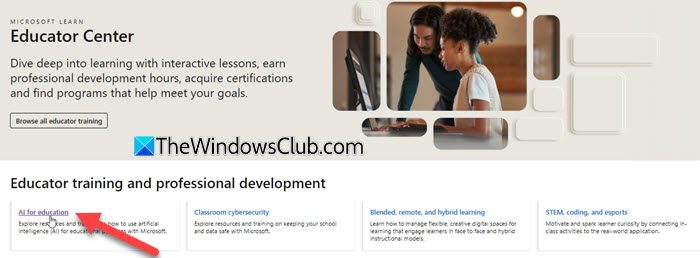
Click the Educator Center menu on top and select Overview. Scroll down a bit and click AI for education under Educator training and professional development. Under Educator Center trainings, click AI for educators.
This module provides an overview of fundamental AI principles and tools, with a focus on practical applications to enhance teaching and learning.
Also, explore the Classroom Toolkit: Unlock generative AI safely and responsibly (click here). It helps you guide your learners in developing critical skills like:
- Fact‑checking
- Cultivating good digital habits
- Safeguarding their data privacy
- Adopting strategies to manage their mental well-being.
3] Explore Microsoft Elevate resources
Once you’ve got the basics, dive into the specific AI tools that Microsoft Elevate offers.
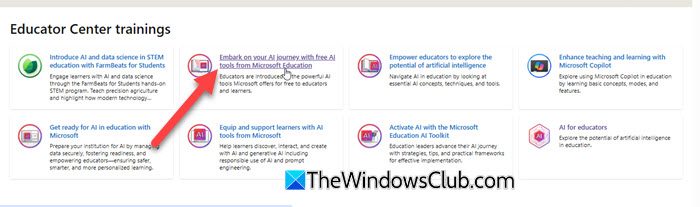
Go back to AI for education. Click Embark on your AI journey with free AI tools from Microsoft Education. This module shows you how to use Microsoft’s AI tools effectively, so you can spend less time on repetitive tasks and more time on teaching and supporting your students. Here’s a quick overview of what each tool offer:
- Microsoft Copilot: Draft lesson plans, create worksheets, or generate ideas.
- Learning Accelerators: Get detailed feedback and track student progress on assignments.
- Microsoft Teams for Education: Organize classes, share AI‑enhanced resources, and communicate efficiently.
- Minecraft Education’s AI Foundations: Introduce students to AI literacy in an engaging, gamified way.
- Khanmigo for Teachers: Brainstorm lesson hooks or real‑world examples.
- GitHub Copilot: Improve students’ coding skills with AI‑assisted suggestions.
4] Reflect on your classroom needs and choose your first tool
Ask yourself, “what repetitive tasks can AI handle for me? Where could AI make lessons more engaging? Which student skills do I want to enhance with AI?”
Don’t overwhelm yourself by trying everything at once. Start with one tool that directly supports one of these needs.
Once you’ve had success with one tool, expand your toolkit gradually.
5] Assess impact and refine your approach
As you use AI tools, regularly evaluate how they’re working for you and your students. Collect feedback from learners. Observe changes in engagement and performance. Review how much time you’re saving on repetitive tasks.
Use these insights to decide whether to continue, adjust, or expand the use of a particular AI tool.
6] Share and collaborate with others
Finally, don’t keep your learnings to yourself. Collaboration often yields new ideas and improved results. Share your experiences, challenges, and successes with your colleagues. You can also join professional learning communities or online forums to discuss AI in education.
I hope you find this useful.
Read: Best free online quiz maker tools for teachers.
How to use AI in school as a teacher?
To use AI in school as a teacher, you first need to understand what AI is and how it works in education. Microsoft offers an easy learning path and resources to help you build that foundation. It has introduced Microsoft Elevate, which brings training, guidance, and free AI tools for teachers. With these, you can save time on tasks and create more engaging lessons for your students.
Read: How to use Gemini for Education from Google for AI in School
How to teach employees to use AI?
To teach employees to utilize AI, begin by helping them understand the fundamentals of AI and its applications in their daily work. Provide easy‑to‑follow training sessions or resources so they can learn at their own pace. With the right guidance and support, employees can quickly develop confidence and utilize AI effectively in their roles.
Read Next: Create AI-generated picture books and bedtime stories for children.
