
Notepad recently got a makeover. Now, it comes with additional features like text formatting options, spell check and autocorrect, Copilot AI assistant, and Microsoft Account sign-in. While these features can be useful, many people prefer to use Notepad in its traditional way.
If the same goes for you too, you can remove text formatting in Notepad and use it the old way. And here’s how to do it.
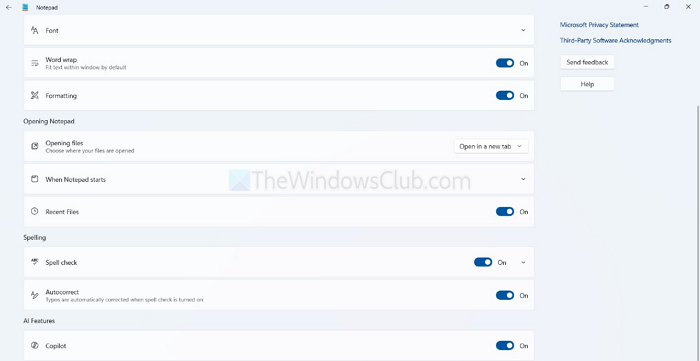
How to remove Text Formatting in Notepad in Windows 11
- Open Notepad from your Start menu or taskbar as you normally would.
- In the upper-right corner of the Notepad window, next to your Microsoft account profile icon, you’ll see a gear icon. This opens the Settings panel.
- Look for a toggle named “Formatting“. Turn it off to remove rich text features such as bold, italic, headings, and font customization. This reverts Notepad to plain text mode.
Here you will also see settings to:
- Turn Off Spell Check and Autocorrect
- Disable Copilot (AI Assistant) if you prefer a clean, AI-free writing space
That was a quick way to remove all the unnecessary features in Notepad.
Apart from this, you can consider using other note-taking tools like Notepad++ if you want something lightweight without any AI bloat.
Read: How to use Explain With Copilot in Notepad on Windows 11
How to restore old Notepad in Windows 11?
How to restore old Notepad in Windows 11, you can follow any one of these methods:
- Open the Classic Notepad from its stored locations
- Install the Classic Notepad using Optional features in the Settings app
- Uninstall the new Notepad app
- Disable Modern Notepad Alias in Settings.
Will disabling Copilot and other features affect other apps on my PC?
Disabling Copilot or spell check inside Notepad only affects Notepad itself. It won’t disable Copilot in Windows or affect other Microsoft apps, such as Word or Edge. These settings are specific to Notepad and only take effect within the app.
Will disabling formatting and features affect how my saved text files look or behave?
Disabling features like formatting, spell check, or Copilot won’t change the content of your existing .txt files. Notepad will simply treat them as plain text, without applying any styling or suggestions. If you previously used formatting (like bold or headings), those elements will no longer be visible or editable after turning formatting off, but the raw text will remain unchanged.
