
Disney Plus is one of the most popular streaming services in the world. With shows like Game of Thrones, WandaVision, Red Sparrow, etc., the service is going toe-to-toe with the likes of Netflix, Amazon Prime Video, and Hulu. They have a very intuitive UI as well. But there may be a reason why you may want to continue this service. In this guide, we will show you how to cancel a Disney+ subscription on a PC or mobile device.
How to cancel Disney Plus Subscription
We are going to easily cancel Disney Plus Subscription on the following platforms.
- Cancel Disney Plus Subscription using PC (Browser)
- Terminate Disney Plus Subscription using Android
- Cancel Disney Plus Subscription using iOS
Let us talk about them in detail.
Cancel Disney Plus Subscription using PC (Browser)
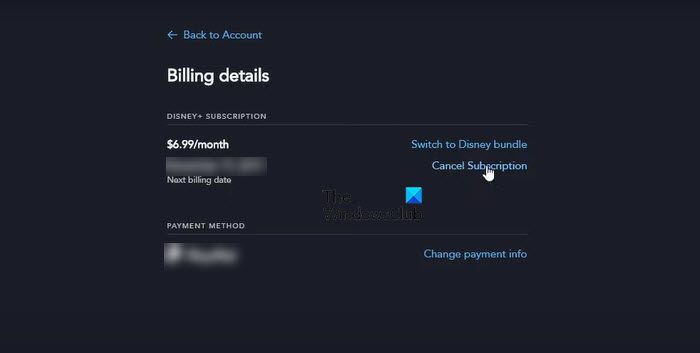
Follow the given steps to cancel your subscription of Disney Plus on your computer.
- Open any browser of your choice.
- Go to disneyplus.com.
- Click on your profile picture and then on Account.
- Go to Billing details > Cancel Subscription.
Finally, follow the on-screen instruction to cancel your subscription.
Terminate Disney Plus Subscription using Android
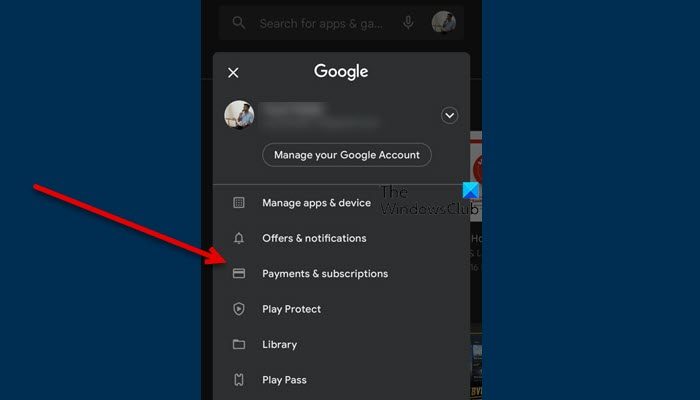
If you are on Android, you can use the same method to cancel your subscription. Also, there is another by which you can do the same. Follow the prescribed steps.
- Open PlayStore.
- Click on your profile pic and go to Payment & subscriptions (or My subscriptions).
- Then cancel Disney + subscription.
That should do the job for you.
Cancel Disney Plus Subscription using iOS
If you want to cancel Disney Plus Subscription on iOS, you can try the browser method or follow these steps.
- Open Settings.
- Click on your name and then go to Subscription.
- Go to Disney Plus > Cancel Subscription.
As easy as it gets.
Hopefully, with the help of this guide, you can understand everything about canceling a Disney+ account.
Can you cancel Disney Plus at any time?
Yes, Disney+ allows its users to cancel the subscription at any time they want. The pack will be valid until your subscription expires, and no further amounts will be deducted to renew your account.
You can also get your account back anytime after making the payment. They have made cancellation and renewal pretty simple for the users.
Read: Disney Plus keeps buffering and showing timeout errors
How do I remove a Credit Card from Disney Plus?
Unfortunately, you can not remove Credit Card details; instead, you have to use another credit card or switch to a different payment method. To do that, follow the prescribed steps.
- Go to dinseyplus.com and log in with your credentials.
- Click on your Profile pic and go to Accounts.
- Then, go to Billing details > Change Payment info.
- Now, enter your card details and save the information.
You will be good to go.
Read: Fix Disney Plus Hotstar error codes: 10 common error codes explained
How do I turn off auto-renewal on Disney Plus?
To turn off auto-renewal, you have to cancel your Disney Plus account. This way, your account will remain active until your pack’s validity period expires. You can then re-subscribe to Disney+ and restart streaming. If you want to turn off auto-renewal on Disney Plus, just follow the guide above to cancel the subscription.
Also Read: How to Get Verizon Disney Plus or Disney Plus Verizon Offer.
