
AI is everywhere. Almost everything digital is embedded with AI and its features. It is now very hard to find anything without AI. There are many online tools that help us detect AI-generated images. Similarly, there are tools and services from big companies like Microsoft that offer facial recognition to the clients. Those facial recognition tools are entirely powered by AI models to ensure accurate results. Let’s see how AI face search works and go deep into it.
How does AI face search work?
AI-powered face search or facial recognition is now the new norm. Every industry is trying to improve its services. Here’s how it works. We will break down the key aspects of AI face search to make it easier to understand.
- What is AI face search?
- Important steps of AI face search and how it works
- Benefits and real-world applications of AI face search.
Let’s deep dive into how it works.
1] What is AI face search?
AI face search, also known as facial recognition, works by analyzing the facial features of an uploaded image against images in databases to verify and identify a person. It is a biometric technology that can help government agencies, banks, and recognized institutions to identify persons.
For example, when you go to a bank or start the KYC (Know Your Customer) process to verify your identity, you take a picture of yourself in which your face is clearly visible. When you finalize the image, the AI algorithms identify the facial features, then compare them with the databases of the bank or allied government institutions. When the facial features match an identity in the databases, it will show you a successful report. If not, it asks you to take another picture.
To sum up, AI enhances facial recognition tools’ accuracy and security.
2] Important steps of AI face search and how it works
As noted, AI face search is a biometric authentication tool that relies on visual data rather than physical contact, such as iris scanning or fingerprinting. For facial recognition or AI face search to work correctly powered by AI and machine learning, which identifies the key features of an uploaded face to match against the faces in the stored databases.
The key features that make AI face search work are:
- Eyes: No matter if a person gains weight, loses weight, or ages, the distance between the eyes remains the same, as it is determined by the skull structure, which does not change. So, AI algorithms rely on the distance between eyes, a key feature of the human face, to match and identify the person.
- Nose: Unless a person gets nose surgery to change their appearance, there won’t be much change. Each person’s nose has distinct features, including width, length, depth, bridge height, and nostril shape. It also provides AI algorithms with a 3D face structure to work with and identify a face.
- Jawline: The contour of the jawline, starting from one ear to the jaw to the other ear. The curves, sharpness, and all the tiny details pave the way for AI algorithms to detect and identify a face.
No AI face search relies on one of the above three features. The three come together to make a perfect identity and accuracy. When the AI algorithms detect these features, it creates a digital template and match it against the faces in the stored databases.
So, when you use facial recognition tools, the steps involved in face search can be summarized as follows.
- Capturing of a face or an image
- Detecting faces in the image
- AI then recognizes the unique facial features
- Compares them with known faces in the databases
- Then shows us the result after successful matching
From your mobile device to banking software to security systems in the airport, this is how facial recognition or AI face search works to successfully verify your identity.
They all use cameras or sensors that capture high-resolution images or videos in real-time for accurate results.
3] Benefits and real-world applications of AI face search
There are many real-world applications we come across daily that we do not know work as AI face search or facial recognition.
- Unlock devices: The Windows PC and smartphone we use have facial recognition features for unlocking. If we set the device to unlock only upon facial recognition, their access becomes impossible without our faces.
- Safety and security: Airports use facial recognition to best identify passengers, safeguard security, and grant or deny entry to a person into the country. The facial recognition powered by AI reduces the time it takes to verify a person, without compromising on the security standards. The surveillance programs used by government agencies ensure threats are neutralized by using facial recognition tools to identify people.
- Banking: Banks use biometric tools to identify a person. Earlier, it was fingerprints; now they have upgraded to facial recognition software for greater accuracy and security.
- Healthcare: Countries are creating health databases where citizens’ health reports and related data are stored on servers to make it easier to provide better healthcare. They use the patient’s facial recognition tools to recognize and access the health databases.
4] Best Face Search Tools
1. Lenso.ai
Lenso.ai is one of the best face search tools for finding exact or highly similar face matches based on the photo you upload. It can find matching faces even when photos have been altered, edited, cropped, or taken from different angles.
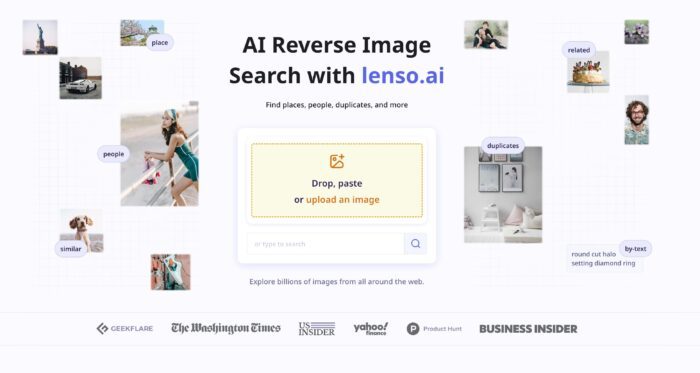
You can also create alerts for specific images and receive notifications whenever new face matches appear.
Best for: Face matching, reverse image search, and monitoring new matches.
2. Eyematch.ai
Eyematch.ai is a facial search engine that helps you find similar or matching faces across images published online. Upload a photo to discover potential face matches and see where those images appear on the web.
Best for:- Finding matching face images online.
3. PimEyes
PimEyes is a popular face search tool that finds images featuring the same or similar face across the public web. It is especially useful for discovering where your photos appear online and monitoring your digital presence.
4. FaceCheck.ID
FaceCheck.ID lets you upload a photo and search the web for images containing similar faces. It can help you discover publicly indexed pages where a matching or similar face appears.
AI tools can flag AI generated faces
To determine whether a face was generated by AI tools, many factors are considered. First, the tool tries to identify patterns that match the AI-generated data. Next, it goes into the details of facial features, symmetry, shadows, color, consistency, patterns, etc.
From eyes and skin to structure, it checks everything. AI tools can flag an AI-generated face if they find any of the following aspects in the image.
- Eye details: Asymmetrical pupils, inconsistent reflections in eyes, eyelashes, and patterns.
- Skin: Smoother, plastic-like skin texture, evenly spaced pores, too-perfect-to-be-true kind of skin.
- Data patterns and invisible watermarks: It also looks for data patterns, as almost every AI tool is trained on similar datasets. They tend to use the same data patterns and sometimes embed invisible watermarks in it.
As AI tools evolve, detection tools are becoming better at keeping up with trends and staying relevant. Here are someof the best AI Facial Recognition Search Engines to Search for a Face
Is AI face recognition legal?
There are currently no laws that make face recognition legal. That’s why we have several tools available online that help us reverse-image search to find people by their faces. It is not yet clear whether the governments will bring laws to prevent misuse.
How to use AI to find a face?
There are several tools available online that help us find a face. They are powered by AI to improve the accuracy. To use those tools, visit a face search tool’s website, upload the photo you want to search for, and make a search. As most tools use the same backend algorithms, it is highly unlikely to get different results across tools.
Related: How to find Similar Images Online using Reverse Image Search
How can I find a person by photo for free?
You can find a person by photo for free using Lenso AI, Reversely AI, FaceCheck ID, and such tools. Just visit the websites on a web browser, upload the photo, and let them search. You can also use Google’s Reverse Image Search to find people for free, with no limits.
Can AI identify people in pictures?
Yes, AI can definitely identify people in pictures, but not the way humans do. It identifies people by converting the pictures into machine-understandable numbers. Those numbers keep on changing with every picture. This way, AI can identify people.
