
If you want to remove all the duplicate images from your Windows 11/10 computer, you need to use these duplicate photo cleaner and remover software. All of them are free and feature-rich to get what you are looking for.
We all love keeping copies of images we shoot during trips, festive seasons, and parties. As it accumulates, we have multiple copies of the same image here and there. All this starts taking a lot of space on your PC, and to make sure you don’t lose everything but keep just one copy, we will have to tools to get rid of them. In this post, I share the best free duplicate image cleaner and remover software for Windows 11/10. You can remove all those extra images, and the software will even help you differentiate between similar images and small modified versions.
Duplicate Photo cleaner and remover software for Windows PC
Just before you start using these tools, make sure to keep the images in your Windows folder, aka System folders. They may have multiple copies, but it’s important. The best way to figure out duplicate images is to scan folders or drives you to know about clearly.
The best duplicate photo cleaner and remover software are:
- Find.Same.Images.OK
- Awesome Duplicate Photo Finder
- CCleaner
- Glary Duplicate File Finder
- VisiPics
- Visual Similarity Duplicate Image Finder
- AntiTwin
To learn more about these tools, keep reading.
1] Find.Same.Images.OK

Find.Same.Images.OK finds duplicate images by comparing them on the pixel level. So, even if the images are edited i.e. rotated, mirrored and even resized, it can find them. This is particularly useful if you have downloaded images and have changed a few things here, and there to share it. However, since you wanted to keep the original files, you always kept a copy.
2] Awesome Duplicate Photo Finder
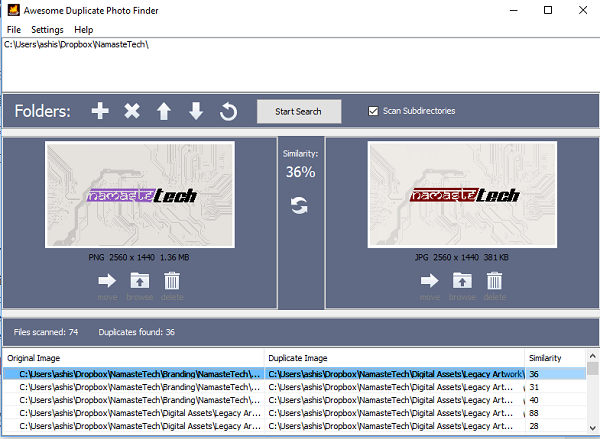
Available in a portable version, this software does some impressive job finding similar images, and exact copies. I ran this through one of my folders, which had different variations of the same photo in terms of colors, size, and even images with similar faces. It found all of them. It also shows the percentage of similarity.
Once it finds, you can choose to delete, explore or move it to anywhere else. If you want to find exact copies, you will need to change in the settings. Download from here.
3] CCleaner
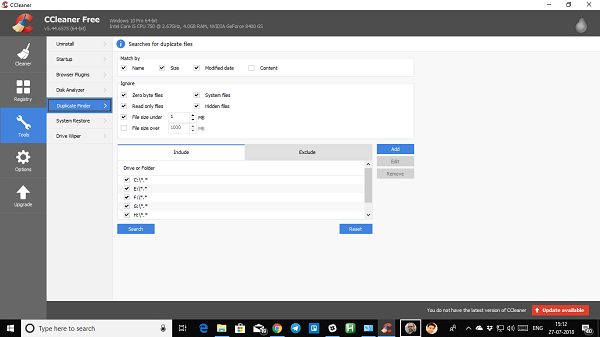
CCleaner comes with an inbuilt duplicate file finder which you can use it to find duplicate images, but it’s going to little restricted. It will only find images that are the exact same size. You can choose folders, exclude folders, and also use wildcards to find an image
4] Glary Duplicate File Finder
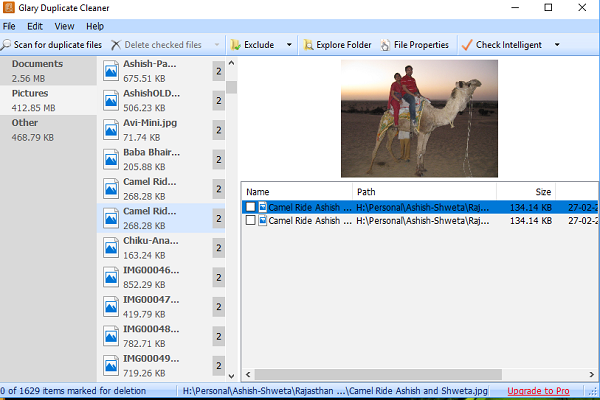
Using Glary Duplicate File Finder you deep scan all the images in your computer to find duplicate images. The result is divided into file types and duplicate files two parts. You can specify which you want to keep and delete rest of them. It supports custom matching conditions by file type, content, size, and date of creation to find duplicates. You can also click the Check Intelligent button, and it will select only duplicate files, which you can delete in one click.
5] VisiPics

It’s old software which works. You might not like the interface at all, but its ability to find images are pretty impressive. You can find duplicate images using three different filters – Strict, Basic and Loose. It also marks small, uncompressed and lower-resolution images as duplicates. This helps ensure you keep the best copy. It supports: JPEG, GIF, PNG, BMP, PCX, TIFF, TGA and RAW images. Results appear in real time. So you do not need to wait for the scan to complete. You can keep deleting images as they show up in the result. Download it here.
6] Visual Similarity Duplicate Image Finder
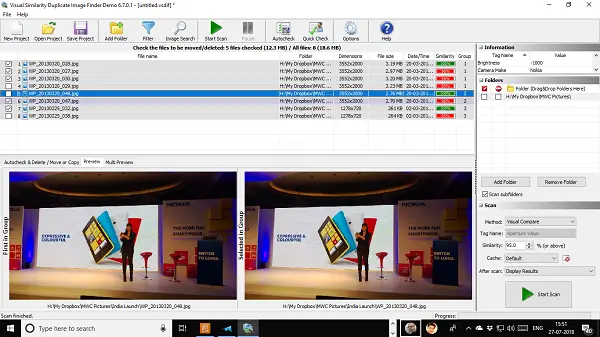
This image finder looks for similar images across different formats, bit depths, and sizes. You can even choose the similarity percentage when searching if you think too many non-similar images are showing up in the results. Like VisiPics, it can also mark smaller, lower-resolution images as duplicates.
The application also lets you create rules, choose post-processing actions and so on. It works, but the free version limits results to up to 10 groups. The software also maintains a cache of previous results for faster results.
7] AntiTwin

This small tool compares file content instead of just size and date. It can find similar images, documents, and music files on your PC. The biggest advantage is that it’s completely free and has no adware. When comparing images, you can do a byte-by-byte comparison or pixel comparison for accurate results.
The results clearly show duplicate images, and you can preview each file for better understanding. Download from here.
TIP: AtiDupl is an open source duplicate photo finder software
What is the best free duplicate photo remover?
There is no best or worst free duplicate photo remover for Windows. You should try at least two or three to find the best option for you. However, in terms of features, you can find CCleaner, Glary Duplicate File Finder, Find.Same.Images.OK are pretty handy.
Is there a program that deletes duplicate photos?
Yes, several Windows programs can delete duplicate photos in minutes. You can use VisiPics, AntiTwin, Awesome Duplicate Photo Finder, CCleaner, etc., to find and remove all the duplicate images on your computer.
These tools should help you get rid of duplicate images, and while many others are available, finding the free ones can be difficult. Not that we don’t pay developers to get paid; not everyone can buy them either. So if you are using a free duplicate image finder, let us know in the comments
