
Hitman 3 is one of the most popular games coming from a franchise that has produced some epic titles. However, just like other new and demanding games, Hitman 3 is facing some issues. In this article, we will discuss one of them. We will explore how to resolve the issue where Hitman 3 fails to open on Windows 11/10 PCs.
Why won’t Hitman 3 launch on Windows?
Since this game is new and demanding, there are many configurations on which this won’t work. Therefore, ensure that your computer is compatible. We have outlined the system requirements for running Hitman 3 below.
Other reasons could include corrupted game files, an outdated Graphics Driver, etc. We have mentioned all the potential solutions in this article.
Fix Hitman 3 won’t launch on Windows PC
Before proceeding, ensure that your computer is up to date. To do that, open Settings, go to Update & Security, and click Check for Updates. There, you need to download and install available updates. Here are some additional steps you can take to resolve this issue.
- Verify Hitman 3 Integrity
- Update your Graphics Driver
- Allow Hitman 3 through Firewall
- Update or Reinstall DirectX
Let’s discuss them in detail.
1] Verify Hitman 3 Integrity
Since a corrupted game file may cause this issue, we need to verify the integrity of your game and check if that can fix the issue.
To do this, follow the given steps.
- Open Epic Games and go to your Library.
- Look for Hitman 3 and click on the three horizontal dots.
- Now, click Verify.
Wait for the process to complete and check if the issue persists. Hopefully, your issue will be resolved.
2] Update Graphics Driver
An inferior or outdated Graphics can stop your game from launching. For the former case, you need to check out the system requirements section, but for the latter, you have to update your Graphics Driver and see if the issue persists.
3] Allow Hitman 3 through Firewall or a third-party antivirus
You might not be able to run the game if your Firewall is blocking it. Therefore, ensure that it is allowed through the Firewall. To do this, follow the given steps.
- Type “Windows Security” in the Start Menu Search bar.
- Go to the Firewall & network protection and click Allow an app through firewall.
- Tick Hitman 3 and allow it through both Public and Private networks.
If you have a third-party antivirus, you should allow Hitman 3 through it or as well.
Now, retry opening the game. Hopefully, it will work this time.
4] Update or Reinstall DirectX
You need DirectX version 12 or later to run Hitman 3. However, sometimes, the service can be up-to-date but corrupt. So, if you have an outdated DirectX, update it. However, if your DirectX is up to date, try reinstalling it. You can download the latest version of DirectX from microsoft.com.
What are the System Requirements to run Hitman 3?
The following are the System Requirements for Hitman 3:
- Operating System: Windows 11/10 64-bit
- Processor: Intel CPU Core i5-2500K 3.3GHz or AMD CPU Phenom II X4 940 (Minimum), Intel CPU Core i7-4790 4GHz (Recommended).
- Memory: 8GB (Minimum), 16GB (Recommended).
- Graphics: NVIDIA GeForce GTX 660 or Radeon HD 7870 (Minimum), NVIDIA GeForce GTX 1070 or AMD Radeon RX Vega 56 8GB(Recommended).
- DirectX: Version 12 or later
- Storage: 80GB.
If you want to know whether if your computer is compatible or not. Open Run by Win + R, type “dxdiag” and click Ok.
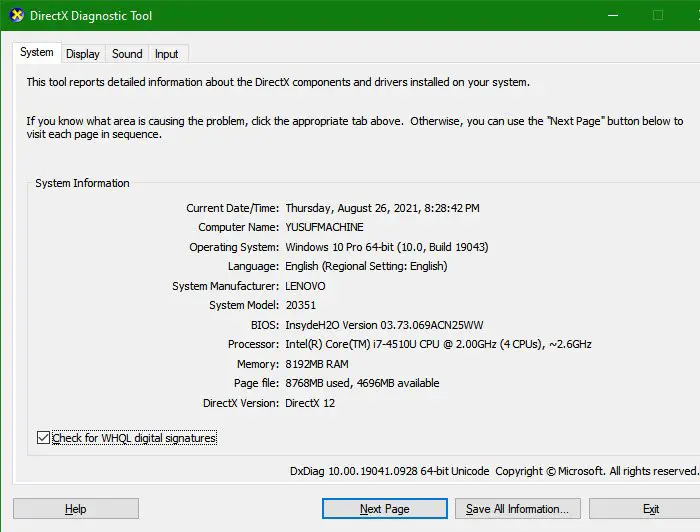
There you can see all your system configurations. So, check and ensure that your computer is compatible.
That’s it!
Read next: Apex Legend won’t launch on PC.
