
If you are facing high CPU usage by IAStorDataSvc on Windows 11 or Windows 10, then it’s because of Intel Rapid Storage Technology. It appears as a Service that may result in not only high CPU usage but also high memory and disk usage, as well as overheating, and slow performance. Usually seen in HP computers, it appears on any PC using Intel Rapid Storage Technology. You will also notice that your Fan runs on high speed every time this happens with average CPU usage spiking up to 50%.
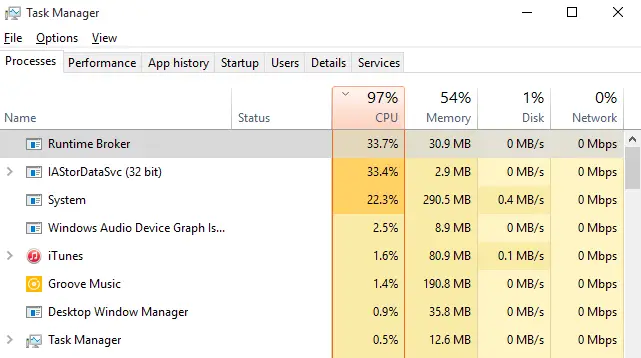
Please note that this service is designed to enhance file access speed. However, if you are not using an SSD on your PC, then it’s not necessary to keep it installed.
IAStorDataSvc High CPU usage on Windows 11/10
If you are experiencing high disk, memory, or CPU usage for the IAStorDataSvc process, this guide provides a definitive solution to resolve the issue on Windows 11/10. Drivers from Intel Rapid Storage Technology usually cause it. The options you should consider are:
- Reinstall/Update or Remove IAStorDataSvc driver
- Disable IAStorDataSvc in Services Manager
1] Reinstall/Update or Remove IAStorDataSvc driver
You will have to choose between one of these options. The first thing we would suggest you is to download the latest driver from Intel Download Centre and install it on the PC. In case this doesn’t work, you may want to remove the driver completely, and let Windows update find the right driver for you after a PC restart. Many times drivers aren’t compatible with the latest Windows upgrade, and it results in this kind of issue.
- Open Device Manager using the key WIN+X+M
- Find the driver, right-click, and uninstall.
- Restart your Windows PC.
You may also have to look into installed programs listed and uninstall any listing of Intel Rapid Storage Technology driver.
2] Disable IAStorDataSvc in Services Manager
- In the Run prompt, type services.msc, and hit Enter.
- Locate Intel Rapid Storage Technology services, and then double-click it.
- Change the Startup type to Disabled.
- Click on Apply and then OK to save the change.
- Exit the Services window and see if the problem is resolved for you.
You can also access the running services list from the Task Manager.
Read: Intel Rapid Storage Technology Service not working.
Please let us know if this helped resolve the issue.
Do I need IAStorDataSvc?
IAStorDataSvc is part of Intel’s Rapid Storage Technology, which enhances system performance and enables faster access to frequently used files. If you’re experiencing high CPU usage due to IAStorDataSvc, it may indicate an issue. It’s not strictly necessary for basic operations, so consider disabling it if you’re facing performance problems, but only if you’re not using RAID configurations.
Other posts about processes using high resources:
- WMI Provider Host High CPU Usage
- Desktop Window Manager dwm.exe consumes high CPU
- Windows Modules Installer Worker High CPU & Disk Usage
- Windows Shell Experience Host uses high CPU.
