
Some users of Twitch love to watch videos in full screen, especially if they have a large-screen monitor. However, there are times when the Twitch full-screen feature does not work, and when that happens, many users have no idea of what to do. Several users are having trouble using the full-screen feature on Twitch. We have seen many complaints online and that’s understandable because who wants to watch videos on a smaller player.
Twitch fullscreen not working
So, how do we get this problem under control? We are going to look at some of these possibilities that could return the full-screen capabilities.
- Log out of Twitch and log back in
- Take advantage of Theater Mode
- Turn off the BTTV extension
1] Log out of Twitch
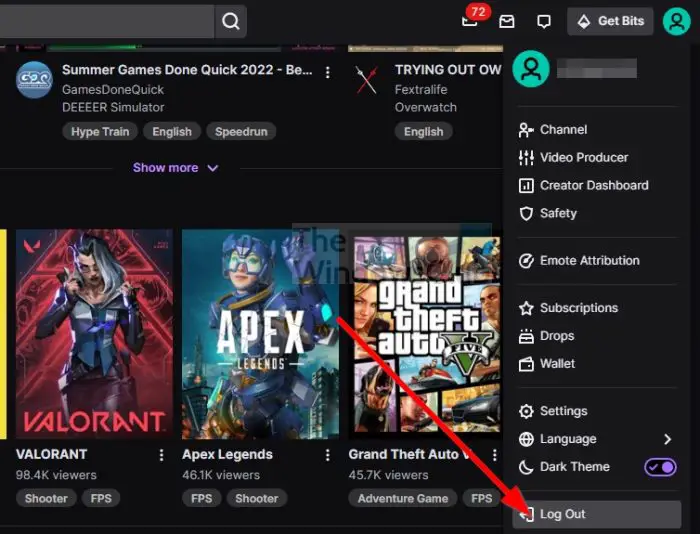
If you are logged in right now, then we suggest logging out of your account, restart the device, then log back in again. From, there, you can check to see if the full-screen issue is still persistent.
If you’re using the Twitch app for Windows (yes, there is an official app), here is what you need to do.
- Click on the profile icon in the top-right section.
- After that, select the Log Out option.
- After you log out, close the app.
- Restart the computer.
- Finally, boot into the Twitch log in with your official credentials.
In most cases, this should help, but if you’re still having problems, then move on to the next possible fix.
2] Take advantage of Theater Mode
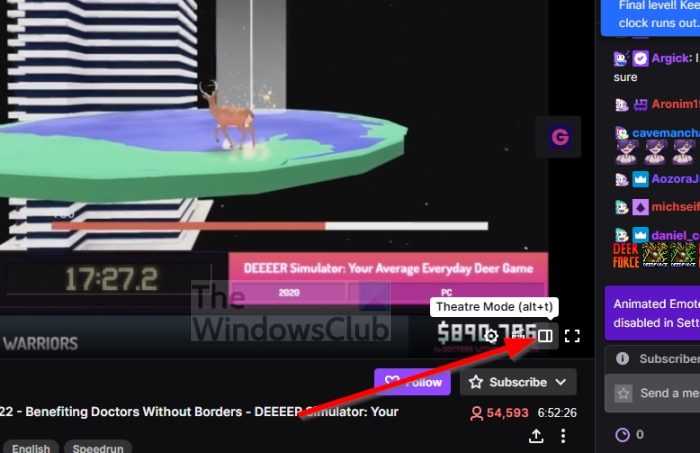
From our point of view, Theater Mode is one of the best features the Twitch team has released. If you aren’t aware, Theater Mode lets you watch and chat in full screen.
So how do you enable it? It’s easy, really. Let’s take a look.
- Visit the official Twitch webpage.
- Sign in with your credentials.
- Visit a currently running stream.
- Click on the Theater Mode button located at the bottom of the video player.
That’s it, you should now be looking at your favorite stream in full-screen with the chat section at the right.
3] Turn off the BTTV extension
One of the best Twitch-related extensions is called BTTV. The extension is available for all major web browsers and is designed to improve Twitch functionality with new features and emotes.
Here are some of the features BTTV brings to the table according to the creators:
- Extra emoticons – BetterTTV global and per-channel emotes
- Username/Word/Phrase highlighting
- Word/Phrase blacklist
- Split chat lines for easy reading
- See deleted links and messages
- Unban all banned chatters with /massunban (channel owner only)
- Anon Chat – join a channel without showing in the user list
- Hide visual noise like bits
Disable the BTTV extension and see if that helps.
Read: Twitch No Sound when streaming
What is the Twitch mini-player?
The mini-player on Twitch is an excellent feature that lets you browse other channels while still tuning into your favorite live stream or any other video you’re watching. This feature is nothing new since several video platforms and web browsers support mini-players.
Can you go fullscreen with chat on Twitch?
While the feature is not built into the application, you can use extensions such as Twitch Chat Overlay that allow you to view and chat while watching a stream in fullscreen. You can also use a second device to get access to chat, which can be a desktop, a laptop or even a smartphone.
