
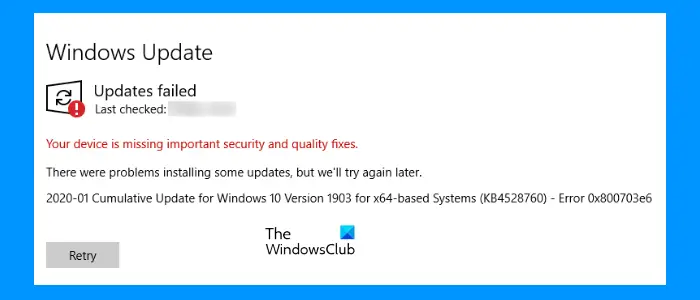
This post includes some solutions to fix the error 0x800703e6, install upgrade failed problem. It is a Windows Update problem that prevents users from installing the available Cumulative Update. Affected users see the following message on the Windows Update section when they try to install the available Cumulative Update on their systems:
There were problems installing some updates, but we’ll try again later.
Cumulative Update for Windows for x64-based Systems – Error 0x800703e6
Sometimes, antivirus programs prevent Windows from installing the updates. Most of the time, this is a false positive flag, hence, it can be avoided. We suggest you update your computer after temporarily disabling Microsoft Defender Antivirus or your third-party antivirus software and see if it helps. Do not forget to enable your antivirus again.
Fix Windows Update failed, Error 0x800703e6
The following fixes may help you get rid of this update error:
- Run Windows Update Troubleshooter
- Run SFC and DISM scans
- Reset Windows Update Components
- Delete WUServer and WStatusServer from Registry
- Perform Disk Cleanup
- Install Windows Update from Microsoft Update catalog
- Run an In-place Upgrade.
Let’s check these fixes in detail.
1] Run Windows Update Troubleshooter
Windows Update troubleshooter is an automated tool that helps the users fix various problems or errors related to Windows Update. This might work for this error too. So, run Windows Update Troubleshooter and see if it helps.
2] Run SFC and DISM scans
You may also experience Windows Update errors due to corrupt system files. Therefore, running an SFC scan (or System File Checker tool) can help you fix the issue. It repairs corrupt or missing system files and then you might be able to update your Windows operating system.
You should also try running DISM scan and see if it works. DISM (Deployment Image Servicing and Management) is a tool developed by Microsoft used to repair WIM files. WIM (Windows Imaging Format) file manages drivers, Windows Update Components, etc. Corruption in this file may affect Windows Update.
3] Reset Windows Update Components
One possible cause of receiving the Windows Update errors is corrupted update components. Therefore, resetting Windows Update Components to default may help you fix Windows Update issues.
4] Delete WUServer and WStatusServer from Registry
If despite trying the above fixes, you are still getting this Windows Update error 0x800703e6, then deleting the WUServer and WStatusServer entries from Windows Registry might help. The following instructions will help you with that:
- Type regedit in the Search box of Windows and press Enter. It will open the Registry Editor window
- In the Registry Editor, navigate to the following path:
HKEY_LOCAL_MACHINE\SOFTWARE\Policies\Microsoft\Windows\WindowsUpdate
Now, check if WUServer and WStatusServer entries are available in the right section. If so, delete them, and restart your computer.
5] Perform Disk Cleanup
Windows Update errors can also occur if your system is running low on disk space. Therefore, we recommend you free up some disk space and then try updating your system. You can run Disk Cleanup utility to delete unwanted or temporary files, previous Windows installation files, and more from your system to gain a lot of disk space.
6] Install Windows update from Microsoft Update Catalog
You can also download and install a Windows Update manually from Microsoft Update Catalog. Just search the update with the update name on that website and download the update file.
7] Run an In-place Upgrade
If none of the above solutions fix your issue, performing an in-place upgrade can help. An in-place upgrade helps to upgrade your system to the next feature update. A good internet connection is required to perform an in-place upgrade.
Though the in-place upgrade does not delete your data, it is better if you backup all your data before proceeding.
How do I install an update that failed to install?
If Windows Update fails for any reason, you can try several solutions, such as performing an SFC scan to repair corrupt system files, using the Windows Update troubleshooter to provide various fixes related to Windows Update, or downloading and installing updates manually.
Why do some updates fail to install?
There could be several reasons for a Windows Update failure, such as insufficient disk space, missing system image files, or corrupt Windows Update components. Additionally, Windows updates may also fail if your internet connection is unstable. Therefore, you need to identify the problem(s) causing the update failure on your computer and then resolve that issue.
Hope this is helpful.
