
The Opera Web Browser has a cool new feature called Tab Snoozing, and we like it very much. This is just one of the many new additions Opera Software has included in the past, and from our experience with them all, this one is the best.
What is Tab Snoozing?
Well, we should point out that Tab Snoozing is nothing new. Folks previously had the option to download extensions that provide the same functionality. However, all major web browsers have been adding this feature natively, and Opera is the latest to take the big step.
Tab Snoozing is a feature designed to suspend background tabs after a set period to preserve system resources. Not only will your computer use fewer resources, but it should run cooler as well because the CPU is not being overworked.
Now, whenever a tab is put to sleep, the browser must reload the page. If this is too much for you, Tab Snoozing is not something you want enabled. The same goes for anyone who is on a limited data connection.
Disable or enable Tab Snoozing in Opera
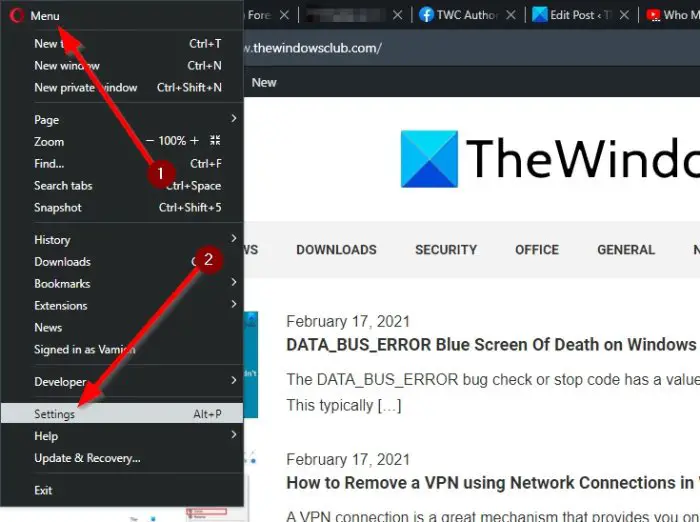
For those interested, we will discuss how to enable and disable Tab Snoozing in the Opera web browser. The procedure is simple:
- Launch Opera
- Navigate to the Settings area
- Locate User Interface section
- Toggle Snooze inactve tabs to save memory setting
- Restart Opera.
To go to the Settings section of Opera, you must click on the Opera menu button at the top-left corner of the web browser and then select Settings from the dropdown menu. Alternatively, you could click on ALT + P to get it done promptly.
The next step is to scroll down to User Interface after opening the Settings tab. In the current version of the web browser at the time of writing, that section is located below Advanced.
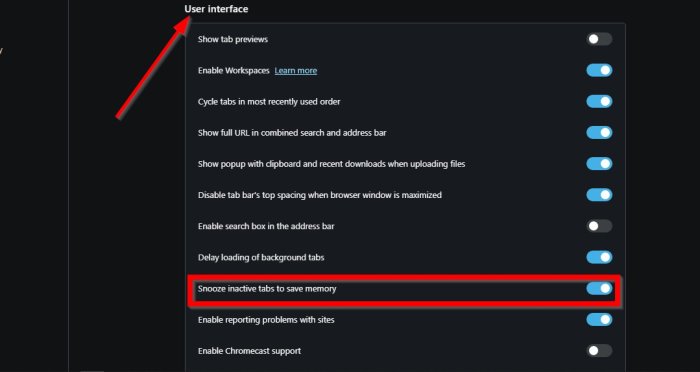
After visiting User Interface, please seek out “Snooze inactive tabs to save memory” above all else. By default, Tab Snoozing is enabled; toggle the button to turn it off, then toggle it back on.
Read: Opera Autoupdate folder keeps appearing; How to disable or stop it?
Can users set a time period?
No, this is not possible at all, which is disappointing. If setting a time period is crucial to you, then visit the Opera web browser extension webpage and download Tab Suspender (Tab Unloader).
Related reads:
