
When it comes down to linking a display to your gaming setup, you can use either HDMI or DisplayPort. The question is which one is better for gaming? Many gamers want to know this before investing in a hardcore gaming PC. Over the years, most people have talked about HDMI as the next best thing. However, as time went by, DisplayPort began to find its footing, and right now both are quite popular, but HDMI is still ahead in this regard, and this is primarily because it was first to market, therefore, it has a lot of consumer mindshare.
Which is better for gaming on PC – HDMI vs DisplayPort cable?
HDMI and DisplayPort are the two top media cables on the market today, but one is better than the other. The question is, which one, and does it even matter in the grand scheme of things?
What is HDMI all about?
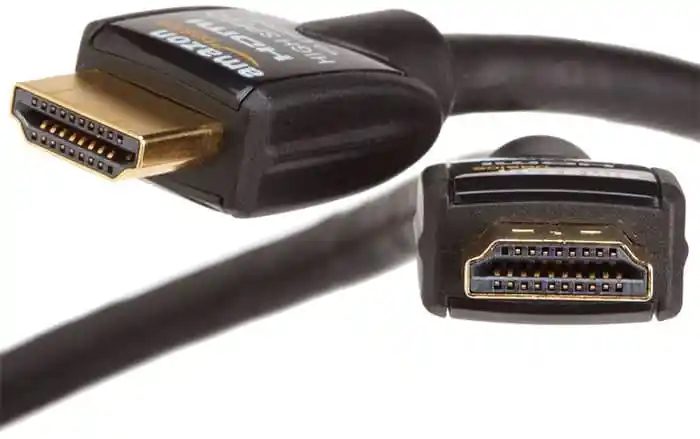
For those wondering, HDMI stands for High-Definition Multimedia Interface, and it is the most popular connector used for gaming, media consumption, and productivity. HDMI first came to market in 2003, and since then, it has undergone several changes.
If you look at the pins on an HDMI connector, you should count 19 pins. Fewer or more means the connector isn’t HDMI.
An HDMI connector can transmit Ethernet, video, and audio data. It does this at a bandwidth of between 10.2 Gbps and 48 Gbps. But it all depends on the version connector you’re using. You see, HDMI 1.4 maxes out at 10.2 Gbps, while HDMI 2.0 and 2.1 can only hit a maximum of 18 Gbps and 48 Gbps respectively.
To better explain what the different versions of HDMI are capable of at the time of writing, we’ve created a simple table:
| Version | Resolution | Refresh Rate | Bandwidth |
| HDMI 1.4 | 4K (4096 x 2160 pixels) | Up to 24 Hz | Up to10.2 Gbps |
| HDMI 2.0 | 4K (4096 x 2160 pixels) | Up to 60 Hz | Up to 18 Gbps |
| HDMI 2.1 | 4K (3840 x 2190 pixels), 10K (10240 × 4320 pixels) | Up to 144 Hz | Up to 48 Gbps |
Something of note that needs to be mentioned is the fact that HDMI consists of four different cables, and they are used for differing purposes. Let us take a look at the four cables and what they’re capable of:
- The Standard HDMI cable: This cable is the most basic and it is used for gaming at 1080i.
- The Standard HDMI plus Ethernet: OK, so this one comes packed with Ethernet support and can deliver a maximum resolution at 1080i.
- The High-Speed HDMI cable: This particular cable is capable of supporting the popular 1080p resolution, but also it can go up to 4K if needed.
- The High-Speed HDMI Cable plus Ethernet cable: If you want to game at high resolution with Ethernet support, then this is the cable you should invest in.
Here’s the thing, most gamers will tell you that high-speed capable HDMI cables are great for gaming, and that’s no lie. These products can go up to 10K, but right now, we don’t know of any games that support that resolution, so don’t try it.
Additionally, these cables support AMD’s FreeSync technology, but they don’t support G-Sync. We’re not sure whether HDMI will support G-Sync in the near future, but for now, some gamers will have to do without.
What is DisplayPort all about?
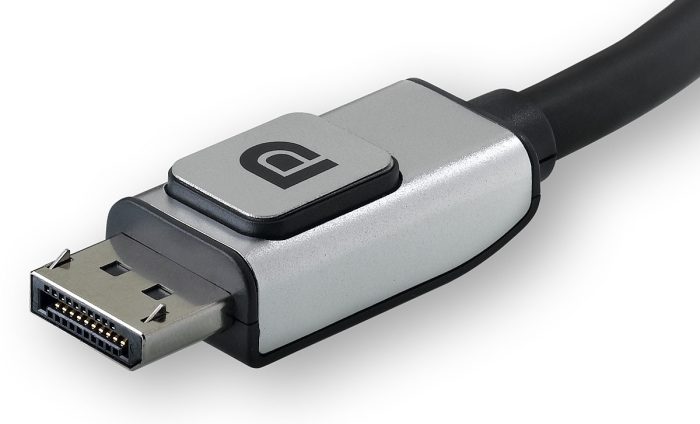
DisplayPort is similar to HDMI, but it was only available for PCs at the time of writing. The connectors have a maximum of 20 pins with a locking mechanism not found on HDMI plugs. Furthermore, a DisplayPort cable can transmit both video and audio at the same time.
There are two types of DisplayPort at the moment. They are Standard DisplayPort and Mini DisplayPort. For gaming, the Standard DisplayPort is mostly used and it works quite well. In fact, DisplayPort is very popular among gamers with high-end machines because it offers superior specifications over HDMI.
Depending on the version, DisplayPort can support a bandwidth of up to 77.37 Gbps. The lowest number is 17.28 Gbps. So as it stands, we can see why many have chosen to go with this type of cable.
We should also point out that DisplayPort supports both FreeSync and G-Sync, another one-up on HDMI.
Comparison Table
| Feature | DisplayPort (1.4 / 2.1) | HDMI (2.0 / 2.1) |
|---|---|---|
| Bandwidth | DP 1.4: ~25.9 Gbps; DP 2.1: up to 77–80 Gbps | HDMI 2.0: ~14.4 Gbps; HDMI 2.1: up to 48 Gbps |
| Refresh Rate Support | 1440p up to 240Hz (DP 1.4); 4K up to 240Hz+ (DP 2.1) | 1080p up to 240Hz (HDMI 2.0); 4K up to 144Hz (HDMI 2.1) |
| Adaptive Sync | Native support for NVIDIA G-Sync and AMD FreeSync | HDMI 2.1 supports VRR, but HDMI 2.0 often fails with G-Sync |
| Multi-Monitor | Supports daisy chaining via MST (Multi-Stream Transport) | No daisy chaining; one cable per monitor |
| Console Compatibility | Rarely supported; PCs only | Required for PS5/Xbox Series X (HDMI 2.1 only) |
| Latency | No measurable difference vs HDMI; both <1ms | Same, negligible latency difference |
Which cable, HDMI or DisplayPort, is better?
To be honest, both are great at what they do. DisplayPort has better raw specs, but most gamers will be very happy with HDMI alone, even if they own high-end gaming computers.
If you have two or more monitors, however, then HDMI won’t cut it. You will need to invest in DisplayPort at t the end of the day.
Read: NVIDIA graphics card not detecting HDMI
Is DisplayPort better than HDMI?
Right now, DisplayPort is better than HDMI because it supports higher bandwidth and multiple monitors. However, it’s not the performance that matters, but also how the availability of the display port. DisplayPort has a few features that make it slightly better suited for specific applications. These include higher maximum resolution and refresh rates, Adaptive Sync (which improves the gaming experience), Multi-Stream Transport (MST), and Display Stream Compression.
Why is HDMI more popular than DisplayPort?
HDMI is more popular than DisplayPort for a few reasons, such as wide support, cost-effectiveness, and it being good enough for most people, especially for home entertainment. DisplayPort isn’t necessary unless you want to play games all the time (higher resolutions and refresh rates).
