
Windows 11/10 built-in security feature – Control Flow Guard (CFG) is designed to combat memory corruption vulnerabilities. Control Flow Guard helps prevent memory corruption, which is very helpful to prevent ransomware attacks. The capabilities of the server are restricted to whatever is needed at that point of time to reduce the attack surface. Exploit Protection is a part of the Exploit Guard feature in Windows Defender. CFG is a part of this feature.
Control Flow Guard in Windows 11
Let’s delve a bit deeper into the Control Flow Guard feature in Windows 11/10 and answer a few questions.
What is Control Flow Guard in Windows 11 and how does it work?
Control Flow Guard is a feature that makes it harder for exploits to execute arbitrary code through vulnerabilities such as buffer overflows. As we know, software vulnerabilities are often exploited by providing unlikely, unusual, or extreme data to a running program. For example, an attacker can exploit a buffer overflow vulnerability by providing more input to a program than expected, thereby overrunning the area reserved by the program to hold a response. This scheme may corrupt adjacent memory that holds a function pointer. When the program calls through this function, it may then jump to an unintended location specified by the attacker.
To avoid such instances, a potent combination of compile and run-time support from Control Flow Guard implements a control flow integrity that tightly restricts spots where indirect call instructions can be executed. It also identifies the set of functions in the application that could be the potential targets for indirect calls. As such, Control Flow Guard inserts extra security checks that could detect attempts to hijack the original code.
When a CFG check fails at runtime, Windows immediately terminates the program, thus breaking any exploit that attempts to indirectly call an invalid address.
How does Control Flow Guard affect browser performance?
The feature is reportedly causing performance issues for Chromium-based browsers. All major browsers, including Google Chrome, Microsoft Edge, Vivaldi, and numerous others, appear to have been affected by it. The issue came to light when developers at Vivaldi ran Chromium unit tests on Windows 7 and found them running faster than on the most recent version of Windows 11/10.
The Windows Kernel Team manager acknowledged the issue and stated that they have built a fix, which will be shipped in a couple of weeks.
How to disable Control Flow Guard in Windows 11?
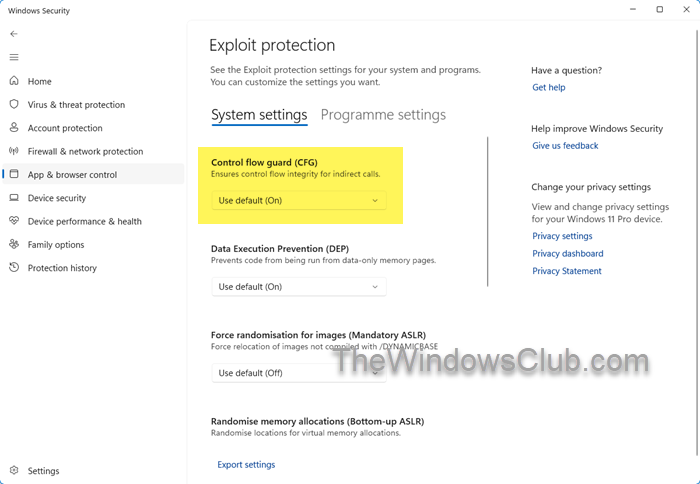
If you wish to disable this feature, follow this procedure.
- Open Windows Security,
- Click App and browser control
- On the right side, click open Exploit protection settings
- Under System settings, turn OFF Control Flow Guard (CFG):
- Restart your computer.
I hope this helps.
Also read: Difference between Microsoft Defender, Windows Defender, Windows Security, Defender Firewall.
