
This post will talk about what you can do if you can’t log in to Twitch. Along with YouTube, Twitch is one of the most popular streaming platforms that you can try. The best part is that you don’t even need to go through sign-in or account creation to enjoy Twitch on your system. However, to enjoy all the features of Twitch, you need an account. The only thing that can stop you from creating an account on Twitch is Twitch itself. Many users have reported that they cannot log in to their Twitch accounts. If you are experiencing the same problem, continue with this troubleshooting guide to resolve it.

Can’t log in to Twitch
If you are unable to log in to your Twitch account, try the solutions below to resolve the issue.
- Restart Twitch and PC
- Enter correct credentials
- Refresh the Twitch login page
- Use the Incognito mode
- Try a different browser
- Check for server issues
- Check your Internet speed
- Reset Twitch credentials
- Contact Twitch support
Now, let’s take a look at all these methods in detail.
1] Restart Twitch and PC
The very first thing you should try is restarting Twitch. There can be a temporary bug stopping you from accessing your account. In that case, the best thing you can try is to restart Twitch and see if it makes any difference. However, if the problem continues, you can restart your system, open Twitch and try to log in with your account. If this solves the problem, you are good to go. But if the issue persists, continue with the workarounds below.
2] Enter correct credentials
If Twitch is not allowing you to access your account, it is likely that you are entering an incorrect login ID or password. Yes, it’s quite hard to remember the credentials of all the different social platforms. So, if you know you are entering the wrong credentials, i.e., you have forgotten your login ID and password, you can try out the Forget password feature.
3] Refresh the Twitch login page
If you have recently created your Twitch account and are facing a problem while logging in for the first time, the first step should be to refresh the login page. As reported by many users, refreshing the login page after entering credentials for the first time has resolved the login issue. Go through the process and check if it makes any difference. If not, continue with the guide.
4] Use the Incognito mode
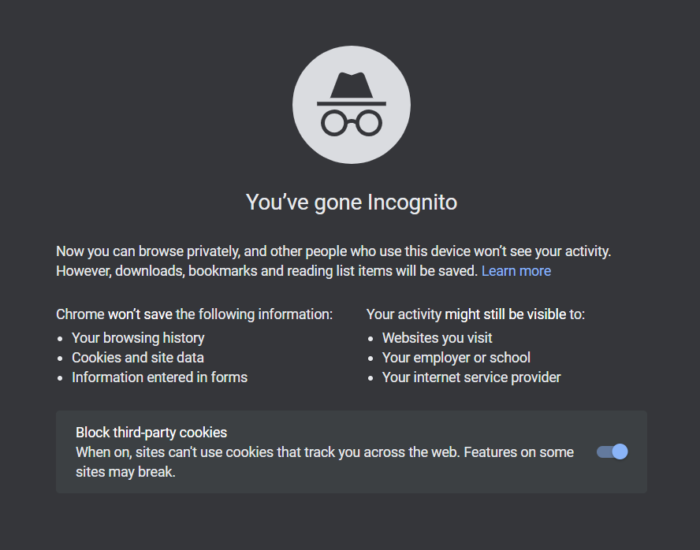
Trying out the incognito mode for logging into Twitch is another effective solution to get rid of the mentioned issue. However, this method is only helpful if you use a browser to access Twitch. The incognito mode of a browser doesn’t store any of your previous data, eliminating any bugs that might be stopping you from logging into your account. So, here’s how to access the incognito mode on Google Chrome.
- Launch Google Chrome on your Windows PC.
- Click on the three dots present at the top right corner.
- From the context menu, choose New Incognito Window. Alternatively, you can press Ctrl + Shift + N hotkeys to access Incognito mode with one click.
- Now visit the Twitch login page and log in with your credentials.
Check whether the problem is fixed.
Read Next: Twitch Freezing, Buffering, and Lag Issues
5] Try a different browser
Another thing you can try, if you are using a browser to access Twitch, is to use a new browser. As it turns out, many users have reported that certain browsers are not compatible with Twitch, which automatically results in various issues when accessing Twitch, including login issues. So, as a solution, use a compatible browser to access Twitch. We recommend trying either Google Chrome or Microsoft Edge.
6] Check for server issues
Like any other social platform, Twitch servers can go down during maintenance or for technical reasons. In either case, you will face different difficulties when accessing the platform, including login issues. You can visit any server status-checking website to check for any ongoing server issues with Twitch. If applicable, you can’t do anything other than wait until the developer fixes the problem.
7] Check your Internet speed
A week or a slow internet connection can also be a major reason you cannot log in with your Twitch account. Twitch requires a stable internet connection to use its platform. You can visit the internet speed checking website and check the current internet speed. If you are getting a comparatively lower speed than the plan you have opted for, contact your ISP and ask them to fix the issue.
8] Reset Twitch credentials
If none of the above-mentioned workarounds helped you solve the issue, the only thing you can try from your side is to reset your account credentials. Reset your ID password and log in with your new credentials. Check if the problem continues.
9] Contact Twitch Support
In the worst case, if resetting the ID password doesn’t resolve the problem, you would have to contact the Twitch support team. Enter your problem in the relevant box and ask them to fix it.
Why can’t I log into Twitch account?
It happens very rarely, but if you are unable to log in to your Twitch account, there can be multiple reasons. From ongoing server issues, incorrect login ID or password, an incompatible browser, an unstable internet connection, to temporary glitches, anything can be the reason behind the issue. Thankfully, it’s very easy to get rid of the problem.
Is Twitch safe?
Yes, without any second thought, Twitch is completely safe to use. However, like any other live streaming platform, it also contains some NSFW content. So, make sure you have enabled the age restriction feature before handing the platform to a kid. Other than this, Twitch is a completely safe platform where you can stream video games along with your friends.
Read Next: Fix Twitch Error 1000 when playing a video.
