
Xbox Game Pass offers over 400 games to play, and it’s a great deal. However, if you wish to cancel Xbox Game Pass on Xbox One for any reason, here’s how to go about it.
Cancel Xbox Game Pass on Xbox One
The Xbox Game Pass subscription service offers Xbox users a large library of games to play without the associated ownership costs. It is provided alongside your Xbox Live Gold membership, which allows you to play games online with your friends and other players. You can consider it essentially a Netflix-like service.
Before canceling your Xbox Game Pass subscription, please note a few things. For example, Microsoft has removed the console option to cancel an Xbox Game Pass subscription. So, you’ll need to do it online.
Secondly, you can cancel your Xbox subscription either immediately or by stopping automatic renewal. If you cancel immediately, you’ll lose access to the subscription service altogether. If you stop automatic renewal of your subscription, you can continue to use the service until it expires.
- To cancel your Xbox Game Pass subscription, go to Services & Subscriptions page. You might be asked to sign in.
- Find the Xbox Game Pass subscription listed under ‘Services & subscriptions’.
- If visible, select the ‘Manage’ option and click on the ‘Cancel’ link seen on the right-hand side.
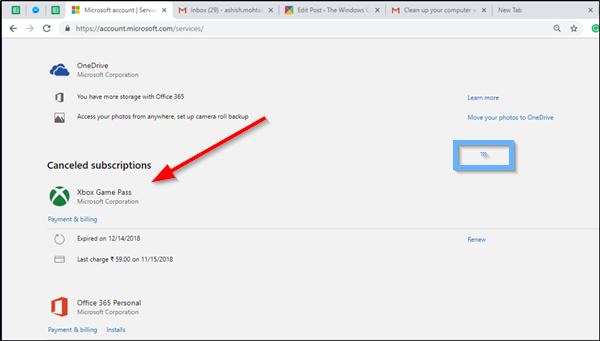
- When prompted, confirm the cancellation and proceed further. Note that if you have a prepaid subscription, you won’t see the Cancel or Remove option next to your Xbox subscription because prepaid subscriptions automatically expire and you aren’t billed. See the screenshot below.
If you’re having problems canceling your Xbox Game Pass subscription, review the following information before contacting support.
For instance, if you don’t see any option to cancel your Xbox Game Pass subscription when you sign in it indicates the following:
- You’ve already turned off auto-renewal, so you won’t incur any additional charges. When you sign in to your Microsoft account, you will see an option to Renew but not to Cancel.
- If you do not see the Xbox Game Pass subscription listed at all when you sign in but still charged for the same, make sure that you’re signed in to the correct Microsoft account. Also, if you are paying for someone else’s subscription, you can’t cancel it.
In that case, the Microsoft account owner must follow the steps outlined in the post.
Hope this helps!
Read: How to turn off Xbox Narrator.

What happens if I cancel my Gamepass subscription?
If you cancel your Game Pass subscription, you will not be able to access the games included in your subscription. Canceling your Game Pass subscription does not affect your saved game data. All your saved game data will remain on your device and in the cloud until you delete it manually.
How do I stop Microsoft from charging my card?
There are two ways to stop Microsoft from charging your card. One way is to cancel your subscription. But if you follow this method, you will not be able to use the rest of your membership. The second option is to disable recurring billing. After turning off the recurring billing, your membership will not be canceled immediately. You will be able to use the products until your subscription expires.
Read next: How to change Xbox Controller to Player 1 on Windows PC.
