
Here is a list of the best free nutrition analysis software for Windows 11/10 PC. These free software tools help you find and analyze the nutritional values of a particular food item. These show you nutrient values like proteins, minerals, fats, carbs, amino acids, fatty acids, vitamins, etc. You can plan your meals according to your target nutrition values. Additionally, these can also be used as a diet planner as this software contains a database of foods and recipes. So, you can plan, manage, and monitor your diet with the help of these free nutrition analysis software.
So, if you are looking for free software that helps you determine nutrition values in your food servings, this article is your stop. You can check out this software and its features, then choose the one you like most.
What is Nutrition Analysis software?
Nutrient analysis software enables you to view, track, and analyze nutrient values for proteins, minerals, fats, carbs, vitamins, sugar, amino acids, fatty acids, etc. It allows you to monitor the nutrient composition of your meals and recipes and analyze the nutrition reports of your dietary habits. If you have a target value for nutrient intake, nutrient analysis software like CRON-o-Meter can help. You can find some nice ones in this post below.
Best free Nutrition Analysis software for Windows 11
Here is a list of the best free Nutrition Analysis software for Windows 11/10:
- CRON-o-Meter
- eFit Calorie Counter
- EasyMenu Balanced Meal Planner
- NutritionInfo
Let us now discuss the software above in detail.
1] CRON-o-Meter
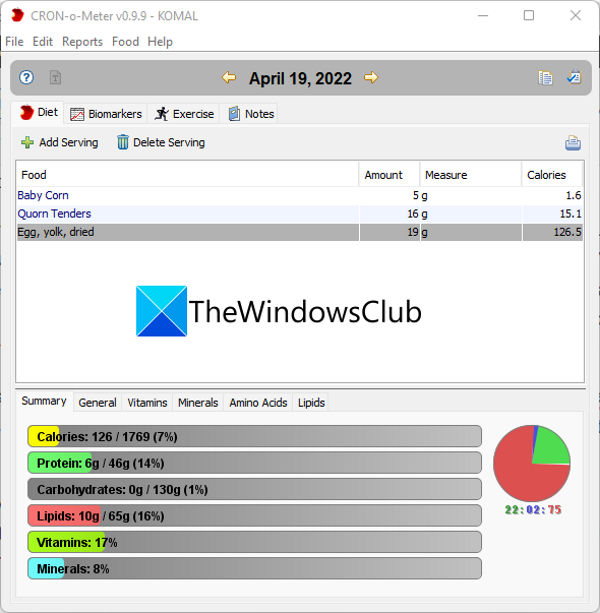
CRON-o-Meter is a free and open source nutrition analysis software for Windows 11. This software is primarily used to monitor and track your daily calorie intake. And also, check out the progress you’ve made by following a specific diet plan. It can be used by different users. All users can enter their specific body profiles to track and analyze their respective nutrition values. They can have their own diet and meal plans that they can monitor.
To start, enter your body details, including your birthdate, gender, height, weight, and activity level. You then are required to set your nutritional targets, i.e., the number and quantity of nutrients you need in your meals, such as protein, carbs, water, caffeine, fats, energy, alcohol, sugars, starch, vitamins, minerals, amino acids, and more. You can enable these nutrients, then enter the respective minimum and maximum values, along with the number of units, as per your requirements. It also provides a Set to Dietary Reference Intakes feature. This feature basically set all the target nutrients’ values configured particularly for your body profile.
Once you have entered the nutritional targets, you can perform the nutritional analysis to get to your target. You can select the current date, and from the Diet section and tap on the Add serving button. You can then add the food items you intake and also specify the amount of food in gram/oz you intake. It contains a database of popular food items with their respective nutrition values. You can search for a specific food item and then add it to your meal plan.
After you have added your food servings, you can look at the bottom of the Diet section, where there is a nutrition analysis report. It contains the report in the form of both a chart and statistics. The nutrition report shows the nutritional values of proteins, minerals, amino acids, lipids, and vitamins in your food servings. On the basis of the report, you can easily analyze various nutrients present in your food items and then compare them with your target nutrient values.
Besides that, it also contains features like Biomarkers and Exercises. In its Biomarkers tab, you can add your weight, body temperature, systolic BP, diastolic BP, resting heart rate, and blood glucose values on different dates. You can then click the Chart button to analyze changes in these values over time. Similarly, in its Exercises tab, you can add your daily exercises with their respective times and burned calories, then analyze your progress. A dedicated Notes tab is also present to add your notes, which you can refer to in the future.
You can save the nutrition analysis report in HTML or text format. To do that, go to the Reports menu and tap on the Nutrition Report option. It lets you select the time period to save the report. It lets you print different reports on paper or save them as a PDF file.
All in all, it is one of the best nutrition analysis software programs that you get for free.
Read: How to use Food Data Type in Microsoft Excel?
2] eFit Calorie Counter
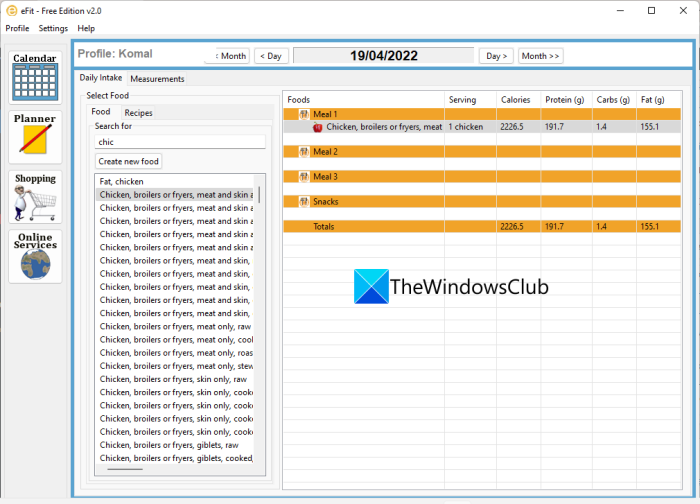
eFit Calorie Counter is another free nutrition analysis software for Windows 11. It can be used for analyzing nutrition values in your food, as well as it can be used as a Meal planner, Calorie Counter, Shopping Manager, and Diet Manager. You can start by adding your body details like height, weight, waist, and more, and then start performing a nutrition analysis.
Using its calorie-tracking feature, you can get nutritional information for different foods and recipes. This feature can be accessed in its Planner section. In the Planner section, you get a database of over ten thousand food items and recipes. From here, you can add your food items and the number of servings based on what it shows you for nutritional details. It shows values of protein, fat, minerals, iron, magnesium, etc.
It also lets you create and add new food items and food recipes by manually entering all the nutritional values. You can also plan meals for different times and then track the nutritional values.
This software can be utilized by multiple users. They just have to create their specific profile by entering personal details and body measurements (height, weight, etc.). You can then set your goals like losing weight, gaining weight, and more, and monitor your progress.
Besides planning meals and tracking nutrition values, it also lets you generate your shopping list. A feature to generate a shopping list from websites like Amazon Grocery and others is also available.
If you liked it, you can download it from sourceforge.net.
See: Best free Fitness apps for Windows.
3] EasyMenu Balanced Meal Planner
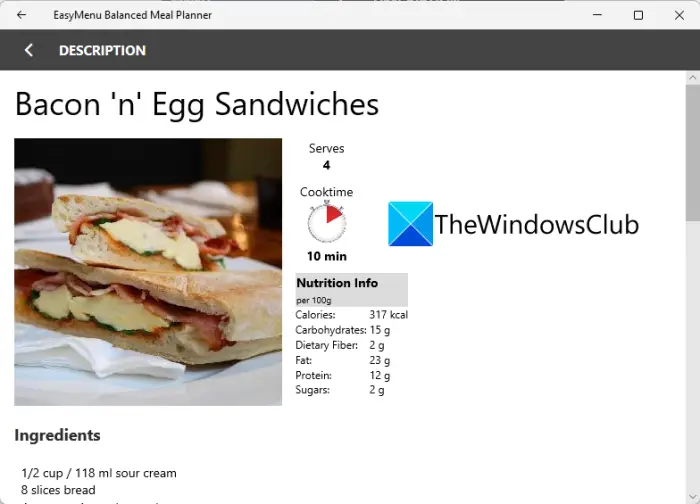
Another free nutrition analysis app for Windows 11/10 is EasyMenu Balanced Meal Planner. It is a simple app that shows you nutritional information on food items and recipes based on the number of servings.
It lets you plan three meals a week and then track the nutritional intake values. It contains a database of multiple recipes that you can add to your meal plan. About 100 recipes are in its database. All the recipes show you their respective nutritional information, like protein, fat, cholesterol, sodium, vitamins, etc., which is available. Apart from nutritional details, it also shows information such as cooking time, cooking methods, and ingredients.
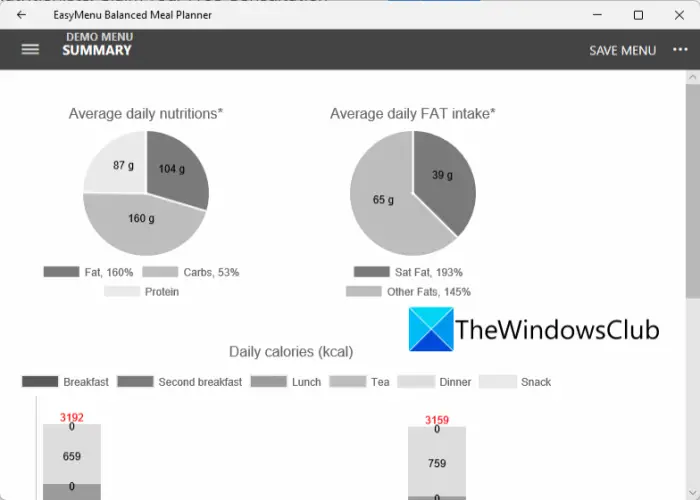
You can add foods to breakfast, lunch, and dinner. Then go to the Summary section to analyze the nutrition report for the whole week. It shows graphs and statistics on the nutrients you consume, including Average daily nutrition, Daily calories, and Average daily FAT intake. Apart from that, you can also create and manage your shopping lists through this app.
It is a basic app for analyzing nutritional values in your food. You can download and install it from microsoft.com.
Related: 10 Best Foods to Stay Active and Energetic in Office.
4] NutritionInfo
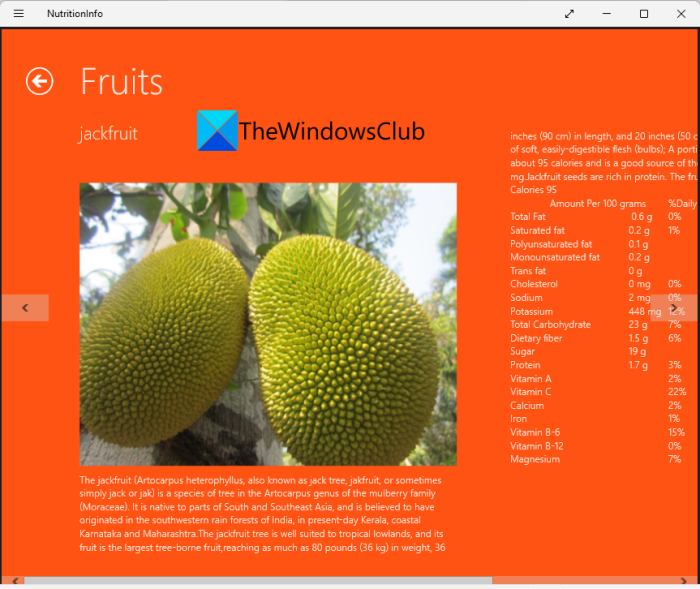
NutritionInfo is a free nutrition analysis app for Windows 11/10. As its name suggests, this simple app provides information on the nutritional values of various fruits, vegetables and more. There are mainly four sections: vegetables, leafy vegetables, fruits, and flesh foods. You can explore different items in these categories and get information on the nutrition they contain.
For each food item, it shows nutrient values such as protein, water, ash, starch, sugar, fat, and more. You can easily analyze the nutritional values and plan your meal accordingly. It also shows the information on the background of fruits, vegetables, etc. Besides that, it shares the fun facts and dimensions of a food item. So, basically, you can know about a particular food or vegetable and its nutritional values using this app.
It is a pretty basic nutrition analysis app. You can get it here.
Read: Best Food, Nutrition and Diet apps for Windows PC
What is a Diet analysis?
Dietary analysis (or diet analysis) is a method for assessing an individual’s diet based on the food and drink consumed over a specified period. The method helps to measure nutrient intake, energy consumption, and nutrient diversity. By analyzing your routine diet, you can determine whether you are getting adequate vital nutrients (like Vitamin D, Iron, Protein, etc.).
How to do Nutrient analysis?
To conduct a nutrient analysis, laboratory analysis is a certified method. In this method, companies send the food sample to the laboratory for physical analysis. There, scientific equipment and methods are used to analyze the food sample for different components. On the other hand, if you want to perform nutrient analysis (or nutritional content analysis) on your computer, you can use nutrient analysis software.
Now read: How to create a Restaurant Menu in Word?
