
Over the years, the Windows OS has evolved significantly. Considering the variety of features, free apps, and improvements, Windows has just re-imagined computing. But, there are still some features missing, which some folks may want to see. One of them is a way to block programs from running. Today we are going to talk about AskAdmin a free tool that lets you block programs in Windows 11/10.
Let’s assume that you are going to hand over your computer for a few hours to your kids or someone close, like your friend or relative. At such times, you might not want anyone running your apps or programs for privacy or security reasons. Thus, it is far better to block programs from running beforehand on a computer for someone.
Sure, you can create a guest account but this will take some time. Rather than creating a guest account, it is convenient to block particular apps on your computer. To do this, you can opt for third-party software called AskAdmin, which can help you block programs in moments. It is almost the same as our very own freeware called Program Blocker, which comes with password protection as well.
Block Programs with AskAdmin
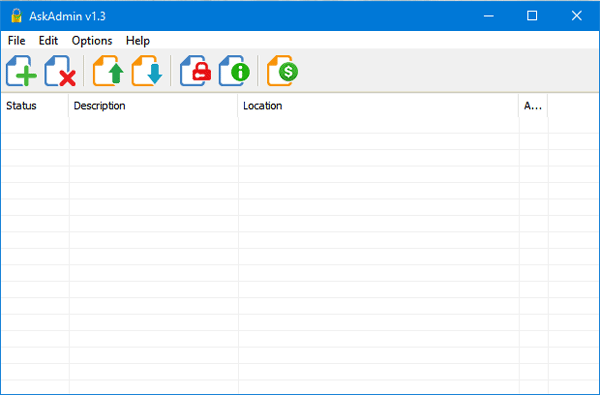
It is really easy to get started with AskAdmin. To block programs in Windows with AskAdmin, do follow these steps. At first, download and open this tool.
To block any app install, just click the green plus sign. After that, select the .exe file to block the program. You will get the .exe file of any program in your Program Files folder or Program Files (x86) folder in your system drive (C Drive).
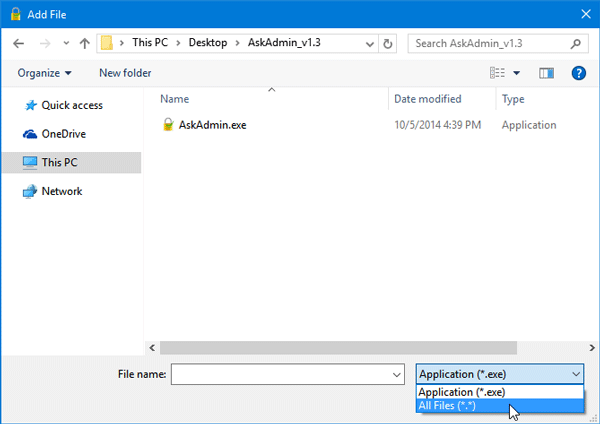
Now, the most interesting thing is that you can block other files, such as text files, Word files, etc., using AskAdmin. To do that, select All Files when choosing an app or file after clicking the green plus button.
If you like it, you can download AskAdmin, a portable freeware from here. It supports all the currently running operating systems, including Windows 11 and Windows 10.
How do I block or allow certain applications for Windows 11?
It is very easy to allow or block certain applications for Windows 11 and Windows 10 computers. For example, you can use AskAdmin, which is freeware and compatible with Windows 11, Windows 10, and some other older versions. On the other hand, you can also use the Windows Program Blocker, which is portable freeware.
What is AskAdmin?
AskAdmin is a freeware that helps you block programs from running on your computer. Whether you want to block a program for kids temporarily or permanently, you can use the AskAdmin app to get the job done. To block any installed program, you must choose the EXE file. It can also help you disable Microsoft Store.
