
Windows 11/10 has an inbuilt Memory Diagnostic Tool. Most of the time, Memory Diagnostic won’t detect bad RAM. If you want to check RAM stability, we suggest using the open-source memory test software Memtest86+.
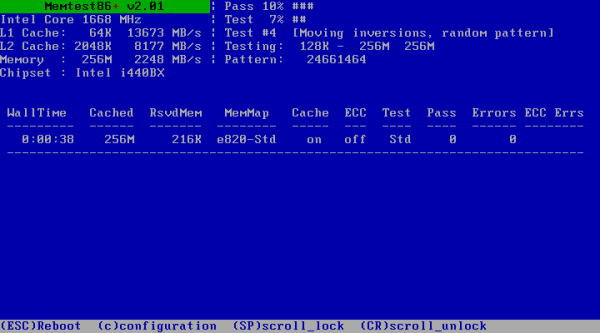
Memtest86+ Advanced Memory Diagnostic Tool
Memtest86+ is a stand-alone memory tester for x86 and x86-64 architecture computers. It provides a more thorough memory check than BIOS memory tests. The tool can be loaded and run either by a PC BIOS (legacy or UEFI) or by an intermediate bootloader that supports Linux 16-bit, 32-bit, or 64-bit, or the EFI handover boot protocol.
It is designed to test and stress-test an x86-architecture computer’s random access memory (RAM) for errors. This tool is helpful when you can’t boot the OS and think it might be a bad RAM.
How to test RAM with Memtest86+
- You can run the Diagnostic in three different methods – Using the Floppy drive, CD ROM, and USB.
- You could download the ISO image or any other format from their website and burn it to disk.
- Then boot the Computer using that disk to start the Diagnostic.
- It’s recommended to run the tool overnight i.e. the Memory test should run at least 7 to 8 passes to get the actual results.
- Even if you get a single error means we have defective RAM.
Remember, MemTest86+ doesn’t run on Windows; it’s a tiny Linux-based system with a GUI.
Memtest86+ download
You can download Memtest86+ from its Home Page.
TIP: You can also test RAM using free tools like MemTest, MemTest64, MemTest86, etc.
You might want to check out some more PC Stress Test free software for Windows too.
Can RAM suddenly go bad?
Any hardware can fail over time or due to a manufacturing defect. The same applies to RAM. If everything looks good, the memory test can reveal if there is an issue with the RAM. If there is a fault, replacing the RAM with a new one would be best.
Is Windows Memory Diagnostic tool any good?
It’s an excellent program and a free tool for checking if there is anything wrong with your RAM. If the tool shows any signs of an issue, you can check further with another program. Along with the standard checking tool, it offers checks such as ERAND, Stride6, and CHCKR8 to detect problems in the installed RAM.
