<?xml version="1.0" encoding="UTF-8"?>
<rss version="2.0"
	xmlns:content="http://purl.org/rss/1.0/modules/content/"
	xmlns:wfw="http://wellformedweb.org/CommentAPI/"
	xmlns:dc="http://purl.org/dc/elements/1.1/"
	xmlns:atom="http://www.w3.org/2005/Atom"
	xmlns:sy="http://purl.org/rss/1.0/modules/syndication/"
	xmlns:slash="http://purl.org/rss/1.0/modules/slash/"
	>

<channel>
	<title>The Windows Club &#187; Aero</title>
	<atom:link href="http://www.thewindowsclub.com/tag/aero/feed" rel="self" type="application/rss+xml" />
	<link>http://www.thewindowsclub.com</link>
	<description>The Windows Club is  created by Anand Khanse, a Microsoft MVP and is primarily targeted at the Windows 7, 8 &#38; Vista user and will address and cover issues in relation to Microsoft and Windows OS.</description>
	<lastBuildDate>Wed, 08 Feb 2012 18:37:32 +0000</lastBuildDate>
	<language>en</language>
	<sy:updatePeriod>hourly</sy:updatePeriod>
	<sy:updateFrequency>1</sy:updateFrequency>
	<generator>http://wordpress.org/?v=3.3.1</generator>
<xhtml:meta xmlns:xhtml="http://www.w3.org/1999/xhtml" name="robots" content="noindex" />
		<item>
		<title>Tweak and Customize Windows 7 explorer border colors with DWMColorMod</title>
		<link>http://www.thewindowsclub.com/tweak-customize-windows-7-explorer-border-colors-dwmcolormod?utm_source=rss&#038;utm_medium=rss&#038;utm_campaign=tweak-customize-windows-7-explorer-border-colors-dwmcolormod</link>
		<comments>http://www.thewindowsclub.com/tweak-customize-windows-7-explorer-border-colors-dwmcolormod#comments</comments>
		<pubDate>Tue, 04 Oct 2011 18:35:19 +0000</pubDate>
		<dc:creator>AnandK@TWC</dc:creator>
				<category><![CDATA[Downloads]]></category>
		<category><![CDATA[Aero]]></category>
		<category><![CDATA[Customize]]></category>

		<guid isPermaLink="false">http://www.thewindowsclub.com/?p=35443</guid>
		<description><![CDATA[<div style=" float: left; padding: 4px; margin: 0 10px 5px 0; width: 75px; height: 75px;"><img style=" float: left; padding: 4px; margin: 0 10px 5px 0;" width="75" height="75" src="http://www.thewindowsclub.com/wp-content/themes/Twc/scripts/thumb.php?src=http://www.thewindowsclub.com/wp-content/uploads/2011/10/aero-mod.jpg&amp;w=75&amp;h=75&amp;zc=1"/></div>Not satisfied with the default settings of your Windows 7 Aero or explorer border colors? Then you might want to check out DWMColorMod that allows you to change literally everything regarding Windows Aero. DWMColorMod is a free portable tool that <span><a class="more-link" href="http://www.thewindowsclub.com/tweak-customize-windows-7-explorer-border-colors-dwmcolormod">...more &#62;&#62;&#62;</a></span>]]></description>
		<wfw:commentRss>http://www.thewindowsclub.com/tweak-customize-windows-7-explorer-border-colors-dwmcolormod/feed</wfw:commentRss>
		<slash:comments>1</slash:comments>
		</item>
		<item>
		<title>AeroTile places system folder glassy tiles on your Windows Desktop</title>
		<link>http://www.thewindowsclub.com/aerotile-places-system-folder-glassy-tiles-on-your-windows-desktop?utm_source=rss&#038;utm_medium=rss&#038;utm_campaign=aerotile-places-system-folder-glassy-tiles-on-your-windows-desktop</link>
		<comments>http://www.thewindowsclub.com/aerotile-places-system-folder-glassy-tiles-on-your-windows-desktop#comments</comments>
		<pubDate>Mon, 20 Jun 2011 18:39:47 +0000</pubDate>
		<dc:creator>AnandK@TWC</dc:creator>
				<category><![CDATA[Downloads]]></category>
		<category><![CDATA[Aero]]></category>
		<category><![CDATA[Desktop]]></category>
		<category><![CDATA[TWC App]]></category>

		<guid isPermaLink="false">http://www.thewindowsclub.com/?p=29238</guid>
		<description><![CDATA[<div style=" float: left; padding: 4px; margin: 0 10px 5px 0; width: 75px; height: 75px;"><img style=" float: left; padding: 4px; margin: 0 10px 5px 0;" width="75" height="75" src="http://www.thewindowsclub.com/wp-content/themes/Twc/scripts/thumb.php?src=http://www.thewindowsclub.com/wp-content/uploads/2011/06/aero-tile-600x379.jpg&amp;w=75&amp;h=75&amp;zc=1"/></div>There is no end to customizing Windows and this is exactly what enthused our 13 year old TWC Forum member in creating this small app AeroTile. It is therefore with great pleasure that we are releasing it today. AeroTile is <span><a class="more-link" href="http://www.thewindowsclub.com/aerotile-places-system-folder-glassy-tiles-on-your-windows-desktop">...more &#62;&#62;&#62;</a></span>]]></description>
		<wfw:commentRss>http://www.thewindowsclub.com/aerotile-places-system-folder-glassy-tiles-on-your-windows-desktop/feed</wfw:commentRss>
		<slash:comments>0</slash:comments>
		</item>
		<item>
		<title>Does disabling Aero really improve performance in Windows 7?</title>
		<link>http://www.thewindowsclub.com/does-disabling-aero-really-improve-performance-in-windows-7?utm_source=rss&#038;utm_medium=rss&#038;utm_campaign=does-disabling-aero-really-improve-performance-in-windows-7</link>
		<comments>http://www.thewindowsclub.com/does-disabling-aero-really-improve-performance-in-windows-7#comments</comments>
		<pubDate>Mon, 07 Feb 2011 23:49:59 +0000</pubDate>
		<dc:creator>AnandK@TWC</dc:creator>
				<category><![CDATA[Windows]]></category>
		<category><![CDATA[Aero]]></category>
		<category><![CDATA[Performance]]></category>

		<guid isPermaLink="false">http://www.thewindowsclub.com/?p=23152</guid>
		<description><![CDATA[Windows Aero, acronym for Authentic, Energetic, Reflective, Open, is the graphical user interface, the module of Windows that processes the GUI and the default theme in most editions of Windows Vista and Windows 7, operating systems released by Microsoft. On <span><a class="more-link" href="http://www.thewindowsclub.com/does-disabling-aero-really-improve-performance-in-windows-7">...more &#62;&#62;&#62;</a></span>]]></description>
		<wfw:commentRss>http://www.thewindowsclub.com/does-disabling-aero-really-improve-performance-in-windows-7/feed</wfw:commentRss>
		<slash:comments>8</slash:comments>
		</item>
		<item>
		<title>Tweak and tune Windows Aero with AeroTuner</title>
		<link>http://www.thewindowsclub.com/tweak-and-tune-windows-aero-with-aerotuner?utm_source=rss&#038;utm_medium=rss&#038;utm_campaign=tweak-and-tune-windows-aero-with-aerotuner</link>
		<comments>http://www.thewindowsclub.com/tweak-and-tune-windows-aero-with-aerotuner#comments</comments>
		<pubDate>Fri, 22 Oct 2010 18:14:32 +0000</pubDate>
		<dc:creator>AnandK@TWC</dc:creator>
				<category><![CDATA[Downloads]]></category>
		<category><![CDATA[Aero]]></category>

		<guid isPermaLink="false">http://www.thewindowsclub.com/?p=19493</guid>
		<description><![CDATA[<div style=" float: left; padding: 4px; margin: 0 10px 5px 0; width: 75px; height: 75px;"><img style=" float: left; padding: 4px; margin: 0 10px 5px 0;" width="75" height="75" src="http://www.thewindowsclub.com/wp-content/themes/Twc/scripts/thumb.php?src=http://www.thewindowsclub.com/wp-content/uploads/2010/10/aero-tuner-400x381.png&amp;w=75&amp;h=75&amp;zc=1"/></div>AeroTuner is a portable freeware application which was created as example for DWM programming article. Can be useful because. It allows you to change all DWM parameters separately without restarting DWM. AeroTuner can change Aero Stripes amount or even disable <span><a class="more-link" href="http://www.thewindowsclub.com/tweak-and-tune-windows-aero-with-aerotuner">...more &#62;&#62;&#62;</a></span>]]></description>
		<wfw:commentRss>http://www.thewindowsclub.com/tweak-and-tune-windows-aero-with-aerotuner/feed</wfw:commentRss>
		<slash:comments>2</slash:comments>
		</item>
		<item>
		<title>Standalone Aero Glass Desktop Gadget Pack for Windows 7</title>
		<link>http://www.thewindowsclub.com/standalone-aero-glass-desktop-gadget-pack-for-gadget-freaks?utm_source=rss&#038;utm_medium=rss&#038;utm_campaign=standalone-aero-glass-desktop-gadget-pack-for-gadget-freaks</link>
		<comments>http://www.thewindowsclub.com/standalone-aero-glass-desktop-gadget-pack-for-gadget-freaks#comments</comments>
		<pubDate>Fri, 10 Sep 2010 16:29:17 +0000</pubDate>
		<dc:creator>AnandK@TWC</dc:creator>
				<category><![CDATA[Downloads]]></category>
		<category><![CDATA[Aero]]></category>
		<category><![CDATA[Gadgets]]></category>

		<guid isPermaLink="false">http://www.thewindowsclub.com/?p=16677</guid>
		<description><![CDATA[<div style=" float: left; padding: 4px; margin: 0 10px 5px 0; width: 75px; height: 75px;"><img style=" float: left; padding: 4px; margin: 0 10px 5px 0;" width="75" height="75" src="http://www.thewindowsclub.com/wp-content/themes/Twc/scripts/thumb.php?src=http://www.thewindowsclub.com/wp-content/uploads/2010/09/glass-gadget-pack-400x254.png&amp;w=75&amp;h=75&amp;zc=1"/></div>This one is especially for the desktop gadget freaks out there! If desktop gadgets are your thing, you just might want to check out this Aero Glass Gadget Pack for your Windows desktop. The Gadget Pack contains around 16 aero <span><a class="more-link" href="http://www.thewindowsclub.com/standalone-aero-glass-desktop-gadget-pack-for-gadget-freaks">...more &#62;&#62;&#62;</a></span>]]></description>
		<wfw:commentRss>http://www.thewindowsclub.com/standalone-aero-glass-desktop-gadget-pack-for-gadget-freaks/feed</wfw:commentRss>
		<slash:comments>2</slash:comments>
		</item>
		<item>
		<title>Peek Through lets you make explorer windows transparent using hot-keys</title>
		<link>http://www.thewindowsclub.com/peek-through-lets-you-make-explorer-windows-transparent-using-hot-keys?utm_source=rss&#038;utm_medium=rss&#038;utm_campaign=peek-through-lets-you-make-explorer-windows-transparent-using-hot-keys</link>
		<comments>http://www.thewindowsclub.com/peek-through-lets-you-make-explorer-windows-transparent-using-hot-keys#comments</comments>
		<pubDate>Fri, 03 Sep 2010 19:49:20 +0000</pubDate>
		<dc:creator>AnandK@TWC</dc:creator>
				<category><![CDATA[Downloads]]></category>
		<category><![CDATA[Aero]]></category>

		<guid isPermaLink="false">http://www.thewindowsclub.com/?p=16262</guid>
		<description><![CDATA[<div style=" float: left; padding: 4px; margin: 0 10px 5px 0; width: 75px; height: 75px;"><img style=" float: left; padding: 4px; margin: 0 10px 5px 0;" width="75" height="75" src="http://www.thewindowsclub.com/wp-content/themes/Twc/scripts/thumb.php?src=http://www.thewindowsclub.com/wp-content/uploads/2010/09/peek-through-windows.png&amp;w=75&amp;h=75&amp;zc=1"/></div>Aero Peak lets you ‘peak’ behind all the windows so that you can have a look at your desktop, should you wish to access any gadgets or shortcuts. Peek Through is a freeware application for Windows 7, Vista &#38; XP <span><a class="more-link" href="http://www.thewindowsclub.com/peek-through-lets-you-make-explorer-windows-transparent-using-hot-keys">...more &#62;&#62;&#62;</a></span>]]></description>
		<wfw:commentRss>http://www.thewindowsclub.com/peek-through-lets-you-make-explorer-windows-transparent-using-hot-keys/feed</wfw:commentRss>
		<slash:comments>0</slash:comments>
		</item>
		<item>
		<title>Microsoft: Windows 7 x64 users may want to turn off Aero for the moment</title>
		<link>http://www.thewindowsclub.com/microsoft-windows-7-x64-users-may-want-to-turn-off-aero-for-the-moment?utm_source=rss&#038;utm_medium=rss&#038;utm_campaign=microsoft-windows-7-x64-users-may-want-to-turn-off-aero-for-the-moment</link>
		<comments>http://www.thewindowsclub.com/microsoft-windows-7-x64-users-may-want-to-turn-off-aero-for-the-moment#comments</comments>
		<pubDate>Wed, 19 May 2010 16:02:25 +0000</pubDate>
		<dc:creator>AnandK@TWC</dc:creator>
				<category><![CDATA[Security]]></category>
		<category><![CDATA[Aero]]></category>

		<guid isPermaLink="false">http://www.thewindowsclub.com/?p=9323</guid>
		<description><![CDATA[Microsoft is investigating a new public report of a vulnerability in the Canonical Display Driver (cdd.dll) in Windows operating system. Although it is possible that the vulnerability could allow code execution, successful code execution is unlikely due to memory randomization. <span><a class="more-link" href="http://www.thewindowsclub.com/microsoft-windows-7-x64-users-may-want-to-turn-off-aero-for-the-moment">...more &#62;&#62;&#62;</a></span>]]></description>
		<wfw:commentRss>http://www.thewindowsclub.com/microsoft-windows-7-x64-users-may-want-to-turn-off-aero-for-the-moment/feed</wfw:commentRss>
		<slash:comments>0</slash:comments>
		</item>
		<item>
		<title>Enable Aero Desktop Experience in Windows Server 2008 R2</title>
		<link>http://www.thewindowsclub.com/enable-aero-desktop-experience-in-windows-server-2008-r2?utm_source=rss&#038;utm_medium=rss&#038;utm_campaign=enable-aero-desktop-experience-in-windows-server-2008-r2</link>
		<comments>http://www.thewindowsclub.com/enable-aero-desktop-experience-in-windows-server-2008-r2#comments</comments>
		<pubDate>Sun, 25 Apr 2010 22:21:27 +0000</pubDate>
		<dc:creator>NitinA@TWC</dc:creator>
				<category><![CDATA[Windows]]></category>
		<category><![CDATA[Aero]]></category>
		<category><![CDATA[NA]]></category>
		<category><![CDATA[Server]]></category>
		<category><![CDATA[Tips]]></category>

		<guid isPermaLink="false">http://www.thewindowsclub.com/?p=8718</guid>
		<description><![CDATA[By default, Aero style is not available in Windows Server 2008 R2. To enable the Aero desktop experience in Windows Server 2008 R2 you will need to install the Desktop Experience feature. After installing the Desktop Experience feature, you will have to enable <span><a class="more-link" href="http://www.thewindowsclub.com/enable-aero-desktop-experience-in-windows-server-2008-r2">...more &#62;&#62;&#62;</a></span>]]></description>
		<wfw:commentRss>http://www.thewindowsclub.com/enable-aero-desktop-experience-in-windows-server-2008-r2/feed</wfw:commentRss>
		<slash:comments>0</slash:comments>
		</item>
		<item>
		<title>Known Issue: Display may not change when switching Aero &amp; Basic</title>
		<link>http://www.thewindowsclub.com/known-issue-display-may-not-change-when-switching-between-aero-basic?utm_source=rss&#038;utm_medium=rss&#038;utm_campaign=known-issue-display-may-not-change-when-switching-between-aero-basic</link>
		<comments>http://www.thewindowsclub.com/known-issue-display-may-not-change-when-switching-between-aero-basic#comments</comments>
		<pubDate>Thu, 15 Apr 2010 01:39:38 +0000</pubDate>
		<dc:creator>AnandK@TWC</dc:creator>
				<category><![CDATA[General]]></category>
		<category><![CDATA[Aero]]></category>
		<category><![CDATA[Known Issue]]></category>

		<guid isPermaLink="false">http://www.thewindowsclub.com/?p=8367</guid>
		<description><![CDATA[Consider the scenario where you decide to change personalization settings for your display in Windows 7 and you do so several times between the Windows 7 Basic and Windows 7 Aero themes. After several iterations between those two themes, your <span><a class="more-link" href="http://www.thewindowsclub.com/known-issue-display-may-not-change-when-switching-between-aero-basic">...more &#62;&#62;&#62;</a></span>]]></description>
		<wfw:commentRss>http://www.thewindowsclub.com/known-issue-display-may-not-change-when-switching-between-aero-basic/feed</wfw:commentRss>
		<slash:comments>0</slash:comments>
		</item>
		<item>
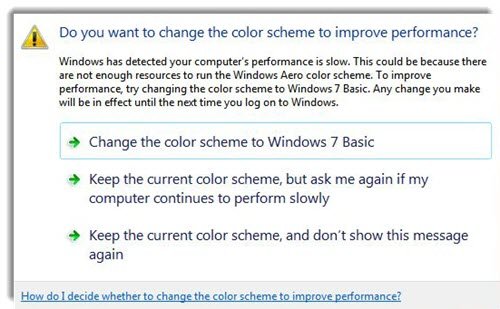
		<title>Why has my color scheme been changed to Windows 7 Basic ?</title>
		<link>http://www.thewindowsclub.com/why-has-my-color-scheme-been-changed-to-windows-7-basic?utm_source=rss&#038;utm_medium=rss&#038;utm_campaign=why-has-my-color-scheme-been-changed-to-windows-7-basic</link>
		<comments>http://www.thewindowsclub.com/why-has-my-color-scheme-been-changed-to-windows-7-basic#comments</comments>
		<pubDate>Tue, 23 Mar 2010 14:08:32 +0000</pubDate>
		<dc:creator>AnandK@TWC</dc:creator>
				<category><![CDATA[Windows]]></category>
		<category><![CDATA[Aero]]></category>
		<category><![CDATA[Tips]]></category>

		<guid isPermaLink="false">http://www.thewindowsclub.com/?p=7660</guid>
		<description><![CDATA[<div style=" float: left; padding: 4px; margin: 0 10px 5px 0; width: 75px; height: 75px;"><img style=" float: left; padding: 4px; margin: 0 10px 5px 0;" width="75" height="75" src="http://www.thewindowsclub.com/wp-content/themes/Twc/scripts/thumb.php?src=http://www.thewindowsclub.com/wp-content/uploads/2010/03/aero-turned-off-400x334.jpg&amp;w=75&amp;h=75&amp;zc=1"/></div>If while working on your Windows 7 you suddenly receive an error message: The color scheme has been changed to Windows 7 Basic or maybe some aero visual element such as window frame transparency has been turned off, then the <span><a class="more-link" href="http://www.thewindowsclub.com/why-has-my-color-scheme-been-changed-to-windows-7-basic">...more &#62;&#62;&#62;</a></span>]]></description>
		<wfw:commentRss>http://www.thewindowsclub.com/why-has-my-color-scheme-been-changed-to-windows-7-basic/feed</wfw:commentRss>
		<slash:comments>2</slash:comments>
		</item>
	</channel>
</rss>