
In Windows 11/10, to run a program, you normally right-click the icon and select Run as Administrator. Next, you give your consent to the UAC prompt. You can launch programs directly from the Start screen, using administrator permissions. Right-click the program tile and select Run as Administrator in the menu bar at the bottom.
If you would like some programs to always Run as Administrator, you can configure them so. Using this tip, you can force or make applications always Run as Administrator and to always start or run a program or software in Administrator Mode.
Make Program always Run as Administrator in Windows 11/10
To make Program always Run as Administrator in Windows 11/10:
- Right the program icon or the shortcut of the application
- Open the Properties box.
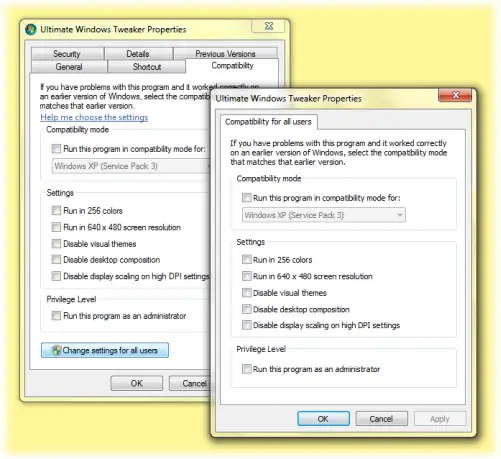
- Click the Compatibility tab.
- Here, select the Run this program as an administrator box.
- Click Apply > OK. This will apply the setting to the current user only.
- But if you’d like to apply the ‘always Run as Administrator’ setting to all users, then click Change setting for all users.
- This will open another dialog box. Again select Run this program as an administrator checkbox.
- Click Apply / OK.
This is also useful for resolving compatibility issues with legacy applications that require administrator privileges.
TIP: To launch a program or app elevated, Hold CTRL+SHIFT and then click on the app icon. The program will launch as administrator.
NOTE:
- If you wish, you can also autostart Programs as an Administrator.
- This post will help you if Run as administrator is not working.
- You can also allow Standard users to Run a Program with Admin rights.
