
We have seen how to make a Windows themepack from your bunch of favorite wallpapers. But what if you want to use the wallpapers of any Windows 11/10 theme pack separately?
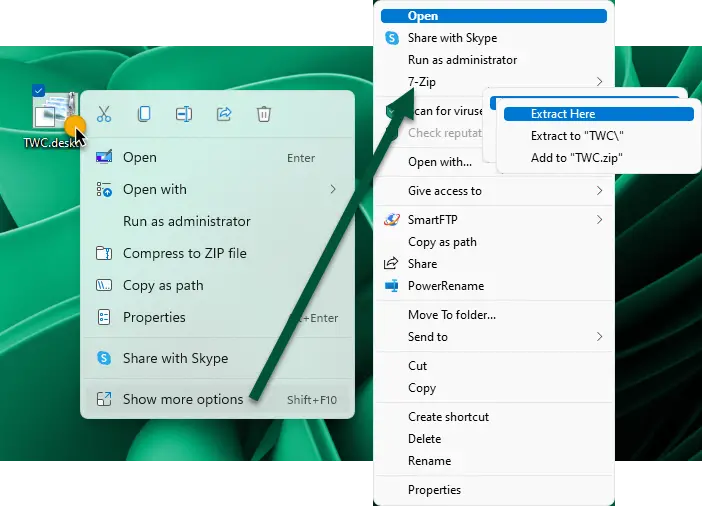
Extract wallpapers from Windows themepack
If you are using 7-Zip as your extraction utility, it shouldn’t be a problem! To extract wallpapers from Windows 11/10 themepack:
- Simply right-click on the themepack file
- Click on Show more options
- Select 7-Zip
- Click on Extract here or Extract too
- The wallpapers and other contents of the themepack will get extracted.
If you are not using 7-Zip, then you may have to first apply that themepack and then navigate to the folder where the themepack stores the desktop wallpapers.
This folder is a hidden folder and hence you may have to first select on ‘Show hidden files & folder’ option from the Explorer Folder Options.
Having done this, navigate to the following folder:
C:\Users\Username\AppData\Local\Microsoft\Windows\Themes\
Here you will see a bunch of theme folders. Select the theme folder, whose wallpapers you need, and open the DesktopBackground folder.
You will see the desktop wallpapers of that themepack there!
This post will tell you where Wallpaper and Lock Screen images are stored in Windows 11/10. You can download some cool Windows 11 wallpapers for your PC here.
