
Windows OS does not provide a GUI to unassociate or dissociate file type extensions. But if you need to remove file associations, you can do so using this portable utility called Unassociate File Types.
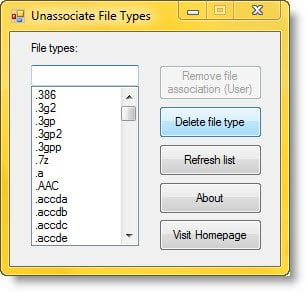
Remove File Type associations
Download unassoc.zip from the link mentioned below, and save it to Desktop.
Next, extract the contents to a folder and run the file unassoc.exe
Now select the file type from the list
Click Remove file association (User).
The user-specific association for the chosen file type is now removed from the registry. The system will now use global file association settings.
The Remove file association (User) button Removes the user-specific association (via the Open With dialog) for the chosen file type. Note that this button will remain dimmed if there is no user-specific association for the file type.
The Delete file type button Deletes the file type completely from the registry. Both the user-specific and global associations for the chosen file type is removed.
And the Refresh list button, Refreshes the list box contents.
This utility requires administrative privileges to work correctly.
So if you need to remove file associations you can download the free tool here and use it. It works on Windows 7 and Windows Vista only.
Windows 10 and Windows 8.1 users may want to check out FileTypesMan and Default Programs Editor. They are similar tools that may interest you.
PS: If you find that you cannot open a particular file type, then our File Association Fixer will be able to easily help you fix, repair, and restore the broken file associations. Incidentally, you may also want to read about how one can set or change file type associations using the Control Panel.
