
Windows File Explorer shows suggestion pop-ups as users type into the Search Box. These suggestions are based on their past entries into the Search Box. But if you wish, you may disable suggesting of recent queries for the Search Box and prevent entries into the Search Box from being stored in the registry for future references.
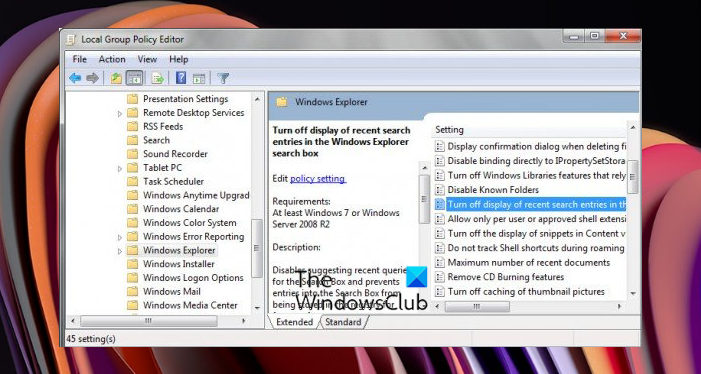
Turn Off Display of Recent Search Entries in Explorer
You can turn off the display of recent search entries in the Windows 11/10/8/7 Explorer search box and prevent entries into the Search Box from being stored in the Registry for future references.
To do so, type gpedit.msc in the Start search and hit Enter to open the Group Policy Editor.
From the left pane navigate to the following directory:
User Configuration > Administrative Templates > Windows Components > File Explorer
Now from the main window, right-click Turn off display of recent search entries in the File Explorer setting and double-click on it to open its Properties box.
Select Enabled and click OK.
The effects of this step are that it:
Disables suggesting recent queries for the Search Box and prevents entries into the Search Box from being stored in the registry for future references.
File Explorer shows suggestion pop-ups as users type into the Search Box. These suggestions are based on their past entries into the Search Box.
Note: If you enable this policy, File Explorer will not show suggestion pop-ups as users type into the Search Box, and it will not store Search Box entries into the registry for future references. If the user types a property, values that match this property will be shown but no data will be saved in the registry or re-shown on subsequent uses of the search box.
Restart your computer and you will see the changes.
NOTE: It appears that Windows 11 File Explorer no longer remembers search history, according to reports.
