
At times, you may need to open and manage your Windows Services. You may want to stop some service, start it, disable the service, delay its start-up or resume or pause the Windows Service. In these cases, the Services Manager, a built-in Windows tool, can help. This post will show you how to open your Windows Services, using Services Manager as well as the Command Prompt.
Windows Services are applications that typically start when the computer boots and run quietly in the background until it shuts down. Strictly speaking, a service is any Windows application that is implemented with the Services API and handles low-level tasks that require little or no user interaction.
How to open Windows Services Manager
To open the Windows Services Manager on your Windows 11 or Windows 10 computer, do the following:
- Right-click on the Start button to open the WinX Menu
- Select Run
- Type services.msc in the Run box which opens
- Windows Services Manager will open.
Here you will be able to start, stop, disable, delay Windows Services.
Let us see how to do this in a bit more detail.
Right-click on your Start button to open the WinX Menu. Select Run. This opens the Run box. Now type services.msc in it and hit Enter to open the Services Manager.
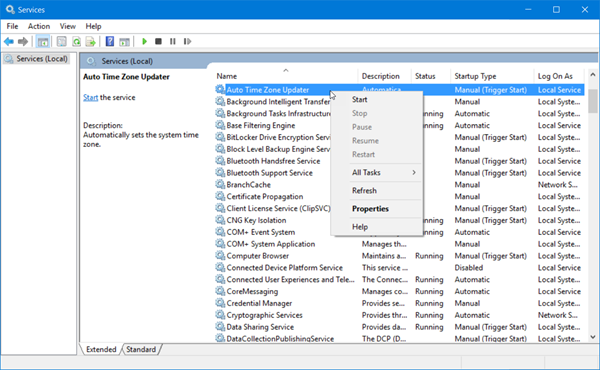
Here, under the Name column, you will see the list of Services running on your system, along with their description. You will also be able to see their Status -whether they are running or stopped, along with the Startup types.
TIP: You can also write services.msc in Run box, Start search, Command Prompt, or PowerShell, and hit Enter to open Services Manager.
Types of Windows Services startup
Windows 11/10 offers four start-ups types:
- Automatic
- Automatic (Delayed Start)
- Manual
- Disabled.
Read: How to restore missing or deleted Windows Service.
How to Start, Stop, Disable Windows Services
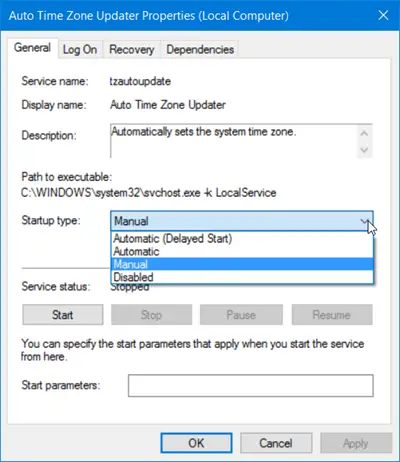
To start, stop, pause, resume or restart any Windows Service, select the Service and right-click on it. You will be offered these options.
- If you wish to manage more options, double-click on the Service to open its Properties box.
- Here, under the Startup type drop-down menu, you will be able to select the startup type for the Service.
- Under Service status, you will see buttons to Start, Stop, Pause, Resume the Service.
- In the Properties box, you will also see other tabs like Log On, Recovery & Dependencies, which offer additional options and information.
- Once you have made your changes, you will have to click on Apply and restart your computer, for the changes to take effect.
Read: What does Automatic (Trigger Start) and Manual (Trigger Start) mean for Windows Services?
Use Task Manager to Stop, Restart or Start Services
You can also Stop, Restart or Start Services using the Task Manager.
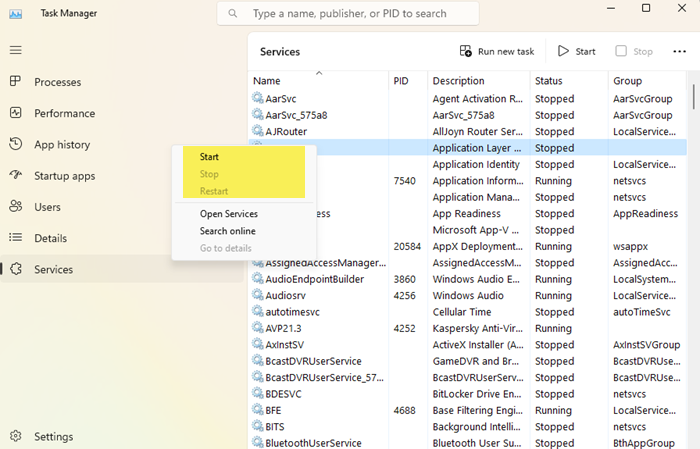
Open the Services tab, right-click on the Service and you will see the available options.
Manage Windows Services using Command Line
You can also use the Command Prompt to start, stop, pause, resume service. To use it, from the WinX Menu, open Command Prompt (Admin) and execute one of the following commands:
To start a service:
net startservice
To stop a service:
net stopservice
To pause a service:
net pauseservice
To resume a service:
net continueservice
To disable a service:
sc config "Name Of Service" start= disabled
It is recommended that you not change the default settings unless you know what you are doing, as this can cause some parts of your operating system to stop working. When you stop, start, or restart a service, any dependent services are also affected, so you want to be careful here.
This post will show you in detail how to Enable, Disable, Start, Stop, or Restart Services in Windows 11 or Windows 10 using PowerShell, Command Prompt, Task Manager and Net Command.
Read: How to reset Services.msc console.
How to Refresh a Windows Service?
When you refresh any Windows Service, the contents are re-read into memory and the changes are reflected the next time the service is accessed. Here’s how you can Refresh a Service:
- Open Services Manager
- Locate the Service you want to refresh
- Right-click on it and select Refresh.
That’s it! I hope you find this post informative and helpful.
TIP: See this post if your Windows Services do not start.
