
In this post, we will see how you can prevent your primary, secondary, or external hard disk drive or USB from going to sleep on a Windows 11/10 computer. You do not want your external hard disk to go to sleep, yet at times it goes into Sleep mode. Sleep is a power-saving state that lets you quickly resume full-power operation when you want to resume working.
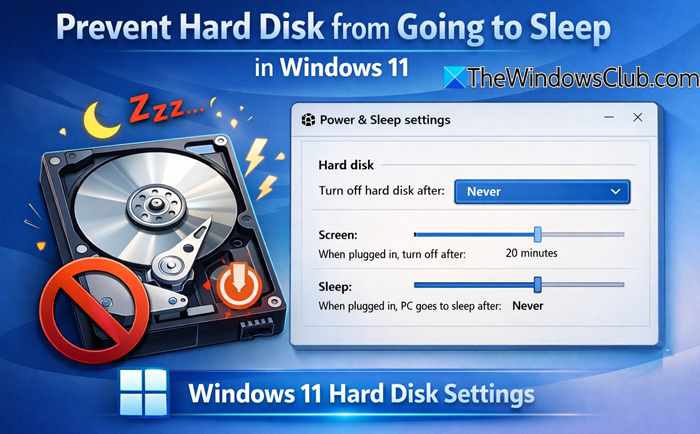
Does the hard drive stop in sleep mode?
Yes, it does, and it applies to SSDs and mechanical hard drives. By design, the power plan ensures that when the PC goes into sleep mode, the storage also stops working unless triggered by a wake-up call. Some PC also offers. That said, Windows offers Modern Standby or Connected Standby power model that offers a low-power idle mode, similar to the smartphone experience. It allows some background processes to keep working, e.g., ensuring you receive emails.
Prevent Hard Disk from going to Sleep in Windows 11
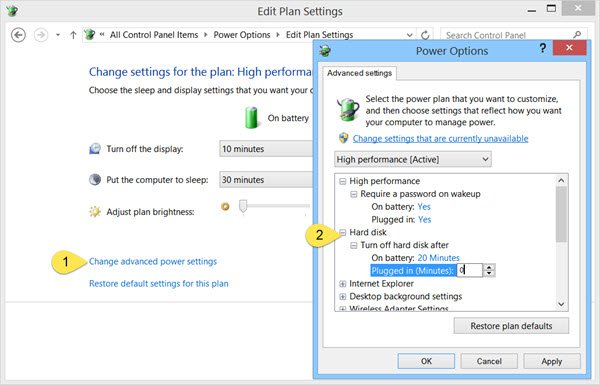
To stop or prevent the Hard Disk from going to sleep, click on the Battery / Power icon in the taskbar, and select More Power options. In the Control Panel window that opens, select Change Plan settings for your current Power Plan. In the next window, select Change advanced power settings.
In the Power Options box that opens, click the + sign next to the Hard Disk option. Here you will see the required settings under Turn off hard disk after heading. Change the value to 0.
In recent Windows 11, you may see the following setting, and you need to set it to Never.
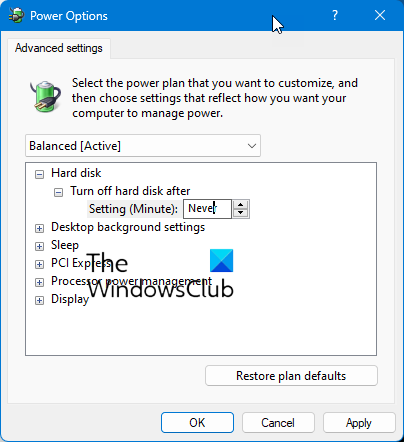
Click on Apply > OK and exit.
This setting will prevent your hard disk from entering Sleep mode.
Using PowerShell
Open PowerShell (admin) and execute these commands:
powercfg /change disk-timeout-ac 0
powercfg /change disk-timeout-dc 0
Here:
disk-timeout-accontrols the timeout when plugged in.disk-timeout-dccontrols the timeout when on battery.- Setting both to
0means Never turn off the hard disk.
Prevent External Hard Drive from going to sleep on Windows PC
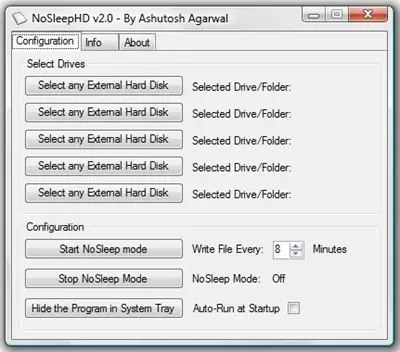
If you are looking for a freeware to make things easy, try these!
- NoSleepHD (nosleephd.codeplex.com) writes an empty text file every few minutes to your external hard disk drive to keep it from going into auto-sleep mode.
- KeepAliveHD (keepalivehd.codeplex.com) will write an empty text file to your primary as well as secondary drives to prevent it from going into automatic standby mode.
- Mouse Jiggler will prevent Windows computer from going to sleep.
- Sleep Preventer will prevent your computer from switching to Sleep, Hibernate, Standby mode.
We hope you find this post useful to help you stop your external hard drive from entering SleepMode.
Do check out these links too:
Can you leave an external HDD plugged in all the time?
Yes, keeping an external HDD connected all the time is absolutely ok. The only thing you need to ensure is if the disk is in use i.e., Backup, File transfer, then it should not be disconnected from the PC or Laptop. If you do that, file corruption or drive issues are likely.
