
You might find this issue where when you try to turn on Windows Firewall it says that the Windows Firewall Service is not running. Then when you try to start the Windows Firewall Service you may see this error message: Windows could not start the Windows Firewall on Local Computer with Error Codes 13, 1079, 6801, etc.
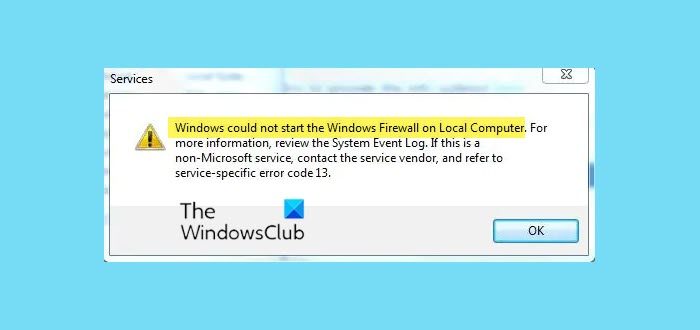
Windows could not start the Windows Firewall
If your Windows 11/10 cannot start the Windows Firewall, here are are some suggestions to help you resolve the issue:
- Run SFC Scan
- Check Permissions
- Run antivirus scan
- Windows Firewall Troubleshooter
- Use Reset This PC option
1] Run SFC Scan
This step is standard to fix most Windows-related issues. Yes, we have to run an SFC Scan to see if Windows could fix it by itself.
- Go to Start under search type in CMD
- Right Click and Run as administrator
- Then type in SFC /SCANNOW and press Enter.
For further details check this article System File Checker.
Read: Windows Firewall with Advanced Security snap-in failed to load, Error 0x6D9
2] Check Permissions
If there is a permission-related issue, we have to give enough permission to those key.
- Go to Start under search type in Regedit
- If it prompts for an administrator password type it in
- There go to Computer and right-click and click on Export
- Under File name type in Regbackup and click on save
Then you have to give permission to the following keys:
HKEY_LOCAL_MACHINE\SYSTEM\CurrentControlSet\Services\SharedAccess\Epoch

HKEY_LOCAL_MACHINE\SYSTEM\CurrentControlSet\Services\SharedAccess\Parameters\FirewallPolicy

HKEY_LOCAL_MACHINE\SYSTEM\CurrentControlSet\Services\SharedAccess\Defaults\FirewallPolicy

HKEY_LOCAL_MACHINE\SYSTEM\CurrentControlSet\Services\Dhcp

HKEY_LOCAL_MACHINE\SYSTEM\CurrentControlSet\Services\Dhcp\Configurations
Right-click the key, and click Permissions. Click on Add. In the “Enter the object names to select field, type “NT SERVICE\mpssvc“. Then click “Check name.”
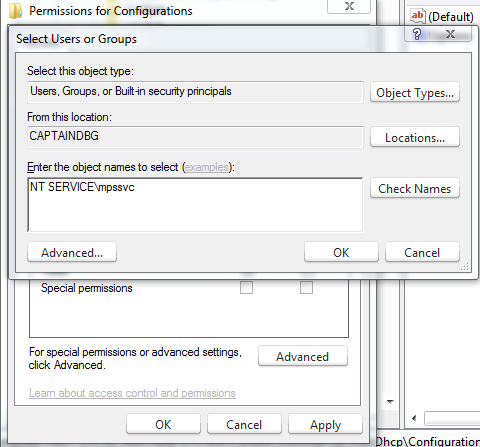
Click OK. Then click on Add again. Type in Everyone and then click OK.
Then select the account which appears in the list, and add the proper permission for it.
Under the Allow section put a checkmark on Full control.
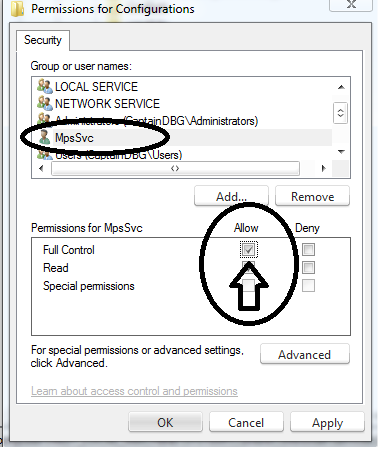
When this is done, click OK and restart your computer.
If you’re getting access denied, Turn Off UAC via your Control Panel and try it again.
Read: Windows Firewall Service does not start
3] Run antivirus scan
Sometimes Malware infections can cause the service to fail. So I would recommend that you run a full scan of your anti-malware. You may also download a second stand-alone scanner like freeware Malwarebytes, Emsisoft or the new Microsoft Safety Scanner and run a complete system scan in Safe Mode, to get a second opinion.
Read: Windows Firewall errors 0x8007042c, 0x80070422, 1068, 0x8007045b, 0x800706d9, 0x80070437
4] Run Windows Firewall Troubleshooter
Run the Windows Firewall Troubleshooter and see if that helps.
5] Use Reset This PC option
If your system fails to find any infection, the last thing left to do is to run a Repair Windows most of one or more system files might have corrupted. Follow this post on how to Reset This PC on Windows.
These links may also interest you:

