
The right-click menu context menu in Explorer under Windows 11/10 is quite useful and improved. Right-click a file or folder, and a menu appears, letting you take a variety of actions, such as opening the file, printing it, deleting it, copying it, creating a shortcut to it, etc. But there is more! Holding down the Shift key while right-clicking in Windows gives you a fuller range of options.
Expand Context menu in Windows 11/10
If you hold down the Shift key as you right-click a file or folder, you’ll see several new menu options. You will see different new options in the right-click context menu for files and folders when you right-click on them by pressing and holding the Shift key. For example, the following options are unavailable if you open the context menu for a file by pressing and holding the Shift key:
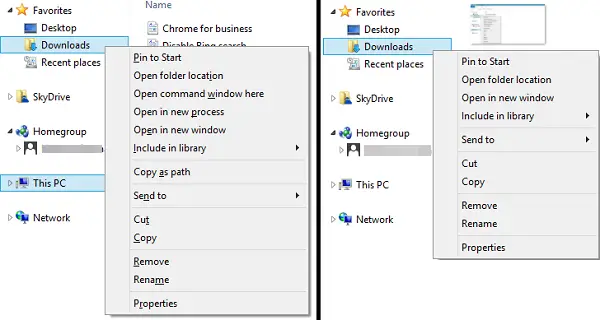
- Open in new process
- Open PowerShell window here
- Open Linux shell here
Windows 11/10 will show the Open Linux shell here option only if you have enabled the Windows Subsystem for Linux (WSL) on your system. I tried it with the ‘Downloads’ folder on my Windows PC, and I got some additional options as well.
Here are the new options you get and what each one does:
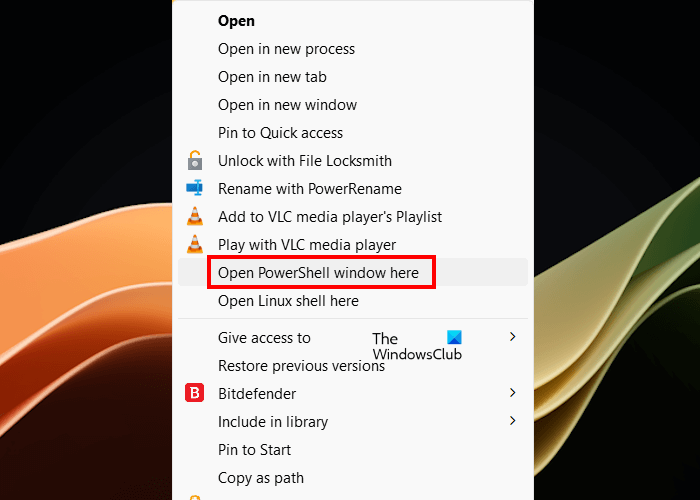
Open PowerShell window here
Sometimes, we need to execute the commands in a particular directory. There are two ways to open the PowerShell window or Command prompt window in that directory.
- Open the Command Prompt or PowerShell window from Windows Search and then change the directory by entering the required command.
- Open File Explorer, navigate to the required directory, and launch the PowerShell or Command Prompt window from there. After navigating to the required directory, type cmd or PowerShell in the address bar of the File Explorer.
The Open PowerShell window here opens the PowerShell window in the selected folder. Windows 11/10 may also show you the Command window or Terminal options in place of the PowerShell window option in the right-click context menu.
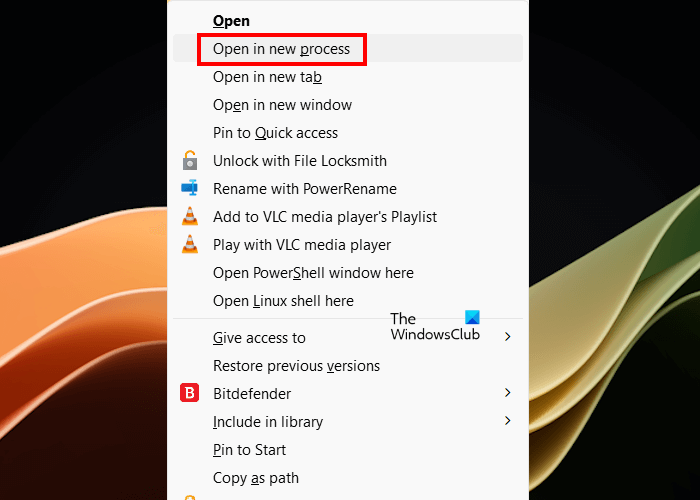
Open in new process
As the name suggests, the option opens the folder in a new process. If you select this option in the right-click context menu, Windows 11/10 will open the targeted folder in a new window. This option is only available for folders. Hence, if you right-click on a file by pressing and holding the Shift key, you will not find this option there.
In Windows 11, when you right-click on any file or folder without pressing and holding the Shift key, you will not get all options in the context menu. You have to select the Show more options. However, if you right-click on a file or folder by pressing and holding the Shift key, you will see some new options. If you want Windows 11 to show all the options in the right-click context menu just like in Windows 10, you can restore the old right-click context menu in Windows 11 by modifying Windows Registry. But before you do this, I recommend you create a System Restore Point.
Read: How to get Old Right-click Context Menu back on Windows 11
Expand the hidden Send To menu
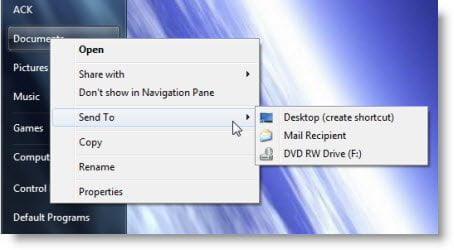
The Send To folder in Windows is typically located at the following location:
%systemdrive%\Users\Username\AppData\Roaming\Microsoft\Windows\SendTo
You can also add or remove items from the Send To menu folder.
If you press Shift key and then right-click, Windows will offer you many more options, under the Send To item in the context menu.
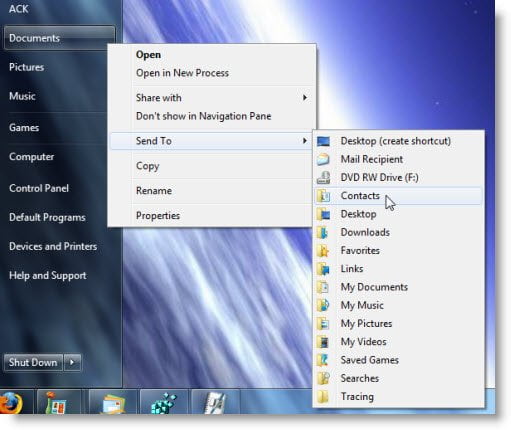
Try that on a folder and also on any file and see for yourself the hidden Send To menu in Windows.
How do I add more to the context menu in Windows 11?
You can add more options to the right-click context menu in Windows 11 by modifying Windows Registry. For example, if you want to add an application to the right-click Context menu, you can do that by adding the complete path of the exe file of that application to the required key in the Windows Registry. Before you do this, create a System Restore Point and back up your Registry.
Which key opens context menu?
You can open the right-click context menu by using the keyboard shortcut. To do this, first, select the file or folder for which you want to open the right-click context menu, then press the Shift + F10 keys. In Windows 11, this keyboard shortcut does not show all the options in the context menu. You have to select the Show more options.
Now read: How to Edit, Remove or Add items to Send To menu.
