Download Windows Live Essentials 2011, Beta 2

Windows Live Essentials 2011, Wave 4, beta refresh, has been released and is now available for download. The new installer weighs in at about 151MB for the full installer and carries the build number 15.4.3001.0809.

UPDATE 30th Sept 2010 : Windows Live Essentials 2011 Final is available now.

windows live essentials Download Windows Live Essentials 2011, Beta 2

This new version of the suite, incorporates new icons, new features, many bugs fixed since version Beta releases and the incorporation Windows Live Language Setting with all language packs (MUI) & (LIP) for example Catalan and Euskera for Spanish version.

This program brings new features like the ability to change languages or install (automatically for the web) the additional languages.

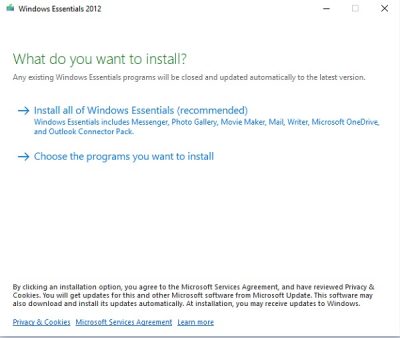
The Windows Live Essentials include Live Messenger, Live Writer, Live Movie Maker, Live Mail, Live Photo Gallery, Live Sync,  Bing Bar, Live Family Safety and Messenger Companion.

Download links: Web Installer | Full Installer. Or download from Windows Live Essentials home page now!

Via LiveSide.

UPDATE: Here are some of the many improvements you’ll see in this area:

  1. Facebook chat
  2. A quicker Messenger – The time it takes to sign in, and to refresh contacts and social feeds, as well as animation speed, are all faster than in previous versions of Messenger.
  3. More efficient video chat – Messenger video chat uses 30% fewer CPU resources by offloading work to the GPU.
  4. Better facial recognition – Photo Gallery facial recognition is improved significantly and works more quickly.
  5. Larger movie uploads – Movie Maker will upload higher resolution movies to SkyDrive (480×640 vs. the previous 320×480).
  6. Higher bit-rate movies – Movie Maker now supports higher quality (bit-rate) content.
  7. Better spell-checking – Writer has significantly improved the quality of its spell-checking.
  8. Better integration with Office – Writer is much better at retaining all formatting when you copy and paste from Word and other Microsoft Office programs.
  9. Better handling of Gmail – Mail now automatically handles Gmail’s spam and trash folders properly.
  10. Faster web filtering – Family Safety web filtering is 35% faster than in the previous version.

If you have liked this post, you might want to check out some more, on topics like .

About AnandK@TWC

Anand aka HappyAndyK is an end-user Windows enthusiast, a Microsoft MVP in Windows Desktop Experience since 2007, and the Admin of TheWindowsClub.com, TheGeeksClub.com & WinVistaClub.com. Creating a System Restore Point before trying out a new software or a tweak is always recommended.

Ads

Random Posts

  • http://www.yethz.com yethz

    this is worth a try, when will be the final release, is it 2011?

  • http://vasudevg.blogspot.com/ vasudev

    Just a point to add-
    The official build number for the beta refresh suite as a whole is 15.4.3002.0810
    While the build number for the installer is 15.4.3001.809 . So don’t get confused.

  • Thomas Skov

    Been trying to install the BETA (2) for the last many hours…
    Keep getting the same error message “No Internet Connection…..”
    Can’t find out what should be the problem, and I have it on both my laptop and my desktop.
    Windows 7 Ultimate x86 on the laptop, and Windows 7 Ultimate x64 on the desktop.
    If anyone has any ideas to what could perhaps be the problem, I would very much appriciate any inputs that you might have.
    I have Google’d and Bing’ed, but haven’t found a sollution to my problem.

    Thanks in advance.

  • http://www.thewindowsclub.com/ Windows Club

    Thats strange. I was able to download the full installer and update my Essentials at the first try itself.

    Why dont you try to download it from the Windows Live Essentials website. I understand the link now directs to the new beta.

  • http://vasudevg.blogspot.com/ vasudev

    Hi Thomas
    I think you are trying to install some language other than English, right? or you are using Windows 7 of some other language ?
    At present installer apart from installing the English ver (if you have selected Eng) or other language you selected tries to install MUI language files that match your OS language. But at present this Refresh beta is available in limited languages only. So when it tries to find these additional lang files, its throwing error.
    I hope soon this will be corrected or try to temporarily change your OS language settings and then try this install.
    Live team is already looking for the workaround.

  • Thomas Skov

    - I have tried with the full-installer/offline-installer as well, same thing happened…

    - It is english windows on both pc’s, with a danish language pack installed on top. This was not an issue with the first BETA release, but I guess that’s no reason why it shouldn’t have become an issue with the second BETA release…!?
    It actually makes perfect sense, in it’s own way…
    I’ll try and switch the language back to english, and then do an install.

    Thanks for your help so far, I’ll post here if it worked or not :)

  • http://vasudevg.blogspot.com/ vasudev

    Thanks Thomas, it’ll be nice if you can post if this worked or not so that it’ll be helpful for others facing such an issue.

  • Thomas Skov

    Yup, it was as simple as that…
    Changed the language to english, relogged, reinstalled and everything works like a charm.
    First time I have had this problem though, but hey – it works now :)

    Thanks for your inputs, it’s much appriciated!

  • http://vasudevg.blogspot.com/ vasudev

    Its nice that you can install WL Essentials beta2. Thanks Thomas for replying with your experience. It’ll help others also.

  • JCF

    151MB?? no thanks, i can chat and use msn live messenger 2009 without problem. I just hope Microsoft don’t make it obligatory to download it in the future.

  • JCF

    I’ll try the messenger alone, phew!! gladly i was wrong and don’t have to download the whole package.

  • Thomas Skov

    @JFC
    151MB is the full installer, which means all the software included in the package. Messenger alone does not take up that much space…
    But seriously, maybe you should get a bigger harddrive if 151MB is a lot to you!?

  • http://vasudevg.blogspot.com/ vasudev

    @JFC there’s a web installer also where you don’t have to download the Full Installer package of 151 MB. As Thomas said, 151 MB includes all WL products.

  • nano

    updated to beta 2 and now i don’t have any shortcuts in start menu, im using windows 7 pro.
    any help?

© 2012 The Windows Club All Rights Reserved