
Very few of us may have bothered to have a look at these settings, but Windows 8.1 does offer some privacy control options that let you control how applications can access your information, which ads can be shown, and more. Let us have a look at these settings, so that you can change the defaults, should you wish to.
NOTE: This post will show you how to harden Windows 10 Privacy Settings.
Privacy settings & options in Windows 8.1
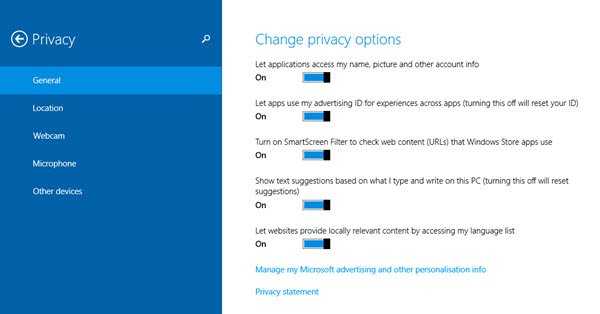
To change the privacy options and settings in Windows 8.1, open Charms > Settings > Change PC settings. Select Privacy from the left side, and you will see the options displayed in the image above.
Once here, under the General sub-heading, you will be able to change your privacy settings for the following:
- Do you want applications to access your personal data like name, picture, etc?
- Can apps use your advertising ID?
- Do you want the SmartScreen Filter to check web links that the Windows Store or Universal apps use?
- Would you like to see text suggestions as you type?
- Do you want to allow websites to provide you with locally relevant content?
You will also see a link to the Microsoft Personal Data Dashboard. Clicking on Manage my Microsoft advertising and other personalization info will take you there.
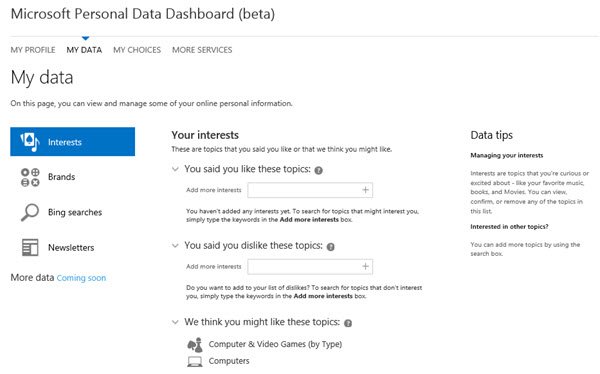
Microsoft Personal Data Dashboard
Here you will be able to manage your Interests, set which Microsoft ads you want to see, subscribe to or unsubscribe from Microsoft newsletters, configure Bing Search results and more. In short, it lets you manage how Microsoft can use your information.
Apart from this, you will also be able to see various other Privacy settings and sub-headings like Location, Webcam, Microphone and Other devices. You can chose whether you want Windows and apps to use your location information and let apps use your webcam, microphone, etc.
Hope you find this bit of information useful.
Stay private, stay safe!
Now read: Harden Windows 8 safety settings.
