
Caesium Image Compressor is a free compressing tool that can optimize & reduce the size of pictures up to 90%, without changing original visual quality. Let us take a look at it in this post.
High-resolution pictures look sharp and crisp, but they take up more space on your computer and also take time to upload to a social networking website or even in a mail. If you are into blogging, you might surely have encountered the issue of high-resolution images. They not only take longer to upload to your blog but also slow down your page speed and occupy more disk space.
Batch compress & optimize images
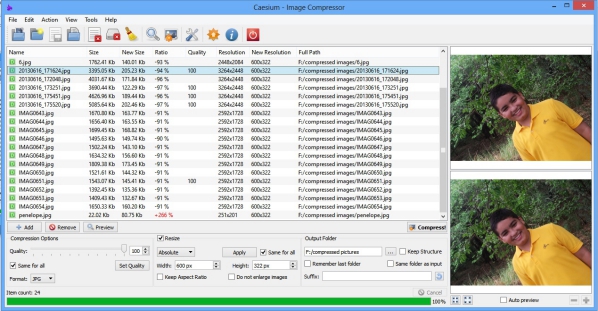
Although we can always compress the images, it reduces the original visual quality. Caesium is an easy-to-use image compressing tool that can reduce the size of pictures up to 90%, without making any changes to the original visual quality. You can compress many pictures together with Caesium image compressor.
This can also help you free a lot of disk space and increase the available disk space on your Windows PC. Compressed images are easier to attach to email and upload on social networking platforms.
Available only for Windows OS, this tool has a very simple and user-friendly interface and even a beginner can use it very easily.
Features of Caesium Image Compressing Tool
- It supports a wide range of file formats and can compress image files saved in any file format such as JPG, PNG, JPEG, WMF, or BMP. After compressing, it saves the images in BMP, PNG, and JPG.
- Caesium allows compressing the images in bulk. You can set the compression level, image size, and quality changes for every picture individually or can also apply it to bulk.
- Caesium features a preview mode that allows you to review the compression results before saving them. You can check all the details of the compressed picture with zoom before you save them to the final folder.
- Drag and drop feature makes it an even simpler and handy tool for compressing images.
- You can select the output folder directly from the tool.
Important Note
Adding or removing image files in Caesium is absolutely simple. However, when you delete an image from Caesium, it also deletes it from your hard drive.
If you notice that the original file from the disk was deleted when you add it in Caesium. Go to the “Compression Settings” from “Tools” bar or from the direct “Settings” tab and uncheck “Delete the original file from disk”.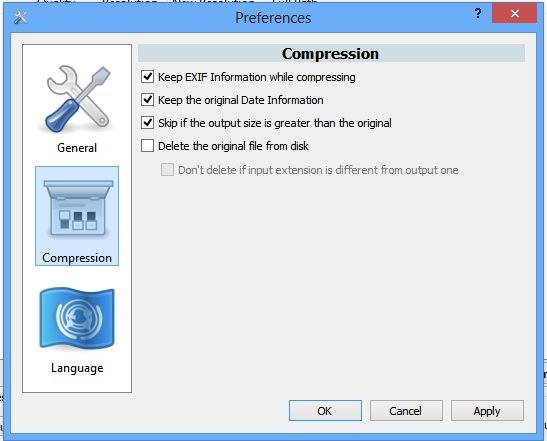
Caesium Image Compressor free download
Overall, Caesium is a very convenient, easy-to-use, and useful tool with many pros and no cons. It is absolutely free and has no hidden charges. Head over to saerasoft.com to download it.
If you are looking for similar free software, you can also check out FILEminimizer Pictures and Radical Image Optimization Tool.
