
If you want to test your hearing capabilities, do check out these free hearing test apps and ear test software. These apps are compatible with Windows 11, Windows 10, and some other older versions of Windows. We have included one free online tool so you can check it on any device.
Think you are hard of hearing and want to test your hearing at home before you decide to go to a Doctor? Ear Test software is designed to give you a quick test of your ear’s capabilities to hear all frequencies of the audible spectrum, separately for each ear. This post also covers a UWP and an online site where you can test your hearing.
Free Hearing test app & Ear test software for Windows 11/10 PC
Free hearing test app and ear test software for Windows 11/10 are:
- Ear Test
- Hearing test
- Widex
To learn more about these apps, keep reading.
1] Ear Test
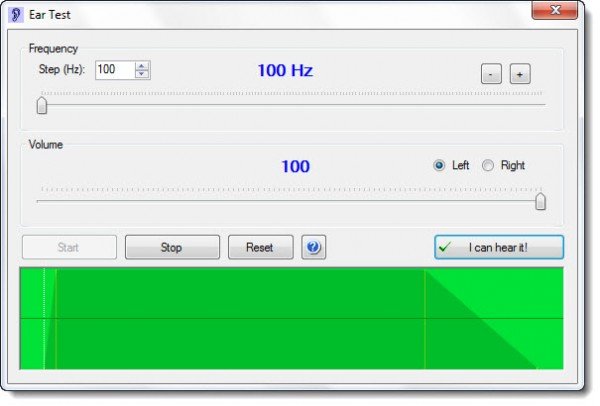
The Ear Test software is designed to give you a quick test of your ear’s capabilities to hear all frequencies of the audible spectrum, separately for each ear. You can measure with good accuracy up to which frequency you can hear and compare your results with those of your friends and family. The upper frequency limit of the human ear is strongly dependent on a person’s age. A child can usually hear frequencies up to 20,000 Hz (oscillations per second), while for an older person, it can be as low as 5,000 Hz or even lower. For a middle-aged person (40 years old), a frequency of 14,000 Hz is average. Some people can have “holes” in their hearing spectrum, due to inner ear injuries – this can also be checked.
Please be careful, when you are using this free Windows software with headphones (which is recommended)! Always start with a low volume. This program can damage your hearing if you turn up the volume too high, although its maximum volume is not very high compared to the maximum possible volume of sounds on your PC in general. However, I must write this warning to be on the safe side. It is recommended to start the program first so the sound is already coming through the headphones, then slowly put them on your head so you can adjust the volume if necessary. The program is not intended to replace a professional ear test at a doctor’s office.
Start with a medium frequency that is easily heard at low volume (default is 2,000 Hz). Now push the “Start” button. An intermediate beeping sinus sound will now be audible from your left speaker (a good pair of headphones is strongly recommended for an accurate test result). Now turn down the volume of your computer speakers until the sound is barely audible. You now have a reference for the volume control and can begin testing. For each frequency, you can press the button “I can hear it!” – but you must turn down the volume until the sound is barely audible. Then step up or down to the next test frequency. You can choose the step with the “Step” selector: 10 Hz (very fine), 100 Hz (medium), or 1,000 Hz (1 kHz, rough). Each time you press “I can hear it!”, a graph is drawn into the chart at the bottom of the program window.
For the critical high frequencies, you can choose a finer grid, and for the medium frequencies, a coarser one (1,000 Hz). When you have finished testing one ear, you can switch to the other one and repeat the test. The chart will give you a good impression of your hearing curve, provided that your computer’s sound card and headphones can reproduce a linear frequency response.
It’s an interesting app where you cannot only test your hearing but also hear how the sound changes at different frequencies. Download it here.
2] Free Hearing test app
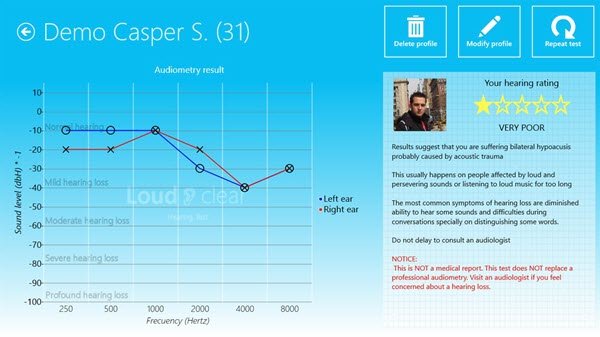
The Hearing Test app for Windows 11/10, available on the Microsoft Store, will help you check your hearing health using this audiometer. Specially targeted at young people, this app helps users to check their hearing. You only need a pair of headphones and two minutes.
3] Free Online Hearing test
If you wish to test your hearing online, you can do that using the Widex website. It is a free website that allows users to test their hearing with headphones. It takes around five minutes to get the job done. However, the results are pretty accurate, which is why it is a highly recommended website or online tool. You can test your ear at widex.com.
Hope this helps.
Is there an app that can test your hearing?
Yes, there are various apps to test your hearing. Whether you want to test your ears using an online or offline tool, you can do both within moments. Although these tests are pretty time-consuming, you can still get a positive result while using these aforementioned apps on your computer. Whether you use Windows 11, Windows 10, or any other version, you can take the help of these apps.
Is there an accurate online hearing test?
Although there are many online tools, you might still be concerned about the test results. However, you can check out the Widex hearing test application, which shows a pretty accurate result. Nonetheless, it is highly recommended to seek help from a professional before experimenting with anything.
