
You can’t focus on anything you’re working on with a noisy laptop fan. The culprit for a noisy laptop fan can be one of the two usually – dust and overheating. If you’ve been using your laptop fan for years now, you would probably wonder why there’s a humming sound that is a far cry from white noise. It isn’t helping you concentrate – you’re getting distracted, and that has to stop.
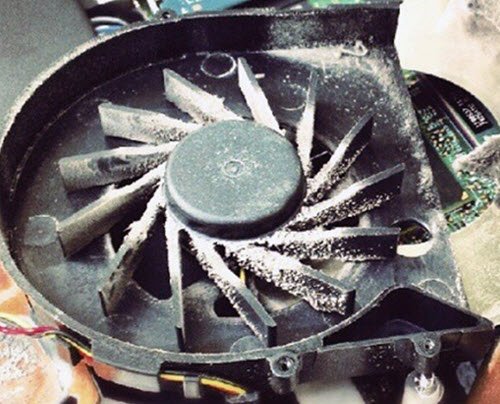
To determine why your laptop fan is noisier than usual, you must get to the bottom of it. The cooling fan running at a high, continuous rate could be to blame. It’s firing up or working harder than usual – churning like a wildcat – when it needs to get rid of heat or under an extreme workload. Although your laptop is compact, it is still susceptible to dust accumulation. The clogged dust can wreak havoc on your laptop’s system, causing it to run hot and noisily. The challenge here is to cool down your laptop and zap the irritating noise.
Fix Computer Overheating and Noisy Laptop Fan issues
If your Windows laptop fan makes weird grinding, buzzing or rattling noise when switched on, here are some ways to fix the noise and overheating Laptop fan issues.
- Check the running processes
- Close the processes
- Use a laptop cooler
- Clean your laptop fan
- Repair or Replace the damaged laptop fan
Laptop fan making noise
1] Check the running processes
When your laptop is noisy, it could mean only one thing – it’s overworked. Check your processes to see if any are running applications or programs that are CPU-intensive or requiring your CPU to work harder than usual. Check if there are processes that are close to running at 100% capacity, as they could be the culprit. If everything appears to be in order, the CPU fan may still require further inspection.
2] Close the processes
Open your Task Manager and kill unwanted running processes to stop your CPU fan from buzzing or whirring up in an effort to keep up with the demands of running programs like when you’re playing games or watching videos online.
Related read: CPU Fan runs at full speed always.
3] Use a laptop cooler
Your laptop can only withstand so much heat before it overheats. Using a laptop cooler is recommended for those who use their laptops for gaming or work, as they may be working hard for extended periods. You can choose between laptop coolers with cooling baseplates and those that clip onto the laptop to directly zap or suck out the hot air. These Laptop cooling software may interest you.
4] Clean your laptop fan
If all else fails, go right to the root of the problem. You can hire a professional to handle the cleanup, or do it yourself. Dust and even hair can pile up and clog your laptop fan, reducing airflow. Cleaning it up would most likely solve your problem.
You need an air compressor and a small screwdriver to do this. To prevent static electricity, remove the battery before starting the cleaning process. Unplug the AC adapter as well. Unscrew the access panel to see the laptop fan. Blow out the dust using the air compressor. Avoid dust exposure outside of your home to prevent asthma or allergic reactions.
Once you’re done, put everything back together and power up the system – you should have a quieter laptop now.
Read: Laptop makes buzzing noise when turned on
5] Repair or Replace the damaged laptop fan
If your laptop fan is making strange rattling or buzzing noises, that’s a problem, and the only fix is to repair or replace the fan. A broken bearing causes this, and while the bearing can be fixed, it’s just a temporary fix that requires too much work in the first place. Your best bet is to replace the fan.
The laptop is considered the most popular device for both work and leisure. Many global businesses now operate online and use laptops to stay competitive. Cleaning your laptop fan and ensuring it doesn’t overheat will help extend your laptop’s lifespan and improve its health, while also reducing noise to a minimum.
More tips to physically clean up your Windows computer, mouse, and keyboard here.
Why is my laptop fan so loud?
If the computer fan is constantly running and louder than usual, it needs cleaning. Clogged air vents or a highly demanding application or video game may also be a reason.
TIP: This post will help you if your Monitor turns off and all the Fans start to spin super fast
Is it safe to use a laptop with a loud fan?
A loud fan does not mean danger; it simply means one or more components are not working as they should. The laptop will not explode so it can be used despite the noise, though it would make sense to have the problem fixed.
Related: How to fix an Overheating Laptop?
