
If you are looking to download the latest Lenovo Drivers, Software, Firmware, Update BIOS, Lenovo System Update comes in handy. While software & driver updates are rolled out through the Windows Update system, OEMs do rollout their own software solution to keep the system updated. Lenovo calls it “System Update Tool”, and the biggest advantage of using System Updates from here they are usually more recent.
Lenovo System Update Tool for Windows 11
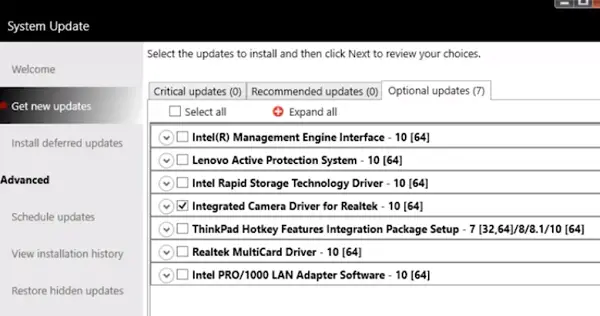
Lenovo offers two types of solutions to keep the system updated. One is called as Lenovo companion, while the other is a lighter, and a compact version called as Lenovo System Update. Once downloaded from Lenovo’s website, the local user can use it without requiring specific user knowledge of where the package is located or if the target system needs it. It can also be used by the System Admin IT administrators to distribute updates for software, drivers, and BIOS in a managed environment from a local server.
Read: Lenovo System Update Service High CPU usage
Download Lenovo Drivers, Software, Firmware, Update BIOS
What one has to appreciate about the System Update is that it offers smart options by categorizing updates into critical, optional, and recommended. The software also offers a direct connection to Lenovo Service and Support, and help maximize your system performance and minimize security vulnerability. Other features include:
- Schedule Updates.
- View installation history.
- Restore hidden updates.
Lenovo System Update currently supports the following systems:
- Lenovo 3000 C100, C200, N100, N200, V100, V200.
- Lenovo 3000 J100, J105, J110, J115, J200, J200p, J205, S200, S200p, S205.
- All versions of ThinkCentre, ThinkPad, and ThinkStation.
- Lenovo V/B/K/E Series.
Lenovo plans to introduce support for its models over time. When it comes to the version of Windows, it supports Windows 7 to Windows 11, both 32-bit and 64-bit systems. You can download this tool from lenovo.com.
Related: How to download and use Lenovo Vantage to update drivers and firmware.
What is Lenovo firmware update?
A firmware update brings various updates to the system. In this case, it will update your Lenovo computer’s BIOS, overall system, and some preloaded drivers. It is always recommended to download and install the latest version of the firmware – no matter which laptop you use.
What is BIOS update in Lenovo?
BIOS is one of the most important elements of every Windows computer. You should update BIOS so that it can continue to establish the connection among your hardware, drivers, and operating system. When you update BIOS, it updates the firmware on your Lenovo laptop.
Are Lenovo updates necessary?
Yes, Lenovo updates are necessary as they ensure your device remains secure and optimized. Regular updates provide critical security patches, performance improvements, and new features. By keeping your Lenovo device updated, you help protect it against vulnerabilities and enhance its overall functionality.
How do I update my Lenovo computer?
To update your Lenovo computer running Windows 11, open the Start menu and select “Settings.” Click on “Windows Update” and choose “Check for Updates.” This will automatically download and install available updates. Next, you can use Lenovo System Update Tool to update Drivers, Firmware, BIOS, etc. on your Lenovo computer.
Read: Where to download drivers for Windows 11.
