
If you’re like us and handle images on a daily basis, you’ve likely come across several image formats over time. The two most popular at this time are JPG and JPEG, but what are the major differences between the two? Well, none actually! Let us explain the entire thing for your education.
Difference between JPEG and JPG image formats
What is JPEG file format?
The acronym stands for Joint Photographic Experts Group, and that’s the name of the subcommittee that helped create the JPEG standard, along with other standards such as ISO. The JPEG standard was created in 1992, and since then it has become the most widely used image format in the world.
One of the key aspects of JPEG is its lossy compression method, designed to keep digital photos as small as possible without a huge hit to image quality. This allows for faster image loading, which the world has come to enjoy.
However, if a JPEG image is edited and saved very often, it will gradually lose more of its quality. Still, those with advanced image-editing skills can preserve the image quality of a JPEG while reducing the file size.
What is JPG file format?
This might come as a surprise to some, but JPG is the same thing as JPEG. There is nothing different between the two names. You see, JPG came into being due to the limitations of MS-DOS 8.3 and FAT-16 file systems. When it came to file names, they were limited to just 3 characters in a letter, a problem Linux and Mac did not suffer from.
Because of this, image files were saved as .jpg on MS-DOS or Windows, and .jpeg on Linux and Mac computers.
Things have changed a great deal since the days of old. Windows now supports more than 3 characters in file extension names, but this hasn’t gotten rid of .jpg as an extension because Windows users are used to it.
What is JPEG 2000?
JPEG 2000 came about as a format to replace JPEG, but unfortunately, it did not catch on. This is due to the larger image file sizes, and although it delivers better image quality compared to the older version, folks were not willing to give up hard drive space for better-quality photos. Additionally, JPEG 2000 was not backward compatible with JPEG, and to many, that was a problem.
The format is still around but hardly used by anyone since only the Apple Safari web browser supports it on the web at the time of writing.
Can you convert JPG to JPEG or vice-versa?
As described earlier in this article, both JPG and JPEG are abbreviations of the same image format. There is nothing different between these two image formats. When it comes to the conversion of JPG to JPEG and vice versa, you can do this simply by changing the image extension on your Windows computer. For this, first, enable the file extensions in File Explorer. After that, right-click on the JPEG or JPG file that you want to convert and select Rename. Now, change its extension from JPG to JPEG or JPEG to JPG. For example, if your image name is abc.jpg, then you have to change its name to abc.jpeg. After that, press Enter. You will receive a popup message saying “If you change a file name extension, the file might become unusable.” Click Yes.
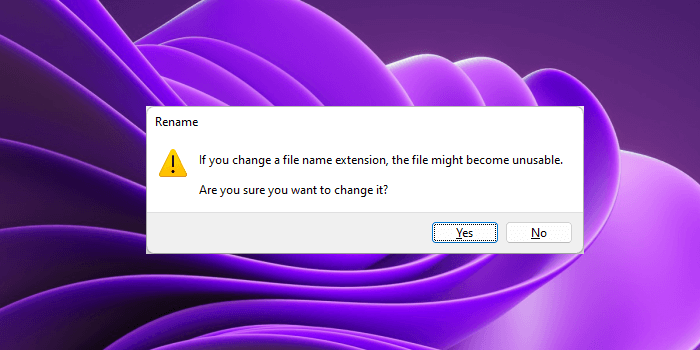
Changing the file extensions by renaming the files may corrupt some files. But this will not happen in the case of converting JPG to JPEG or JPEG to JPG, because both formats are the same. But we suggest you back up your image before doing this. If you have multiple JPG or JPEG files that you want to convert, you can use free online tools to convert JPG to JPEG and vice versa. Some free online tools also let you convert multiple images.
Is JPEG better than PNG?
PNG is a higher-compression format for those who want higher-quality images, as long as they understand that photos will take up more space on their devices. As for JPEG, it uses lossy compression; therefore, images come out looking decent but smaller.
For quality, choose PNG, but if you have limited space, then JPEG should be your best friend going forward.
Read: PNG vs JPG vs GIF vs BMP vs TIF: Image file formats explained.
Which is better JPEG or PDF?
Out of the two options, PDF has higher quality than JPEG. As stated above, JPEG’s biggest downside in terms of image quality is its compression method. Whenever quality is lost, there is no way to retain it. PDFs, on the other hand, s more customizable with better quality, which makes the file format the best choice for printers.
Can I rename JPEG to JPG?
JPEG and JPG are the same file format. If you want to rename JPEG to JPG, you just have to change the file extension from JPEG to JPG. Right-click the image file and select Rename, then change the extension from. JPEG to. JPG. As simple as that!
Read next: Best free Portable Image Editor software for Windows 11.
