
If you are new to the world of AI, you might want to look at its use cases; one of the best ones is using it for research. In this guide, we will use Perplexity AI, a powerful tool designed to simplify and enrich the research process. So, if you want to use Perplexity AI for research, this post is for you.
How to use Perplexity AI for Deep Research
Perplexity AI is a smart tool that helps people find and organize information easily. It works like a supercharged search engine, providing clear, simple answers to tough questions by gathering data from many sources. Whether you’re a student, professional, or just curious, Perplexity AI makes research faster and more straightforward, so you can quickly get the useful insights you need.
To use Perplexity AI for research, go over the following steps and tips.
- Access Perplexity AI
- Switch to Academic
- Search using Perplexity
- Use other Perplexity features for your research
- Change Perplexity Settings
Let us discuss them in detail.
1] Access Perplexity AI
As mentioned earlier, Perplexity is the AI tool we will access for research. To do so, go to perplexity.ai using any browser. It is a simple-to-use AI chatbot where you can search for whatever you want and get results.
2] Switch to Academic

Perplexity, just like any other chatbot, searches multiple sources. For research purposes, we are supposed to set it to Academic. To do so, when you are on the home screen of Perplexity, hover over the hat icon labeled “Set sources for search,” click it, and then enable Academic.
When conducting research, it is always recommended to enable this option; however, for greater versatility, you can also enable Web. You can also select the model you want to use for this research; if you are unsure, you can keep it on Auto. Once we have configured everything, we are good to continue our research.
Read: How to download Perplexity AI Desktop app for Windows PC
3] Search using Perplexity
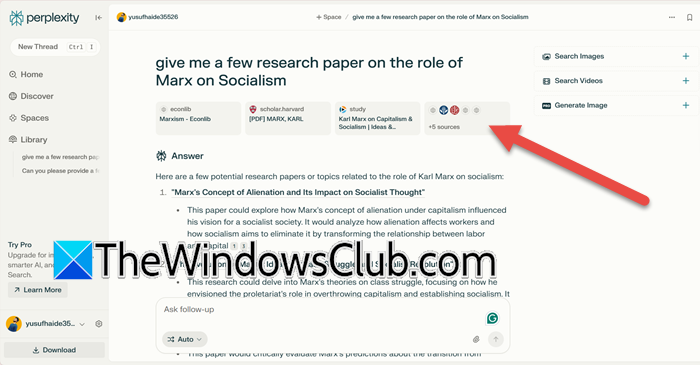
After configuring the search engine, we are good to start our research. To do so, just go to the search bar and enter a prompt. Once you give it a prompt and ask it to search, it will go through all the research papers on the Internet and give you a proper result.
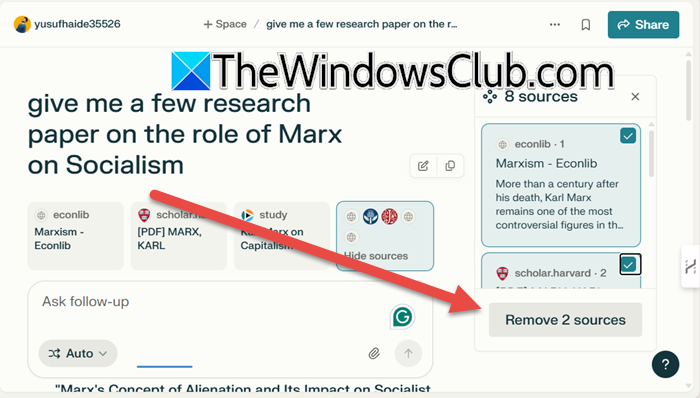
The result will be from varied sources. However, if you are conducting research, you must know your sources. To do so, you can click on the Sources button to get a list of sources on the right side of the window. If you want to visit these sources, just click on them, and you will be redirected. If you don’t like a resource, you can remove it by ticking its checkbox and clicking Remove source.
You can also ask a follow up question in the search box that says “Ask follow-up”, it will look it up and give you the result that you need. If you want to follow up one of the sub-headings, just click on it and Perplexity will start searching for it.
4] Use other Perplexity features for your research
There are other features of Perplexity that you can use for your research. If you want to generate an image or read using an image, you can do that using ChatGPT’s Vision, that has come to Perplexity. To do so, all you need to do is feed Perplexity any diagram of your choice and ask it the question based on that, it will go through the image, and present you with all the information you need.
You can also ask Perplexity to read papers for you, which has to be one of the coolest things about this AI tool. So, if you just click the Pin button, attach your paper, and give it a prompt, Perplexity will read it and then give you the answer based on that.
Read: How to get More Accurate Answers in Perplexity.
5] Change Perplexity Settings
If you are doing research, you might not want your input to be used to train the AI models, as that should be as private as possible. Therefore, we recommend you turn that feature off. To do so, you can follow the steps mentioned below.
- In Perplexity AI, click on the cog icon to open Settings.
- In the General section, disable AI Data usage.
- Additionally, if you want to make some changes to the response language, you can do that by switching the language from the Answer Language section.
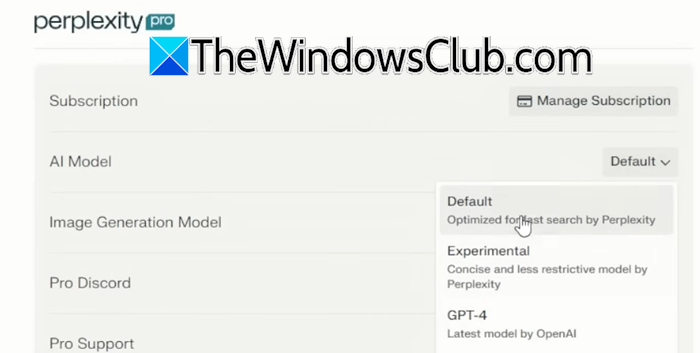
You can also pick a different AI model for the purpose of your research. For that, you need to have Perplexity Pro, if you have the subscription, go to AI Model, and then choose a different model.
You might want to take a look at several other amazing niche AI Tools here.
Read: How to use DeepSeek R1 on Perplexity
How to use Perplexity AI for research paper?
Perplexity AI makes research easier by synthesizing information from multiple sources. Simply enter your research paper topic or question, and it provides clear, helpful answers. Use it to gather ideas, understand concepts, or find references quickly. It saves time by organizing information, making it easier to focus on writing and analyzing your paper.
Read: How to copy Table from Perplexity AI
How can I use AI for research?
AI can be and should be used for research. It can draw on multiple sources and, based on that, give you an accurate result. There are various AI models you can use for this purpose; however, we recommend giving Perplexity a try.
