
Notion AI is one of the most popular productivity apps out there. Everyone uses the app for project management, note-taking, knowledge organization, or as a digital workspace. But it can also be used as an AI tool, since it includes an AI feature similar to LLMs like ChatGPT or Google Gemini. As a result, one can use it for content creation, and that’s what we are going to talk about in this post.
How to use Notion AI for Faster Content Creation
Notion AI’s built-in assistant tool can help you write, find answers, and work with your pages and databases. And since one of its key features is writing, you can use it for generating blog posts, social media content, essays, YouTube scripts, and more. And here’s your step-by-step guide to exactly that:
1] Start a draft
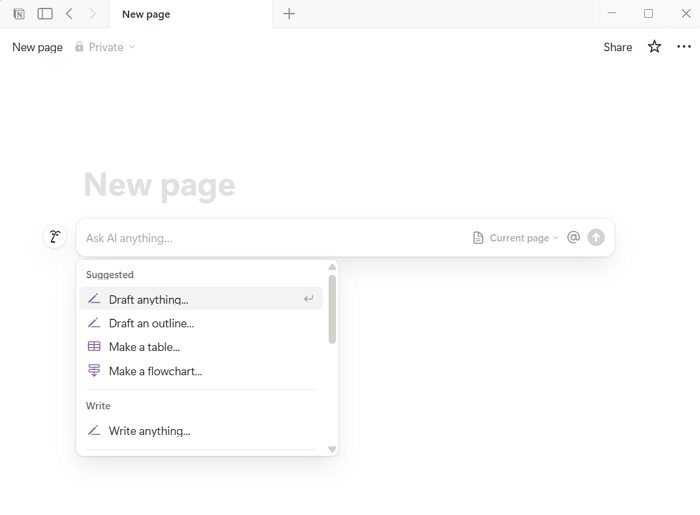
Start by creating a new page or using an existing one, then click the Ask AI button at the bottom. Once you click on it, you will encounter several options such as Draft anything, Draft an outline, and more. Since we want to generate content, click on Draft anything.
2] Type your prompt
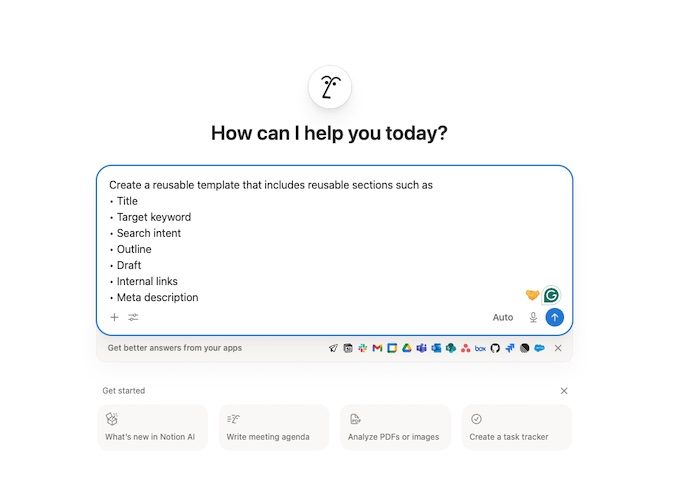
Now, just like any other LLMs, you need to write a prompt, which is basically describing what you wish to write. For instance, if you run a travel blog and want to talk about the places to visit in Europe, then you can simply tell the AI to write a blog post about the best places to visit in Europe, and it will start generating the content for you.
For example:
Create a reusable template that includes reusable sections such as
- Title
- Target keyword
- Search intent
- Outline
- Draft
- Internal links
- Meta description
Once done, you can trigger Notion AI inside each section using prompts such as “Write a blog intro in a conversational tone for US audience.”
3] Use AI inline to rewrite what you already have
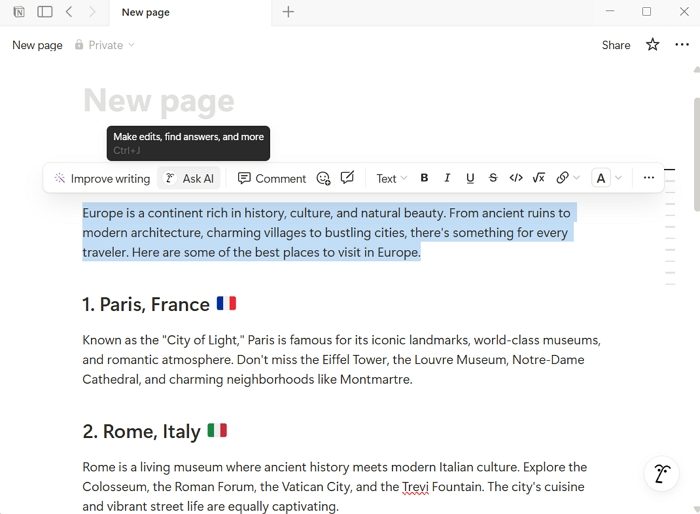
There is a pretty good chance that the content generated by AI needs to be rewritten or revised. And you can make all the changes using the AI inline feature. You can highlight a specific paragraph, section, or the entire content, then click Ask AI to make changes such as fixing grammar, shortening or expanding the content, or changing the tone.
You can also click the Improve writing button to generate an improved version of the content. But you cannot add your own instructions.
4] Repurpose content instantly
Convert Blog Posts into social media content by using prompts such as these:
- Turn this into a LinkedIn post
- Convert this into a Reddit post with a natural tone
- Create 5 tweet ideas from this
5] Give AI more context with @mentions
You can also use the @mention feature to attach another page, so the AI can get more context about what you wish to write. This is particularly useful when you want to create a report on existing data you have stored in Notion, summarize your knowledge base and more.
So those were a few quick steps to start using Notion AI for faster content creation. If you have already used an LLM tool before, Notion AI wouldn’t feel strange. You just need to learn the little features it has, which are no-brainers.
Can Notion AI generate SEO-optimized content automatically?
Notion AI can help create SEO-friendly content by structuring articles, suggesting keywords, and generating meta descriptions. However, it doesn’t fully replace dedicated SEO tools. For best results, you should still manually refine keywords, optimize headings, and ensure proper formatting based on your SEO strategy.
Is Notion AI suitable for collaborative content creation?
Yes, Notion AI works well in collaborative environments. Teams can edit documents together in real time while using AI to generate ideas, summaries, or drafts. This makes it especially useful for content teams, marketers, and writers who want to speed up workflows while maintaining consistency across projects.
