
You might be curious about who your Twitch followers are. There are many reasons why they could be following you. Maybe they like your personality or they love what you do on your stream. Regardless of the reason, finding out who your Twitch followers are is a lot easier than you think.
How to see who follows you on Twitch
In this guide, we will share the steps you need to take to find out who is following you on Twitch.
Is there any way to see who is following you on Twitch
If you’re a Twitch streamer and want to know who’s following your channel, you’ll be happy to know that you can find all of them in the Dashboard. Your followers would be listed by Username, although there is no way to know how long they have been following you.
How to see who follows you on Twitch on PC
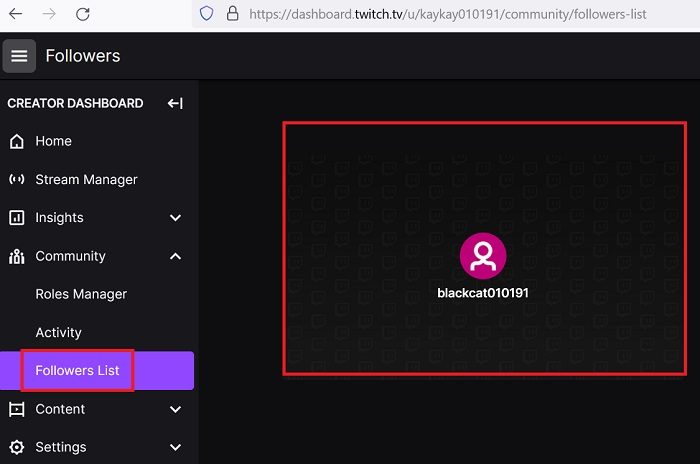
To easily find your follower list on Twitch, follow the steps below:
- Log into your Twitch.tv account.
- Click on your profile picture in the top right-hand corner.
- Select Creator Dashboard from the dropdown menu.
- Next, navigate to Community on the left-hand side and then select Followers List.
There are 2 different types of followers. The first type is chronological, in which your most recent follower will be at the top left of the screen. You can quickly find OGs among your most recent followers. This way of building a following is best for brands that want to build a highly engaged audience and improve their chances of engagement.
Searching for someone on a long list can be difficult. We suggest using CTRL+F to search for the username you are looking for. This might be a faster way to find them.
How to see who follows you on Twitch on Mobile
You can tell who is following you on mobile using this little trick. Unfortunately, it’s not possible in the Twitch app. But if you switch to the browser version of Twitch, you’ll be able to see the followers right away.
- Start by logging in to your Twitch account from your browser.
- Next, go to your Creator Dashboard.
- When you’re on the Dashboard, select the Hamburger icon.
- Then, click on the Community tab.
- Under the Community tab, tap on the list of followers.
You can now see who is following you and if you’re successful in reaching your 50 follower goal. It’s helpful to know which friends of yours are not following you on Twitch, so you can encourage them to do so.
Is it illegal to buy Twitch followers?
It isn’t illegal to buy Twitch followers, but it is unethical. Even more, high-quality followers wouldn’t sell themselves. However, it is an open secret that buying and selling of followers on Twitch is common.
Read: How to block someone on Twitch?
What is the difference between Subscriber and Follower on Twitch?
A follower is a person who likes your channel and wants to receive updates about its activities. A subscriber is a higher level of commitment and involves monetary exchange.
Is it hard to get followers on Twitch?
Unlike other social media channels, on Twitch, quality isn’t the primary factor to consider when inviting followers. The quantity matters too. So, other than posting the right thing, you would have to engage a lot to be available as much as possible. This way, you will be visible on the featured streams list and thus have more reach.
Read next: How to make someone a VIP on Twitch?
