
Deepfake is a technology that uses artificial intelligence (AI) to create highly manipulated media. The media created by Deepfake can be image, audio, or video, and falls under the category of synthetic media. Since Deepfake technology often uses artificial neural networks, such as Generative Adversarial Networks (GANs) or Diffusion Models, media generated by Deepfake is highly manipulative, making it difficult to identify it as fake or real. In this article, we will show you the best ways to identify Deepfake videos.

What makes it difficult to identify the Deepfakes?
Deepfakes use Diffusion models trained on vast amounts of human data (photos, videos, and audio). This allows AI to:
- Swap faces: AI can replace a person’s face in a video with another person’s face.
- Manipulate expressions: AI can alter a person’s facial expressions to make them appear to say or do something they never did. Cybercriminals often use this technique to defame a particular person, especially a celebrity or a high-ranking official.
- Clone voice: AI can replicate a person’s voice, including his/her tone and speech patterns, to generate new audio.
How to identify Deepfake videos
The following are some of the ways to identify Deepfake videos:
- Look for a watermark
- Zoom in to see pixels and lip movements
- Use the metadata extractor tool
- Check soundwave consistency
- Additional ways to find Deepfake videos
Let’s start.
1] Look for the watermark
Most users use free AI tools to generate deepfake media. Many AI tools allow users to generate synthetic media for free. However, such synthetic media contains a watermark. That watermark clearly indicates that the media is generated using an AI tool.
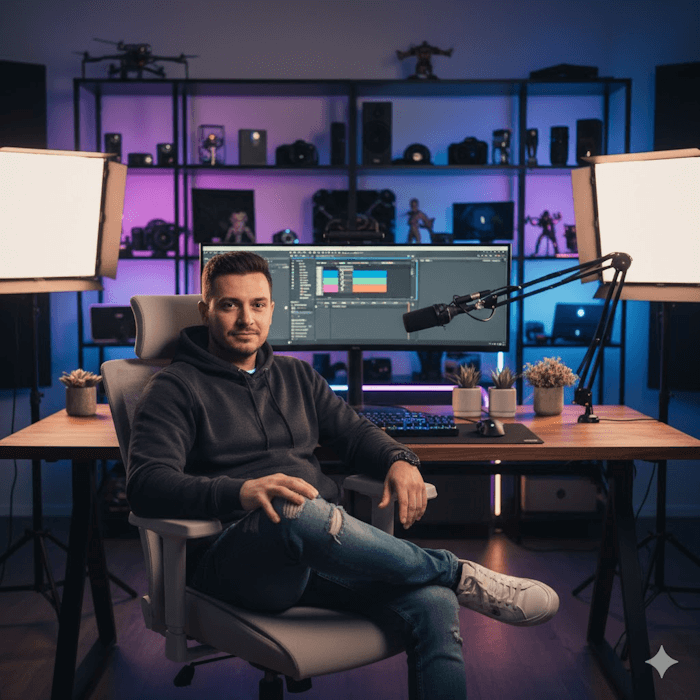
If you look carefully at the image above, you will see a watermark in the bottom-right corner. That watermark is of Google’s Gemini AI tool. I have created this image using Google AI Studio. If you use this image to generate a video, that video will also contain this watermark.

Therefore, look for a watermark in the video to determine whether it is a Deepfake or the original. Some platforms ask creators to mark their videos as AI before posting. For example, YouTube has a field called Altered content. Any YouTuber who wants to post a Deepfake video on YouTube must select Yes in the Altered content category. Marking Yes in this category adds the Synthetic media tag to the video, which helps viewers identify that the video is generated by AI.
2] Zoom in to see pixels and lip sync
Videos generated by AI generally do not show lip syncing. AI tools that offer lip-syncing are usually not free. Carefully watch the video for lip syncing. If the lips do not perfectly match the audio, or if the movements seem unnatural or robotic, there is a high possibility that the video was created by AI.
AI often makes small mistakes that are harder for users to spot. If you zoom in on the video, you can easily spot such mistakes. AI-generated videos also look smooth and fuzzy, even when created in 4K resolution. AI usually blurs the background, so viewers can focus only on the person in the video and cannot easily spot mistakes in the background. The above video includes a watermark, making it easier to spot as an AI-generated video. However, if it does not contain the watermark, you can spot it by noticing a few mistakes, such as the tornado destroying only one building and other buildings remaining unaffected. Also, the building that fell is converted into a broken car.
This video looks too perfect to be identified as an AI-generated media. I generated it through Google Veo. Since this video does not have a watermark, ordinary viewers may struggle to identify it as an AI-generated video. But if you notice it carefully, you can view the following mistakes:
- The woman is completely wet despite holding the umbrella.
- The drop at the top of the umbrella is converted into the umbrella strap.

Look at the above image; the fingers are not normal. This clearly indicates that the image is generated by AI.
3] Use the metadata extractor tool
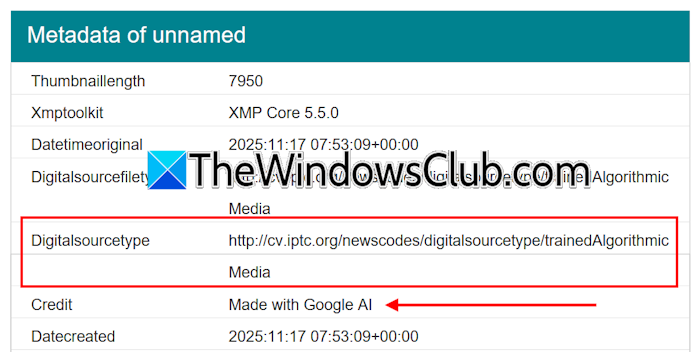
You can also use the metadata extractor tool to identify whether the image or video is AI-generated. Many free metadata extractor tools are available online that you can use. Read the metadata of the media carefully. It may contain information that shows the media is AI-generated.
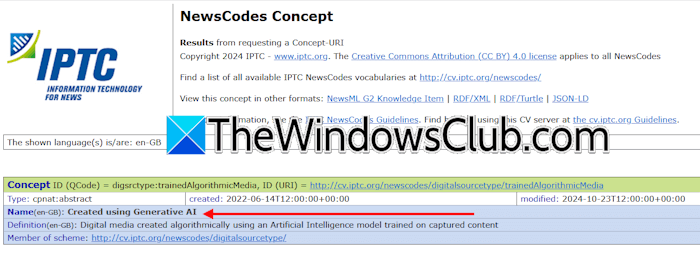
If you copy the Digitalsourcetype URL and go to that URL in your web browser, you will land on a Government website that shows the media is generated through AI. If metadata does not contain such information, you have to use other ways to identify whether the video is AI-generated.
4] Check soundwave consistency
You can also identify whether the video is synthetic or real by listening carefully to the sound. In Deepfake videos, audio often does not match perfectly with the person’s lip sync, tone, and breathing pattern. Also, the audio may sound robotic. By carefully watching the video, you can detect anomalies.
5] Additional ways to find Deepfake videos
Apart from the above-mentioned ways, the following are some additional ways to detect Deepfake videos:
- Unnatural facial movements: Deepfakes often show small facial irregularities, such as strange eye blinking patterns, overly smooth skin, and unnatural expressions.
- Inconsistent lighting and shadows: The lighting on the face may not match the background or environment. Shadows may also look incorrect or form in the wrong direction.
- Face glitches: Persons in the AI videos may have blurry effects on their face boundaries.
- Motion blur inconsistency: Deepfakes may show blurry effects and lagging movements during fast motion.
- Poor hair details and other inconsistencies: The edges of hair may appear blurry, fuzzy, or unnaturally smooth. Deepfakes can sometimes show asymmetrical ears. Moreover, the fingers of the hands may also look unnatural.
You can also use Deepfake Detection free onlinetools.
I hope this helps.
Related read: Is it Real or AI Picture? How to identify using tools?
Which method can detect inconsistencies in Deepfake videos?
There is no perfect method for determining whether a video is a Deepfake. You have to identify it yourself. Watch the videos carefully and note some inconsistencies, such as unnatural skin tones, unnatural hand movements, face glitches, motion blur, poor hair details, and unnatural facial movements. Check if the video has a watermark.
Read: Best Real-Time Face Swapping Deepfake Software for Video calls & PC streaming
Is Deepfake illegal in India?
Deepfakes are illegal in India when they are used to defame, impersonate, deceive, or depict adult content without consent. If Deepfakes are used during the elections to defame a candidate, deceive voters, or spread fake news, it is considered a serious legal violation.
