
If you plan to use QuickBooks, then this guide is for you. In this guide, we explain what is QuickBooks Tool Hub, how to download and use it? QuickBooks is efficient accounting software used by many worldwide. As it involves a lot of data, issues occur frequently. To solve those errors on your own, without anyone’s support, the QuickBooks team launched a tool to solve issues that occur with QuickBooks.
What is QuickBooks Tool Hub?
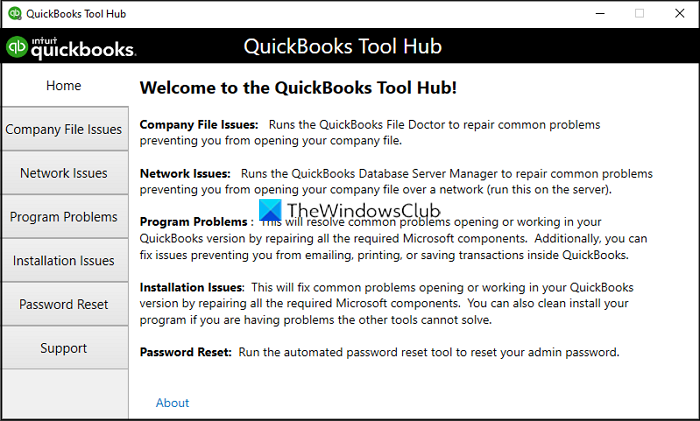
QuickBooks Tool Hub is a desktop application with multiple features that can help you resolve the most common errors and issues in QuickBooks accounting software. It includes multiple tools to address common errors in QuickBooks.
The QuickBooks tool hub can resolve the following issues with QuickBooks.
- Company File Issues
- Network Issues
- Program Problems
- Installation Issues
- Password Reset
How to use QuickBooks Tool Hub
First, download the latest version of the QuickBooks tool hub from the official website. Then, follow the on-screen steps to install it on your PC. After you have installed the QuickBooks tool hub, open it by double-clicking on its shortcut on the Desktop or from the Start menu. Before using the QuickBooks tool hub, you must close the QuickBooks software.
Then, you will see the QuickBooks tool hub with different tabs like Home, Company File Issues, Network Issues, Program Problems, Installation Issues, Password Reset, and Support on the left side. Let’s see what these different tools do.
Company File Issues
Sometimes, you may face data errors or damage to company files. Earlier, it was solved using QuickBooks File Doctor. From the release of the QuickBooks tool hub, you can solve it with the Company File Issues tab. Click Company File Issues, then log in with the company credentials. It will find the issues and fix them automatically.
Network Issues
If you are experiencing any network issues in QuickBooks, the Network Issues tab will resolve them. All you need to do is select it. Remember, you need to do it on your server computer where all the data is hosted through QuickBooks.
Program Problems
The Program Problems tab is used to resolve any issues that occur with the QuickBooks program. It gives three choices to the user—Quick Fix my Program, QuickBooks Program Diagnostic Tool, and QuickBooks Print and PDF Repair tool. You need to select any of them based on the error you are facing.
Installation Issues
The Installation Issues tab helps you in fixing any issues that occur while installing or updating QuickBooks program. All installation errors and issues will be fixed with this tool.
Password Reset
The Password Reset tab helps resolve password issues. If you have forgotten the password to log in to QuickBooks, or facing any issues with the password, this tool will help you reset the password. You need to enter your username, phone number, license number, email address, zip code to reset the password.
These are the different tools on the QuickBooks tool hub that can fix the issues with QuickBooks accounting software. If none of the tools helped you fix the problem you are facing on QuickBooks, use the Support tab and contact the dedicated support team who can guide you in fixing the issues you are facing.
QuickBooks tool hub is available for free download on QuickBooks website. It is also available on third-party websites, which you can download on your own discretion. It is always recommended to download any program from their official sources.
How do I fix a QuickBooks error?
If you are facing any issues or errors with QuickBooks, you can fix them using QuickBooks tool hub. You have to download it from the official website, install it and run it. Then, you have to select the tools you see on screen, based on the error.
Related read: Free Personal Finance & Business Accounting Software.
