
Here is a complete guide to converting MSG files to EML on Windows 11/10. MSG (Microsoft Outlook Item) is a file format used in Microsoft Outlook. It saves email messages, contacts, appointments, and tasks created in Outlook. Users can generate an MSG file using the File > Save As option in Outlook. Similarly, EML (Electronic Mail Format) is a popular email file format used to store email messages and related information. It is supported by a wide number of email clients.
How to convert MSG to EML on Windows 11/10
Here are the methods you can use to convert your MSG files to EML format on your Windows 11/10 PC:
- Use free converter software like CubexSoft MSG Export or SysTools MSG Converter to convert MSG to EML.
- Try a free online tool like Aconvert to convert MSG to EML.
Let us discuss the above methods in detail.
1] Use free converter software like CubexSoft MSG Export or SysTools MSG Converter to convert MSG to EML
You can try a free desktop application to convert MSG files to EML. Here are some free software that let you do so:
- CubexSoft MSG Export
- SysTools MSG Converter
- Xtraxtor
A) CubexSoft MSG Export
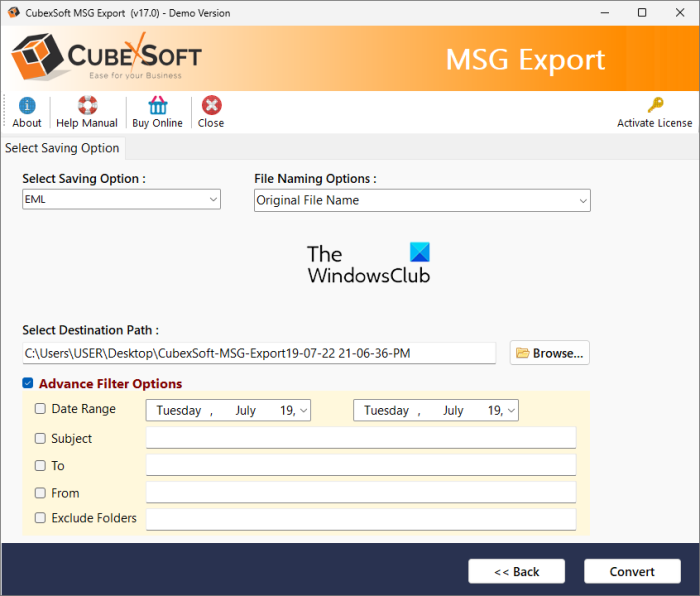
CubexSoft MSG Export is a dedicated MSG file converter. Using it, you can convert MSG files to various email file formats including EML and EMLX. Some other supported output email formats in it include PDF, XPS, MHT, HTML, PST, MBOX, RTF, CSV, and some more.
With the help of this free MSG to EML converter software, you can perform batch conversion. That means you can convert a set of several MSG files to EML format at once. But, do note that, you can convert up to 25 messages per folder at the same time in its free version.
How to batch convert MSG to EML using CubexSoft MSG Export?
Follow the steps below to batch convert MSG to EML on Windows:
- Download and install CubexSoft MSG Export.
- Launch it.
- Add the input MSG files or folder.
- Choose EML as the output format.
- Provide the output location.
- Press the Convert button.
Firstly, download and install this free software on your PC, and then launch the main application. You can browse and select the MSG files, or import the source folder containing the input MSG files. And then, tap on the Next button.
Now, select the input MSG files and click Next. After that, set the output format as EML or EMLx. Next, if you want to apply advanced filters to the source files, use the corresponding feature.
Next, select a file-naming option and specify the output location. Finally, click the Convert button to start the batch MSG-to-EML conversion.
It is one of the best MSG to EML converter software on this list. You can download it from here.
Read: Stellar Viewer For PST: View contents of damaged Outlook PST Files.
B) SysTools MSG Converter
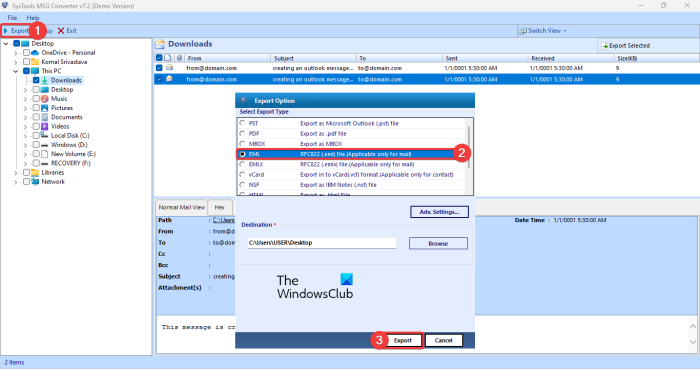
Another free software that you can use to convert MSG files to EML is SysTools MSG Converter. Like the software above, it also lets you batch-convert MSG files to EML. In addition to EML, you can convert MSG files to other email formats, such as PST, PDF, NSF, and HTML. Before conversion, you can filter emails by specific dates.
How to convert MSG files to EML in SysTools MSG Converter:
You can follow the below steps to batch convert MSG to EML using this free converter:
- First, download this software from here and install it on your PC.
- Now, launch the application and browse and select the input MSG files using its built-in File Explorer.
- After that, tick the MSG files that you need to convert from its main GUI.
- Next, click on the Export button and choose EML as the output format.
- Finally, enter the output location and click on the Export button to convert all the selected MSG files to EML format.
Note: Its free edition lets you batch convert up to 10 MSG files per folder. You will need to buy its Pro version to remove this limitation.
Read: How to open MIME Emails and Attachments in Outlook?
C) Xtraxtor
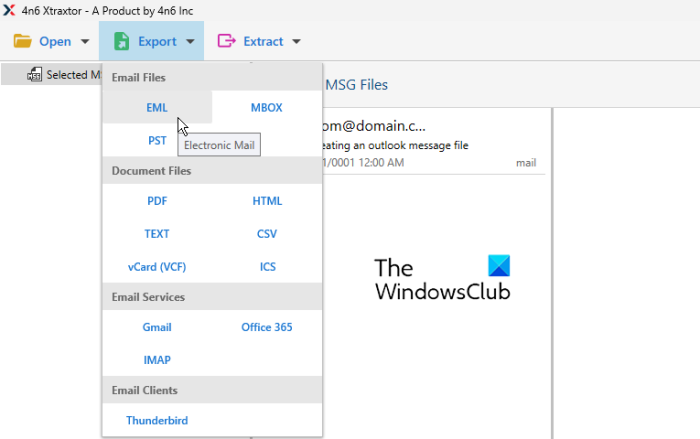
Xtraxtor is a free MSG-to-EML converter for Windows 11/10. It is specially designed to convert email files including MSG, EML, MBOX, DBX, OFT, etc. Using it, you can convert MSG to EML and many other formats. Some of the supported output formats in it include Text, CSV, PDF, VCard, ICS, Gmail, MBOX, IMAP, PST, and some more.
How to convert MSG to EML using Xtraxtor?
Try the below steps to convert MSG to EML using Xtraxtor:
- Download and install Xtraxtor.
- Open it.
- Import MSG files.
- Tap on the Export button.
- Select EML as output format.
- Configure output options,
- Press the Save button.
First, download and install it. The software can be downloaded from its official website. And then, open the software,
Now, go to the Open option and click on the Email Data FIles > MSG Files option to browse and import the input MSG file. To view the content in the imported MSG file, double-click it.
After that, go to the Export option and select the EML format as output. Then, you can set up some options like Include email headers, Omit folder structure, etc. Once done, specify the destination folder where you want to save the resulting EML file, then click the Save button to start the conversion.
It is a simple yet effective MSG to EML converter that also supports various other email file formats to convert.
Read: How to convert PST to EML in Windows 11/10?
2] Try a free online tool like Aconvert to convert MSG to EML
You can use one of the below-listed free online tools to convert MSG to EML online:
- OnlineConvertFree
- Aconvert
A) OnlineConvertFree
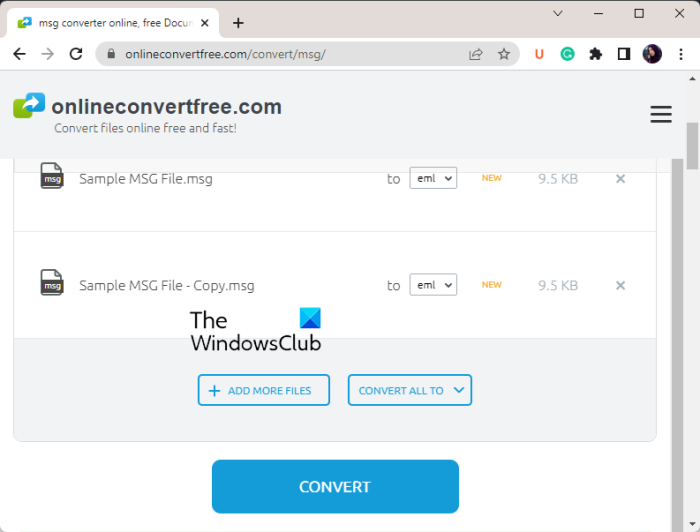
OnlineConvertFree is a free online file converter tool that you can use to convert MSG to EML. Using it, you can convert images, documents, videos, audio, and many more files. It lets you batch convert MSG to EML. However, you can only convert up to 7 MSG files to EML at a time in its free plan. To remove this limitation, you must purchase its pro plan.
How to convert MSG to EML online using OnlineConvertFree?
Firstly, open its website in a web browser and browse and select the source MSG files (up to 7). You can even drag and drop the source MSG files onto its interface. Now, select EML as the output format and press the Convert button. It will quickly convert all your MSG files to EML format in a few seconds. You can download the output EML files once the process is done.
See: How to convert MSG to PDF in Windows 11/10?
B) Aconvert
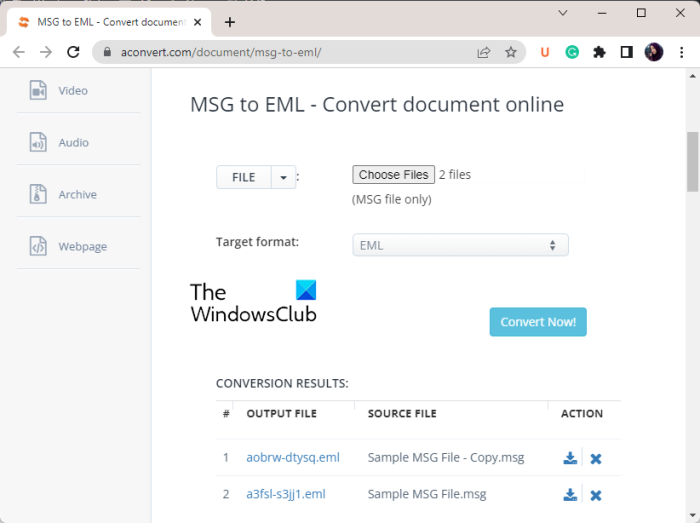
Aconvert is a free online MSG-to-EML converter. It is a free web service that lets you convert various file types, including images, documents, videos, audio, eBooks, archives, and more. In addition to EML, it supports LDIF for converting your EML files. Additionally, it can batch-convert your MSG files to EML.
How to batch convert MSG to EML online using Aconvert.com?
Firstly, you can go to the Aconvert website and move to its MSG to EML converter page. Next, you can import an MSG file from your PC, URL, or cloud services like Dropbox and Google Drive. Once you have selected the source files, make sure the target format is set to EML. After that, simply tap on the Convert Now! button to start the conversion.
Once the conversion is complete, you can download the resulting EML files to your PC. It also lets you save EML files directly to your Dropbox account. Or, you can share the files with others online.
That’s it.
Are EML and MSG the same?
EML and MSG are mail file formats but not the same. MSG files are specifically generated and supported in Microsoft Outlook. On the other hand, EML is a standard file format that is supported by a large number of email clients including SeaMonkey, Mozilla Thunderbird, Apple Mail, Microsoft Outlook Express, etc.
If you want to convert a MSG file to EML format, this is your stop. In this post, we are going to discuss two different methods using which you can convert your MSG files to EML format. So, let us check out.
How do I convert .MSG to .EML files?
To convert MSG files to EML, you can use a third-party application for Windows. There are free software tools, such as CubexSoft MSG Export and SysTools MSG Converter, that let you convert MSG files to EML and other formats. If you want to convert MSG to EML online, you can try a free online tool like Aconvert. We discuss this software and these online tools in detail below, so keep reading.
Now read: How to Convert OLM email files to PST format in Windows 11/10?
