
If you want to calculate the CAGR (Compound Annual Growth Rate), then your best bet is to use Microsoft Excel to get the job done. You will have to use the RRI function to complete this task, but don’t worry, it’s not a difficult one to accomplish at all.
How to calculate CAGR in Excel
When calculating CAGR, first add the periods and the values for each period. To do this, you need one column for Years and another for Amount. If you are still unsure, the information below explains everything you need to know. Here are the steps involved:
- Add the data to Cells in Excel spreadsheet
- Add the Formula for the RRI function
- Choose the cell where you want to calculate the CAGR data.
- Format the final result as a percentage
1] Add the data to Cells
- In the first Cell under A, type the word Year.
- In column B, type Amount.
- Be sure to add Bold to each word before moving forward.
2] Add the Formula for the RRI function
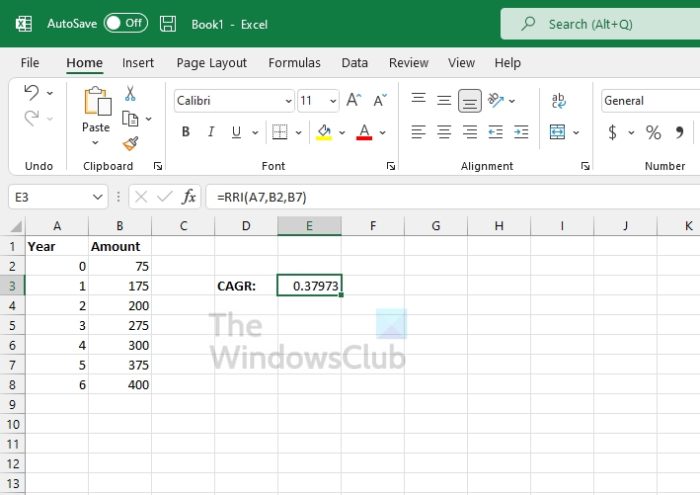
Now that the data is added to the spreadsheet, it’s time to get things going.
Before we add the function, we must note that, from our understanding, the required function syntax is RRI(periods, present value, future value). Based on our data, the RRI function is =RRI(A7,B2,B7).
So, the A7 section is all the number of periods. B2 focuses on the present value, while the data in B7 contains the future value amounts.
3] Choose the cell where you want to calculate the CAGR data.
This is the location where you’ll enter the RRI function, so keep that in mind.
- Type =RRI(A7,B2,B7) as the function, for example.
- Hit the Enter key and you should now see the results.
4] Format the final result as a percentage
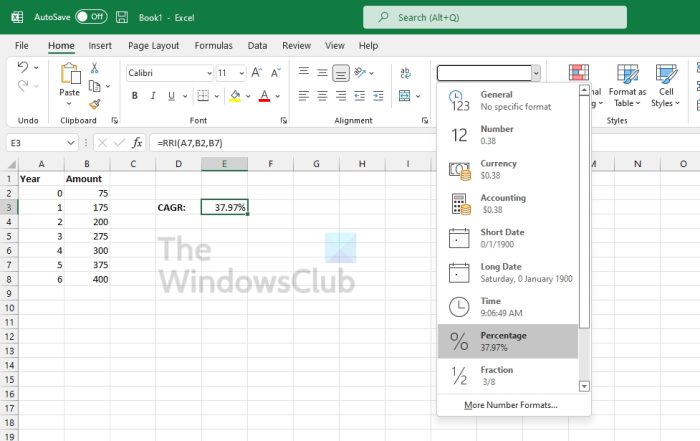
The final step is to format the result as a percentage. This isn’t necessary, but some users may want to do it for their own purposes.
- Click on the Home tab.
- Look to the Number category.
- Select the Percentage button.
- Alternatively, click General, then select Percentage from the dropdown menu.
Read: Not enough memory to run Microsoft Excel
Is RRI in Excel CAGR?
Yes, they are basically the same thing. For those who are unaware, the RRI function returns an equivalent interest rate for the growth of an investment. In Excel, you can use RRI to calculate the Compound Annual Growth Rate (CAGR).
What are the 5 functions in Excel every professional should use?
From our point of view, the 5 best functions every professional should use are listed as follows:
- VLookup Formula.
- Concatenate Formula.
- Text to Columns.
- Remove Duplicates.
- Pivot Tables.
Read next:
